
Met Excel kun je eenvoudig je eigen whois-zoektool maken. Deze tool helpt websiteontwikkelaars of hostingbedrijven om domeinnamen om te zetten in leads. De tool toont de namen van personen of organisaties die eigenaar zijn van verschillende domeinen.
Nu downloaden
Als u de software zo snel mogelijk wilt gaan gebruiken, kunt u het volgende doen:
Anders, als je zelf wilt klussen, kun je de onderstaande inhoud lezen.
Laten we de GUI voorbereiden
De GUI van deze tool is heel eenvoudig. Zoals in de afbeelding te zien is, is slechts één blad met de nodige kopteksten en kolommen voldoende. In dit voorbeeld schrapt de tool voor een bepaald domein de naam van de registrant en de organisatie van de registrant. Om gebruikers in staat te stellen de macro uit te voeren, maakt u een knop op hetzelfde blad.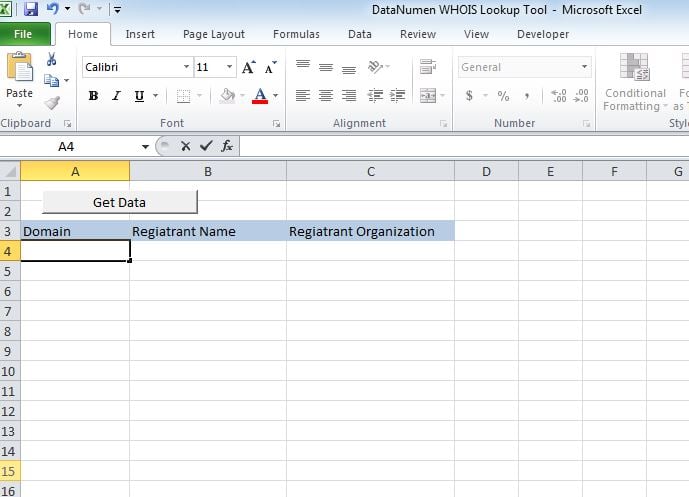
Laten we het functioneel maken
Plak het script in een nieuwe module en koppel de sub "whoismacor" aan de knop die we op Sheet1 hebben gemaakt.
Laten we het testen
Voeg domeinen toe in kolom A en voer de macro uit. Waarden worden weergegeven in de respectieve kolommen.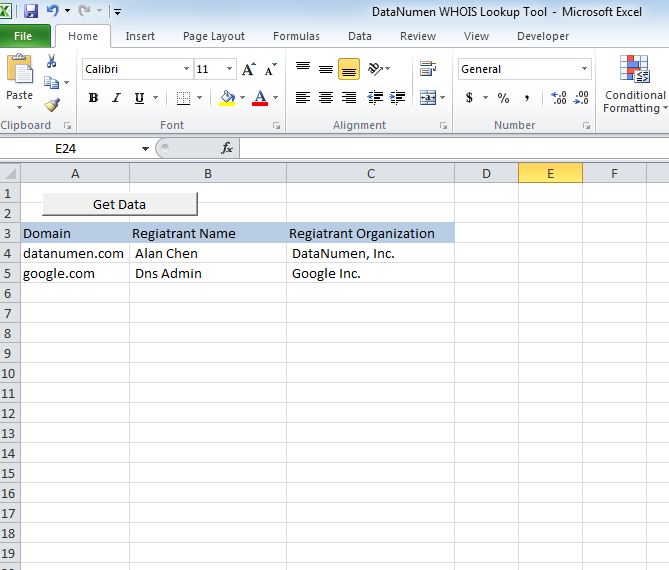
Pas het aan
Vanaf nu toont de tool 2 headers, namelijk Registrant Name en Registrant Organization. U kunt de tool aanpassen om een van de volgende koppen op te halen.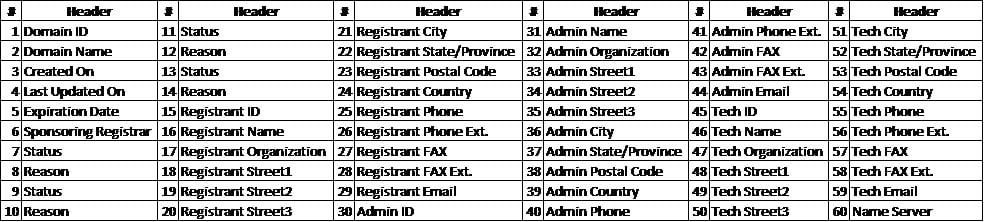
Herstel xlsm-bestand
Als u problemen ondervindt bij het openen of opslaan van deze tool, zijn er grote veranderingen die u een corrupt Excel-bestand en je moet het repareren voordat je het gebruikt.
Script
Sub whoismacro()
    Dim v_lrow As Long
    Application.DisplayStatusBar = True
    v_lrow = Sheets("whois").Range("A" & Rows.Count).End(xlUp).Row
    Dim r As Long
    Dim v_string As String
    For r = 4 To v_lrow
        Application.StatusBar = "Macro is running... Now fetching Registrant Name and Organization info for domain at Row : " & r & " /// Total Rows : " & v_lrow
        Sheets("whois").Range("B" & r).Value = WhoIsName(Sheets("whois").Range("A" & r).Value)
        Sheets("whois").Range("C" & r).Value = WhoIsorganization(Sheets("whois").Range("A" & r).Value)
    Next r
    Application.StatusBar = "Ready"
End Sub

Function WhoIsName(v_string As String) As String
    Application.DisplayStatusBar = True
    v_string = Replace(v_string, "http://www.", "")
    v_string = Replace(v_string, "https://www.", "")
    v_string = Replace(v_string, "http://", "")
    v_string = Replace(v_string, "https://", "")
    Dim I As Long
    Dim browobj As Object
    Dim obj1 As Object
    Dim obj2 As Object
    Dim obj3 As Object
    Dim v_website As String
    Dim ws As Worksheet
    Dim rng As Range
    Dim tbl As Object
    Dim rw As Object
    Dim cl As Object
    Dim tabno As Long
    Dim nextrow As Long
    Dim URl As String
    Dim lastRow As Long
    Dim xmlobj As Object
    Dim htmobj As Object
    Dim divobj As Object
    Dim objH3 As Object
    Dim linkobj As Object
    Dim vv_startrow As Integer
    Dim vv_lastrow As Integer
    Application.DisplayAlerts = False
    Application.DisplayStatusBar = True
    URl = "https://www.whois.com/whois/" & v_string
    Set xmlobj = CreateObject("MSXML2.XMLHTTP")
    xmlobj.Open "GET", URl, False
    xmlobj.setRequestHeader "Content-Type", "text/xml"
    xmlobj.setRequestHeader "Cache-Control", "no-cache"
    xmlobj.send
    Set htmobj = CreateObject("htmlfile")
    htmobj.body.innerHTML = xmlobj.responseText
    x = InStr(htmobj.body.innertext, "Registrant Name:")
    y = InStr(x, htmobj.body.innertext, Chr(10))
    WhoIsName = Replace(Mid(htmobj.body.innertext, x, y - x), "Registrant Name:", "")
End Function

Function WhoIsorganization(v_string As String) As String
    Application.DisplayStatusBar = True
    v_string = Replace(v_string, "http://www.", "")
    v_string = Replace(v_string, "https://www.", "")
    v_string = Replace(v_string, "http://", "")
    v_string = Replace(v_string, "https://", "")
    Dim I As Long
    Dim browobj As Object
    Dim obj1 As Object
    Dim obj2 As Object
    Dim obj3 As Object
    Dim v_website As String
    Dim ws As Worksheet
    Dim rng As Range
    Dim tbl As Object
    Dim rw As Object
    Dim cl As Object
    Dim tabno As Long
    Dim nextrow As Long
    Dim URl As String
    Dim lastRow As Long
    Dim xmlobj As Object
    Dim htmobj As Object
    Dim divobj As Object
    Dim objH3 As Object
    Dim linkobj As Object
    Dim vv_startrow As Integer
    Dim vv_lastrow As Integer
    Application.DisplayAlerts = False
    Application.DisplayStatusBar = True
    URl = "https://www.whois.com/whois/" & v_string
    Set xmlobj = CreateObject("MSXML2.XMLHTTP")
    xmlobj.Open "GET", URl, False
    xmlobj.setRequestHeader "Content-Type", "text/xml"
    xmlobj.setRequestHeader "Cache-Control", "no-cache"
    xmlobj.send
    Set htmobj = CreateObject("htmlfile")
    htmobj.body.innerHTML = xmlobj.responseText
    x = InStr(htmobj.body.innertext, "Registrant Organization:")
    Debug.Print x
    y = InStr(x, htmobj.body.innertext, Chr(10))
    Debug.Print y
    WhoIsorganization = Replace(Mid(htmobj.body.innertext, x, y - x), "Registrant Organization:", "")
End Function
Auteur Introductie:
Nick Vipond is een data recovery-expert in DataNumen, Inc., de wereldleider in technologieën voor gegevensherstel, waaronder reparatie docx probleem en Outlook-herstelsoftwareproducten. Voor meer informatie bezoek www.datanumen.com