
完成即时搜索后,您可能会在 Outlook 中获得大量搜索结果。 在这种情况下,您可能希望快速访问搜索结果中某个项目的父文件夹。 本文将教你如何用VBA实现它。
看完之前的文章“如何使用 Outlook VBA 获取搜索结果的完整文件夹路径”,许多用户渴望另一种解决方案,即直接跳转到搜索结果所在的文件夹。 因此,在下文中,我们将逐步介绍这种方法。

跳转到搜索结果中找到的项目的文件夹
- 首先,启动 Outlook 应用程序。
- 然后,按“Alt + F11”键按钮访问 VBA 编辑器。
- 接下来,将以下 VBA 代码复制到“ThisOutlookSession”项目中。
Sub Application_ItemContextMenuDisplay(ByVal CommandBar As Office.CommandBar, ByVal Selection As Selection)
    Dim objCommandBarButton As Office.CommandBarButton

    If Selection.Count = 1 Then
       Set objCommandBarButton = CommandBar.Controls.Add(msoControlButton)

       With objCommandBarButton
            .Style = msoButtonIconAndCaption
            .Caption = "Jump To Folder"
            .FaceId = 331
            .OnAction = "Project1.ThisOutlookSession.JumpToFolder"
       End With
    End If

    Set objCommandBarButton = Nothing
End Sub

Sub JumpToFolder()
    Dim objItem As Object
    Dim objFolder As Outlook.Folder
    Dim objNewExplorer As Outlook.Explorer

    Set objItem = Application.ActiveExplorer.Selection(1)
    Set objFolder = objItem.Parent

    'Display the folder in a new Outlook window
    Set objNewExplorer = Outlook.Application.Explorers.Add(objFolder)
    objNewExplorer.Display

    'To directly open the folder in current window, use the following line instead
    'Set Outlook.Application.ActiveExplorer.CurrentFolder = objFolder

    Set objItem = Nothing
    Set objFolder = Nothing
    Set objNewExplorer = Nothing
End Sub
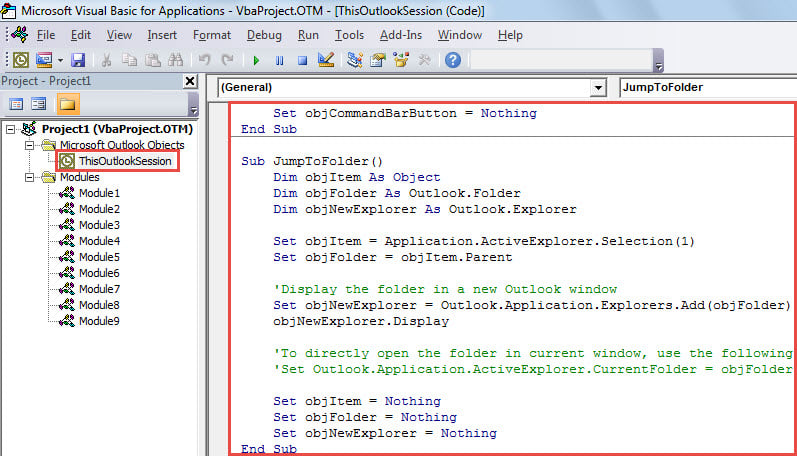
- 之后,退出当前窗口。
- 最后,你可以拍一张照片。
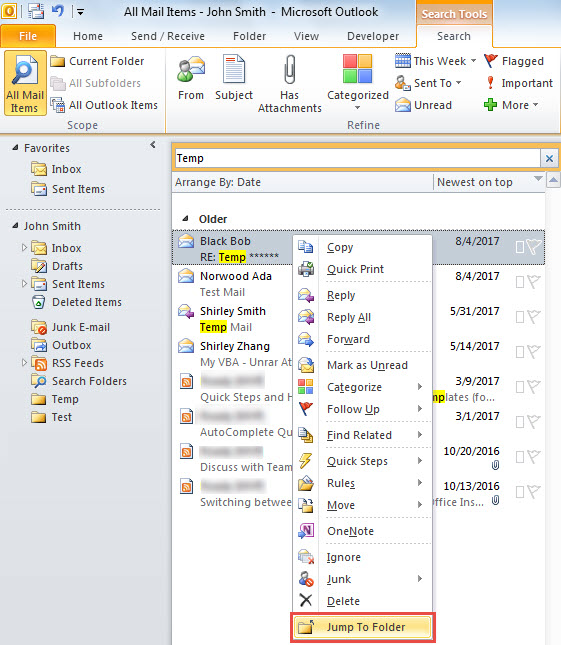
- 首先,执行搜索,例如搜索主题中包含“Temp”文本的电子邮件。
- 然后,在搜索结果中选择一封电子邮件。
- 随后,右键单击它并在上下文菜单中选择“跳转到文件夹”。

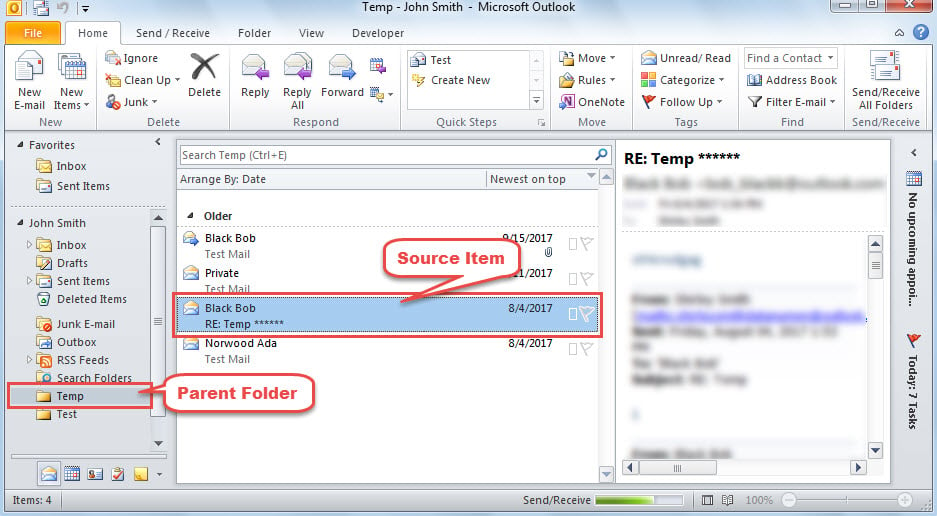
- 立即,将显示一个新的 Outlook 资源管理器,其中打开了所选项目的父文件夹,如下面的屏幕截图。

永远不要害怕 Outlook 崩溃
通常,当 Outlook 崩溃时,许多用户会感到恐慌,担心他们的 Outlook 数据会损坏。 其实,只要你做好充分的防范,你的数据就永远不会烟消云散。 例如,如果您备份了 Outlook 文件,您将能够 恢复 PST 数据只是来自备份。 如果没有备份,您仍然可以使用内置的修复工具尝试修复文件。 最坏的情况是,当 Scanpst 没有做出效果时,您可以使用经验丰富且可信的工具,例如 DataNumen Outlook Repair.
作者简介:
Shirley Zhang 是一位数据恢复专家 DataNumen, Inc.,它是数据恢复技术领域的世界领先者,包括 sql恢复 和 outlook 修复软件产品。 欲了解更多信息,请访问 datanumen.com