
默认情况下,Outlook 将自动使用任务的默认提醒时间来处理各种标记的项目。 但是,如果您想根据项目类型对标记的项目使用不同的提醒时间,您可以参考本文介绍的方法。
Outlook 允许您为所有标记的项目设置默认提醒时间,无论项目类型如何。 您可以转到“文件”菜单,然后单击“选项”。 然后,在“Outlook选项”窗口中,您可以在“任务”选项卡上看到“默认提醒时间”选项,如下图所示。
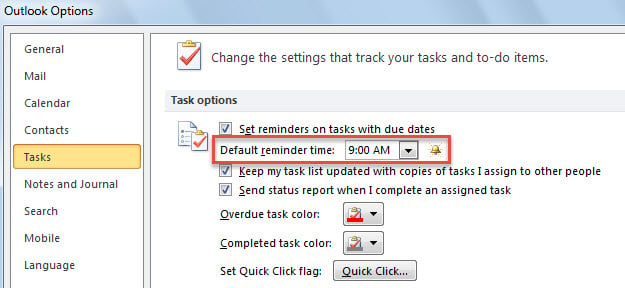
然而,大多数用户希望为不同类型的标记项目设置不同的提醒时间,例如标记邮件设置为“9:00”,标记联系人设置为“17:30”。接下来,我们将以这个例子为例,介绍一种方法。
为不同类型的标记项设置不同的默认提醒时间
- 首先,启动 Outlook 应用程序。
- 然后,参考“访问 Outlook VBA 编辑器如何在 Outlook 中运行 VBA 代码“。
- 在随后的“Microsoft Visual Basic for Applications”窗口中,将以下代码复制到“ThisOutlookSession”项目中。
Public WithEvents objExplorer As Outlook.Explorer
Public WithEvents objInspectors As Outlook.Inspectors
Public WithEvents objMail As Outlook.MailItem
Public WithEvents objContact As Outlook.ContactItem

Private Sub Application_Startup()
    Set objExplorer = Outlook.Application.ActiveExplorer
    Set objInspectors = Outlook.Application.Inspectors
End Sub

Private Sub objExplorer_SelectionChange()
    On Error Resume Next
    If objExplorer.Selection.Item(1).Class = olMail Then
       Set objMail = objExplorer.Selection.Item(1)
    ElseIf TypeOf objExplorer.Selection.Item(1) Is ContactItem Then
       Set objContact = objExplorer.Selection.Item(1)
    End If
End Sub

Private Sub objInspectors_NewInspector(ByVal Inspector As Inspector)
    If Inspector.CurrentItem.Class = olMail Then
       Set objMail = Inspector.CurrentItem
    ElseIf Inspector.CurrentItem.Class = olContact Then
       Set objContact = Inspector.CurrentItem
    End If
End Sub

Private Sub objMail_PropertyChange(ByVal Name As String)
    If Name = "ToDoTaskOrdinal" Then
       If objMail.IsMarkedAsTask = True Then
          If objMail.TaskDueDate <> "1/1/4501" Then
             With objMail
                  .ReminderSet = True
                  'Change the reminder time for flagged emails
                  .ReminderTime = objMail.TaskDueDate & " 10:00"
                  .Save
             End With
          End If
       End If
    End If
End Sub

Private Sub objContact_PropertyChange(ByVal Name As String)
    If Name = "ToDoTaskOrdinal" Then
       If objContact.IsMarkedAsTask = True Then
          If objContact.TaskDueDate <> "1/1/4501" Then
             With objContact
                  .ReminderSet = True
                  'Change the reminder time for flagged contacts
                  .ReminderTime = objContact.TaskDueDate & " 17:30"
                  .Save
             End With
          End If
       End If
    End If
End Sub
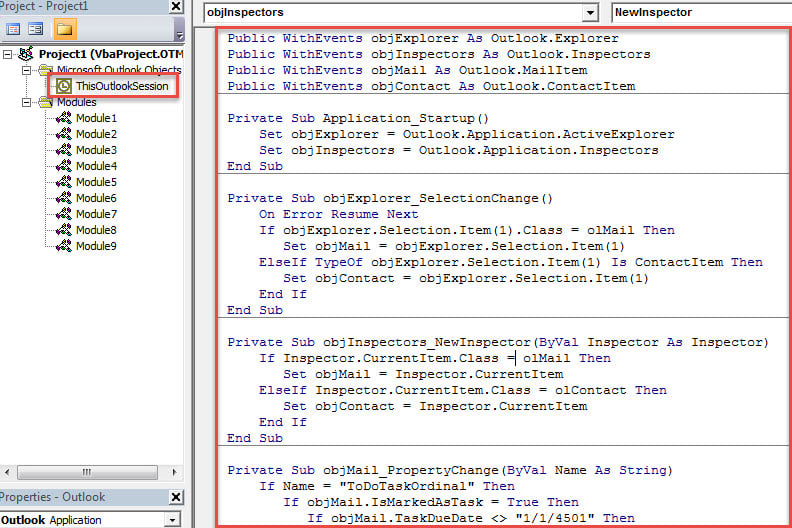
- 之后,重启 Outlook 以激活此宏。
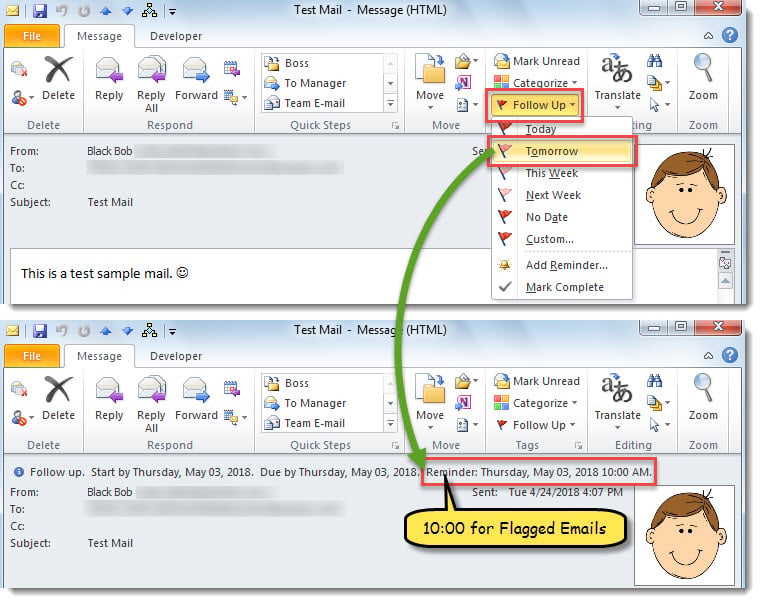
- 从现在开始,每次标记邮件时,提醒时间将设置为标记截止日期的“10:00”。

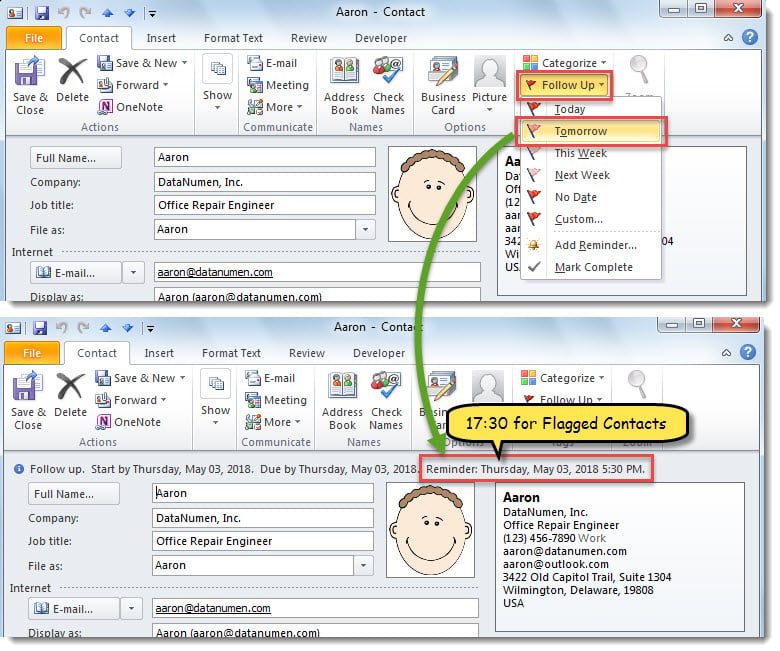
- 当您标记联系人时,提醒时间将设置为标记到期日的“17:30”。

灵活处理 Outlook 问题
您在使用 Outlook 时可能会遇到各种各样的问题。因此,您需要提前学习一些应对方法。例如,如果您的 Outlook 经常重启,您需要修复 Office 或禁用第三方加载项等。或者,如果您的 Outlook PST 文件损坏,您可以先尝试…… 收件箱维修工具. 失败时,您可以继续求助于强大的外部工具,例如 DataNumen Outlook Repair.
作者简介:
Shirley Zhang 是一位数据恢复专家 DataNumen, Inc.,它是数据恢复技术领域的世界领先者,包括 中密度纤维板恢复 和 outlook 修复软件产品。 欲了解更多信息,请访问 datanumen.com