
也许您总是将会议安排在同一地点,例如公司的特定会议室。 如果是这样,您可能希望将该房间设置为您在 Outlook 中创建的所有会议的默认位置。 这篇文章将帮助你得到它。
创建 Outlook 会议时,您需要输入或选择一个位置。 否则,您将收到有关空位置的警告。 如果您习惯于在特定位置(例如同一房间)召开您发起的会议,您可能希望将该房间设置为默认会议位置。 现在,下面就给大家分享一个实现方法。
自动设置您组织的会议的默认位置
- 首先,按照以下步骤触发 Outlook VBA 编辑器:“如何在 Outlook 中运行 VBA 代码:.
- 然后,在 VBA 编辑器中,将以下代码复制到“ThisOutlookSession”项目中。
Public WithEvents objInspectors As Outlook.Inspectors
Public WithEvents objAppointment As Outlook.AppointmentItem

Private Sub Application_Startup()
    Set objInspectors = Outlook.Application.Inspectors
End Sub

Private Sub objInspectors_NewInspector(ByVal Inspector As Inspector)
    If Inspector.CurrentItem.Class = olAppointment Then
       Set objAppointment = Inspector.CurrentItem
    End If
End Sub

Private Sub objAppointment_Open(Cancel As Boolean)
    'If it is a meeting
    If objAppointment.MeetingStatus = olMeeting Then
       'If it is a fresh new meeting
       If objAppointment.Subject = "" Then
          'Enter the specific location
          objAppointment.Location = "Conference Room A"
       End If
    Else
       objAppointment.Location = ""
    End If
End Sub

Private Sub objAppointment_PropertyChange(ByVal Name As String)
    'If you change an appointment into a meeting
    If Name = "MeetingStatus" Then
       If objAppointment.MeetingStatus = olMeeting Then
          'Enter the specific location
          objAppointment.Location = "Conference Room A"
       Else
          objAppointment.Location = ""
       End If
    End If
End Sub
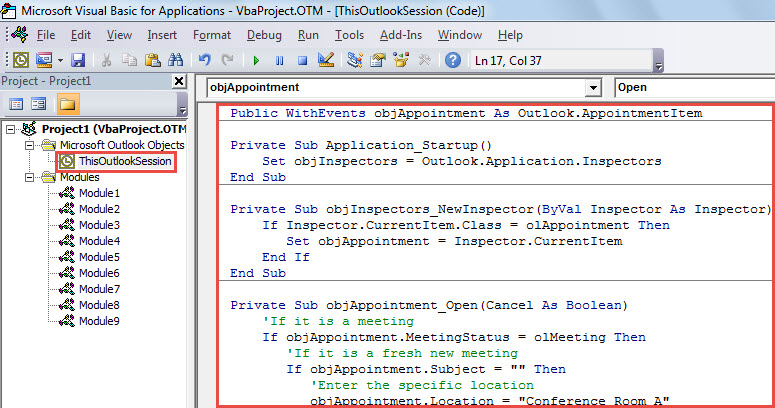
- 之后,退出 VBA 编辑器并重新启动 Outlook 以激活此宏。
- 到目前为止,您已经成功地为您组织的会议设置了默认位置。
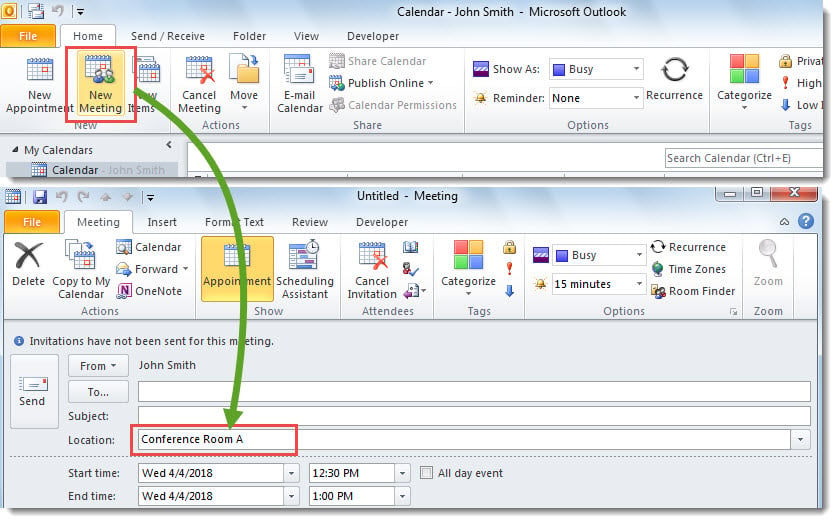
- 每次当您通过单击“主页”选项卡上的“新建会议”创建新会议时,会议将打开并填充默认位置。

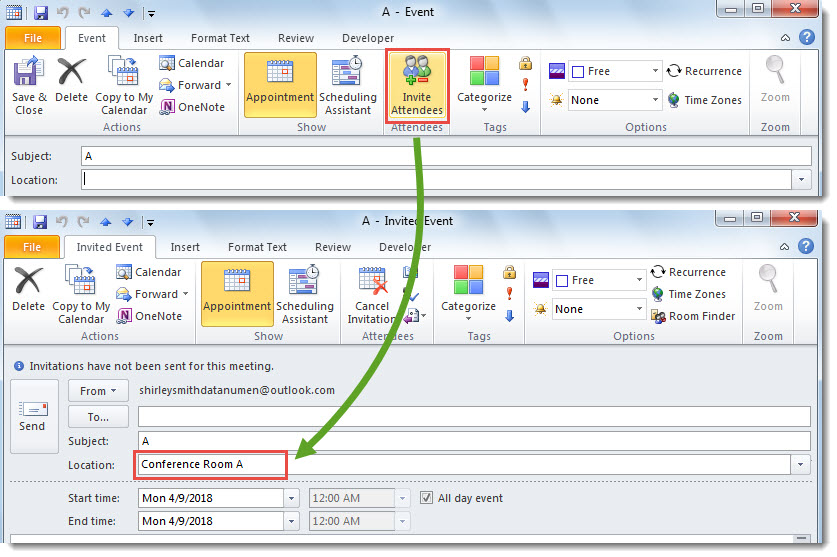
- 每次通过单击“邀请与会者”按钮将约会转换为会议时,默认位置将自动填充到“位置”字段中。

挽救损坏的 Outlook 数据
在所有 Outlook 问题中,最严重的莫过于 Outlook 数据损坏。通常,遇到此类问题,首先需要找出真正的原因。然后,您可以根据不同的原因选择相应的解决方案。例如,如果文件感染了病毒,则首先需要清除病毒。接下来,您需要…… 修复Outlook 文件,通过内置修复工具或可靠的外部修复工具,例如 DataNumen Outlook Repair.
作者简介:
Shirley Zhang 是一位数据恢复专家 DataNumen, Inc.,它是数据恢复技术领域的世界领先者,包括 损坏的sql 和 outlook 修复软件产品。 欲了解更多信息,请访问 datanumen.com