
如果您希望 Outlook 从特定的传入电子邮件中自动提取并保存嵌入的图像,您可以参考这篇文章。 下面教大家如何用VBA代码实现。
一些用户经常需要从特定的传入电子邮件中提取嵌入的图像并将它们保存到某个 Windows 文件夹中。 每次都手动去做,太麻烦了。 因此,许多人期待学习一种快速方便的方法来让 Outlook 自动完成此操作。 现在,在这里我们将与您分享这样一种方法。
从特定的传入电子邮件中自动提取嵌入图像
- 首先,照常启动您的 Outlook 程序。
- 然后,像往常一样触发 Outlook VBA 编辑器,参考 t “如何在 Outlook 中运行 VBA 代码“。
- 稍后,将以下 VBA 代码复制并粘贴到“ThisOutlookSession”项目中。
Public WithEvents objInbox As Outlook.Folder
Public WithEvents objInboxItems As Outlook.Items

Private Sub Application_Startup()
    Set objInbox = Outlook.Application.Session.GetDefaultFolder(olFolderInbox)
    Set objInboxItems = objInbox.Items
End Sub

Private Sub objInboxItems_ItemAdd(ByVal Item As Object)
    Dim objMail As Outlook.MailItem
    Dim objAttachments As Outlook.Attachments
    Dim objAttachment As Outlook.Attachment
    Dim strWindowsFolder As String
    Dim i As Long

    If TypeOf Item Is MailItem Then
       Set objMail = Item

       'Specify the emails as per your needs
       If objMail.Importance = olImportanceHigh Then
          Set objAttachments = objMail.Attachments

          'Specify the windows folder
          strWindowsFolder = "E:\" & objMail.Subject & Format(Now, "yymmddhhmmss")
          MkDir (strWindowsFolder)

          'Save all embedded images to the folder
          For i = 1 To objAttachments.Count
              Set objAttachment = objAttachments.Item(i)
              If IsEmbedded(objAttachment) = True Then
                 objAttachment.SaveAsFile strWindowsFolder & "\" & objAttachment.FileName
              End If
          Next
      End If
    End If
End Sub

Function IsEmbedded(objCurAttachment As Outlook.Attachment) As Boolean
    Dim objPropertyAccessor As Outlook.PropertyAccessor
    Dim strProperty As String

    Set objPropertyAccessor = objCurAttachment.PropertyAccessor
    strProperty = objPropertyAccessor.GetProperty("http://schemas.microsoft.com/mapi/proptag/0x3712001E")

    If InStr(1, strProperty, "@") > 0 Then
       IsEmbedded = True
    Else
       IsEmbedded = False
    End If
End Function
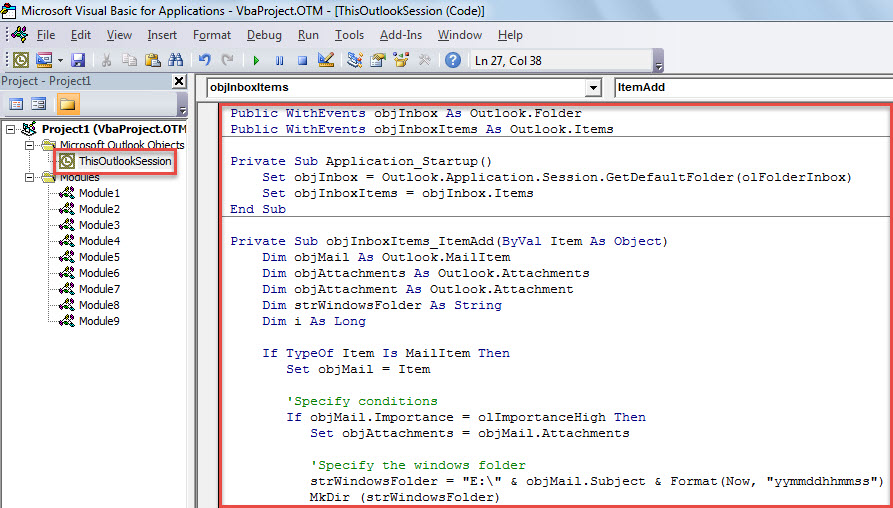
- 之后,点击进入“Application_Startup”子程序。
- 最后,单击“F5”键触发该宏。
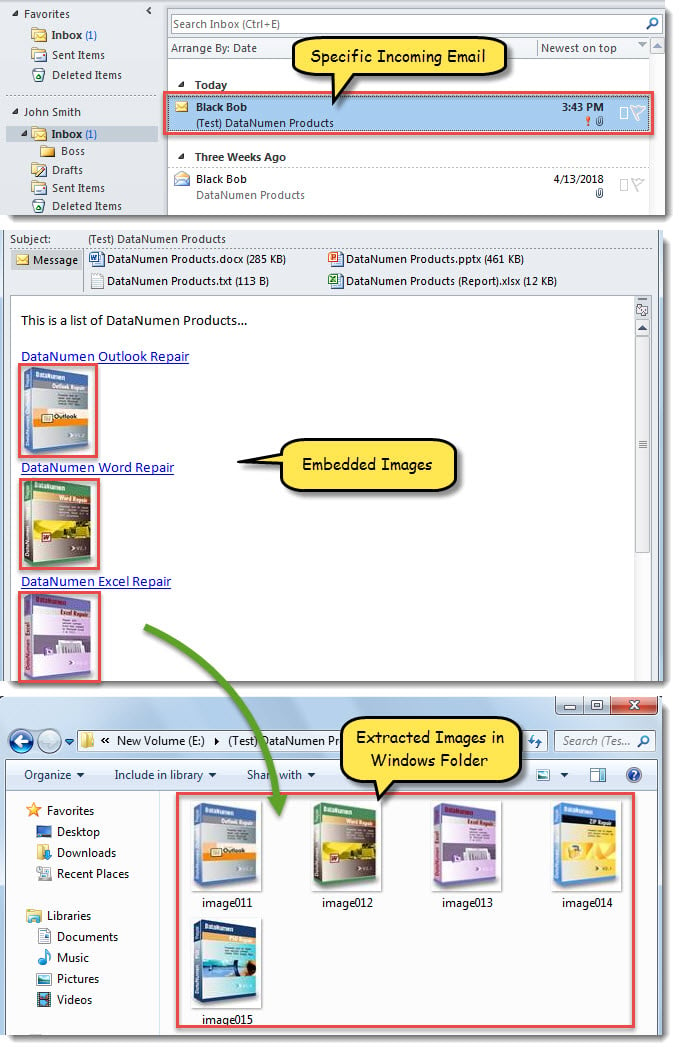
- 从现在开始,每当特定的新电子邮件到达收件箱时,嵌入的图像将保存到特定的 Windows 文件夹中,如下面的屏幕截图所示。

定期清理大附件
建议您定期清理 Outlook 中的大型附件,以保持 Outlook 文件大小适宜。较大的 Outlook 文件更容易损坏。众所周知,PST 文件损坏很难彻底修复。您可能首先会尝试使用收件箱修复工具进行修复,但大多数情况下都无法奏效。您唯一的办法是寻求专业的 Outlook 修复服务。 PST修复 工具,例如 DataNumen Outlook Repair,或相关的专业恢复服务。
作者简介:
Shirley Zhang 是一位数据恢复专家 DataNumen, Inc.,它是数据恢复技术领域的世界领先者,包括 中密度纤维板修复 和 outlook 修复软件产品。 欲了解更多信息,请访问 datanumen.com