
下面的文章展示了如何用 老鼠。 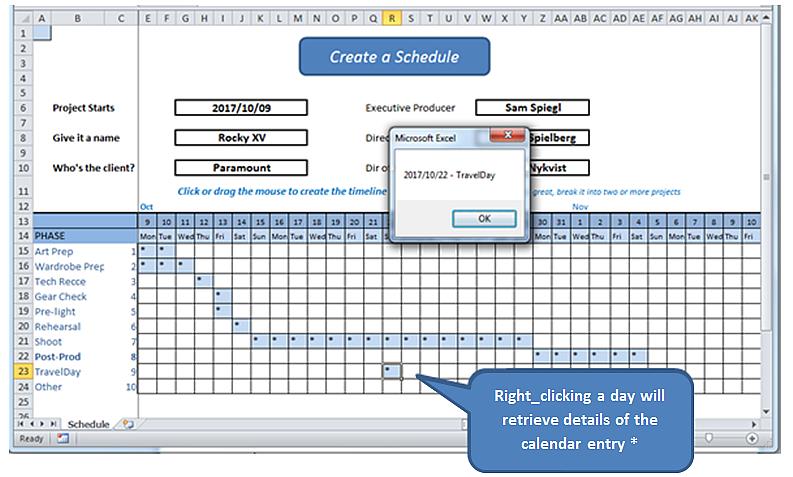
*在现实世界中,我们会打开一个表单来读取有意义的日记条目并将其写入数据库。 这个练习简单地揭示了右键单击的机制,并从工作表本身找到了细节。
在我们开始之前,先解释一下电子表格,可以找到它的工作模型 开始.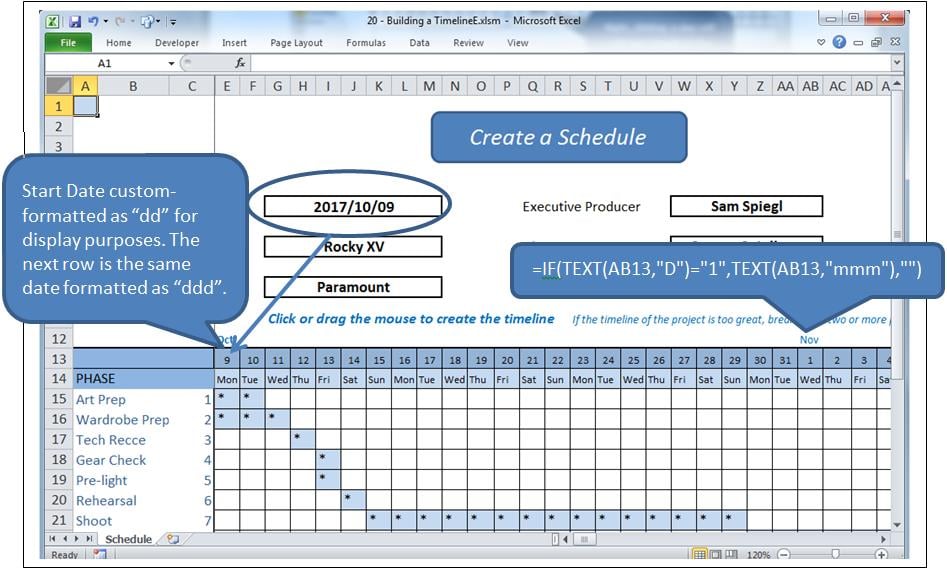
流程
单击网格中的单元格将突出显示该单元格并更改其值。 单击并拖动将突出显示一个范围并更改其值。 如果单元格已填充,它将被清除,否则将被填充,在本例中为“*”。
相比之下,右键单击是对所选单元格信息的请求。
基本上使用了两个事件,以及几个模块。
- 工作表_SelectionChange 选择一个或多个单元格时调用。
- 工作表_BeforeRightClick 由鼠标右键调用。
当前困境
右键单击单元格也构成选择,触发 选择改变. 我们将不得不让那个事件顺其自然,在它把控制权交给 BeforeRight点击k 事件,当我们重新填充已清除的单元格时。 但是这个动作会触发 选择已更改 再次发生事件,必须停止再次清除它。
我们将使用一个名为 blnLoading 的布尔标志来完成此操作。
事件
在工作表后面的代码窗口中输入以下内容(即不在模块中)。
Option Explicit

    Dim blnLoading As Boolean
    Dim sPhase As String
    Dim currCellValue As String
    Dim dDate As Date

    Private Sub Worksheet_SelectionChange(ByVal Target As Range)
     If ActiveCell.Row > 14 And ActiveCell.Row < 25 Then
         If ActiveCell.Column > 4 And ActiveCell.Column < 47 Then 'selection is valid

             On Error Resume Next
             currCellValue = Target.Value 'get the target value from (ByVal Target As Range)

             If blnLoading = True Then 'a value of True will force an exit from this event
                 blnLoading = False
                 Exit Sub
             End If

             sPhase = Cells(ActiveCell.Row, 1)
             If sPhase = "" Then Exit Sub

             If ActiveCell = "*" Then 'if the cell is populated, clear the selected range
                 Call ClearRange
                 Call UnblockCalendar
             Else
                 Call PopulateRange
             End If

             Call RedrawCells
             Range("A1").Select 'revive the SelectionChange event by changing selection.
             Exit Sub
         End If
     End If
End Sub

Private Sub Worksheet_BeforeRightClick(ByVal Target As Range, Cancel As Boolean)
     If currCellValue = "*" Then   'picked up by the previous event BEFORE it cleared it;
                                     'This means this is a valid diary entry with detail.
        blnLoading = True    'this will prevent the SelectionChange event (above) from running.
        Target.Select
        'currCell = Target.Address
        'Range(currCell).Select

            Target.Value = "*" 're-instate the value of the cell, since SelectionChange has cleared it
            Call PopulateRange
            dDate = Cells(13, ActiveCell.Column)
            sPhase = Cells(ActiveCell.Row, 1)
            MsgBox dDate & " - " & sPhase
        Cancel = True 'suppress Excel’s standard right_click menus
    End If
    Range("A1").Select
        blnLoading = False
End Sub
这会处理两个事件。
参考代码
将以下填充和减少填充范围附加到代码中:
Sub ClearRange()
     Selection.FormulaR1C1 = ""
     With Selection.Interior
         .Pattern = xlNone
         .TintAndShade = 0
         .PatternTintAndShade = 0
     End With
End Sub

Sub PopulateRange()
     Selection.FormulaR1C1 = "*"
     With Selection.Interior
         .Pattern = xlSolid
         .PatternColorIndex = xlAutomatic
         .ThemeColor = xlThemeColorLight2
         .TintAndShade = 0.799981688894314
         .PatternTintAndShade = 0
     End With
End Sub
网格线维护
将模块插入应用程序。 添加以下代码以维护网格的外观。 这是从宏记录器、冗余和所有内容中复制的。
Option Explicit

Sub UnblockCalendar()
     Selection.FormulaR1C1 = ""
     With Selection
         Selection.Borders(xlDiagonalDown).LineStyle = xlNone
         Selection.Borders(xlDiagonalUp).LineStyle = xlNone
         Selection.Borders(xlEdgeLeft).LineStyle = xlNone
         Selection.Borders(xlEdgeTop).LineStyle = xlNone
         Selection.Borders(xlEdgeBottom).LineStyle = xlNone
         Selection.Borders(xlEdgeRight).LineStyle = xlNone
         Selection.Borders(xlInsideVertical).LineStyle = xlNone
         Selection.Borders(xlInsideHorizontal).LineStyle = xlNone
     End With
End Sub

Sub RedrawCells()
     Selection.Borders(xlDiagonalDown).LineStyle = xlNone
     Selection.Borders(xlDiagonalUp).LineStyle = xlNone
     With Selection.Borders(xlEdgeLeft)
         .LineStyle = xlContinuous
         .ColorIndex = 0
         .TintAndShade = 0
         .Weight = xlThin
     End With
     With Selection.Borders(xlEdgeTop)
         .LineStyle = xlContinuous
         .ColorIndex = 0
         .TintAndShade = 0
         .Weight = xlThin
     End With
     With Selection.Borders(xlEdgeBottom)
         .LineStyle = xlContinuous
         .ColorIndex = 0
         .TintAndShade = 0
         .Weight = xlThin
     End With
     With Selection.Borders(xlEdgeRight)
         .LineStyle = xlContinuous
         .ColorIndex = 0
         .TintAndShade = 0
         .Weight = xlThin
     End With
     With Selection.Borders(xlInsideVertical)
         .LineStyle = xlContinuous
         .ColorIndex = 0
         .TintAndShade = 0
         .Weight = xlThin
     End With
     With Selection.Borders(xlInsideHorizontal)
         .LineStyle = xlContinuous
         .ColorIndex = 0
         .TintAndShade = 0
         .Weight = xlThin
     End With
End Sub
防范灾难
经常使用 Excel 进行开发的人都知道,复杂的 xlsm 电子表格有时会崩溃,导致打开的文档损坏。很多情况下,Excel 的恢复程序无法恢复损坏的工作簿。如果没有备份,所有工作都将丢失。使用专门设计的工具可以避免这种情况的发生。 Excel修复.
作者简介:
Felix Hooker 是一位数据恢复专家 DataNumen, Inc.,它是数据恢复技术领域的世界领先者,包括 rar修复 和sql恢复软件产品。 欲了解更多信息,请访问 datanumen.com