
คุณสามารถสร้างเครื่องมือค้นหาข้อมูล Whois ของคุณเองได้ง่ายๆ โดยใช้ Excel เครื่องมือนี้จะช่วยให้นักพัฒนาเว็บไซต์หรือบริษัทผู้ให้บริการโฮสติ้งเปลี่ยนโดเมนให้เป็นโอกาสทางธุรกิจได้ เครื่องมือนี้จะแสดงชื่อบุคคลหรือองค์กรที่เป็นเจ้าของโดเมนต่างๆ
ดาวน์โหลดตอนนี้
หากคุณต้องการเริ่มใช้งานซอฟต์แวร์โดยเร็วที่สุด คุณสามารถทำได้ดังนี้:
มิฉะนั้นหากคุณต้องการ DIY คุณสามารถอ่านเนื้อหาด้านล่าง
มาเตรียม GUI กัน
GUI ของเครื่องมือนี้ง่ายมาก ดังที่แสดงในภาพเพียงแผ่นเดียวที่มีส่วนหัวและคอลัมน์ที่จำเป็นก็เพียงพอแล้ว ในตัวอย่างนี้สำหรับโดเมนหนึ่ง ๆ เครื่องมือจะขูดชื่อผู้จดทะเบียนและองค์กรผู้จดทะเบียน ในการอนุญาตให้ผู้ใช้เรียกใช้แมโครให้สร้างปุ่มบนแผ่นงานเดียวกัน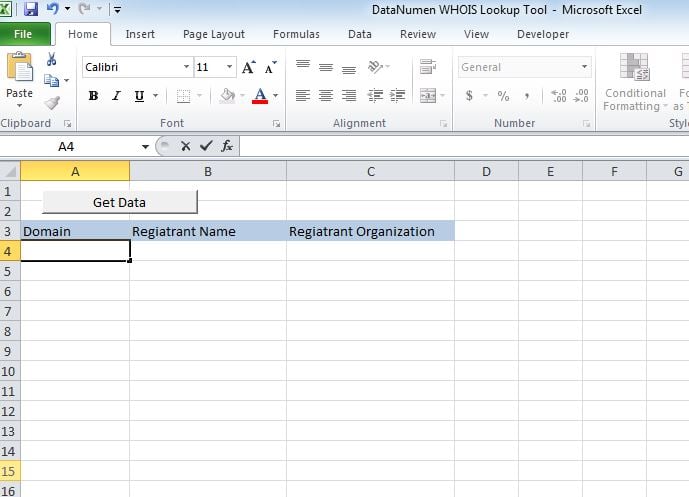
มาทำให้มันใช้งานได้
วางสคริปต์ลงในโมดูลใหม่และแนบ "whoismacor" ย่อยเข้ากับปุ่มที่เราสร้างบน Sheet1
มาทดสอบกันเลย
เพิ่มโดเมนในคอลัมน์ A และเรียกใช้แมโคร ค่าจะแสดงในคอลัมน์ตามลำดับ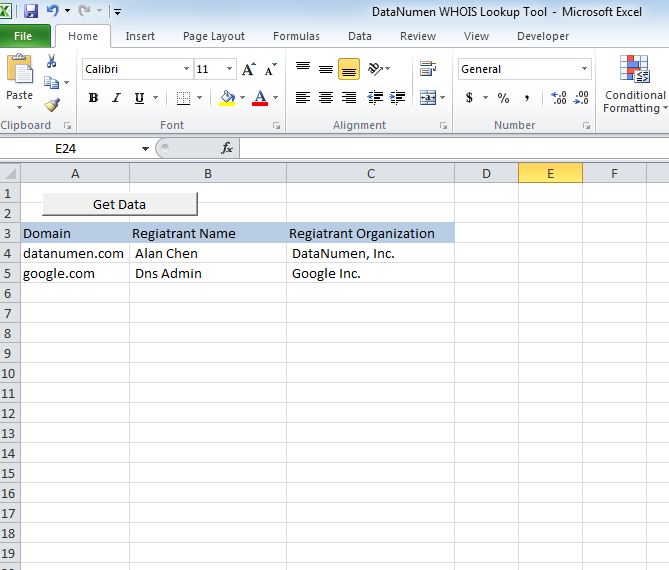
แก้ไข
ณ ตอนนี้เครื่องมือจะแสดง 2 ส่วนหัว ได้แก่ ชื่อผู้จดทะเบียนและองค์กรผู้ลงทะเบียน คุณสามารถปรับแต่งเครื่องมือเพื่อดึงข้อมูลส่วนหัวต่อไปนี้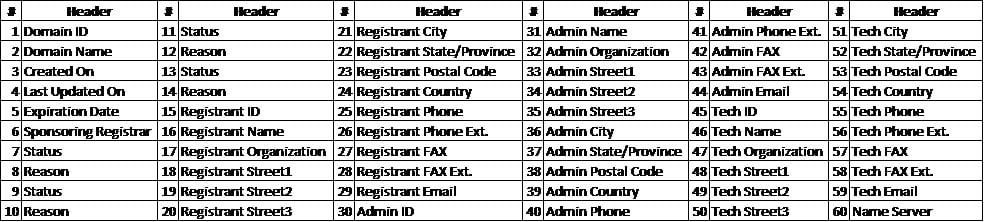
กู้คืนไฟล์ xlsm
หากคุณประสบปัญหาในการเปิดหรือบันทึกเครื่องมือนี้มีการเปลี่ยนแปลงสูงที่คุณมี ไฟล์ Excel เสียหาย และคุณต้องแก้ไขก่อนใช้งาน
ต้นฉบับ
Sub whoismacro()
    Dim v_lrow As Long
    Application.DisplayStatusBar = True
    v_lrow = Sheets("whois").Range("A" & Rows.Count).End(xlUp).Row
    Dim r As Long
    Dim v_string As String
    For r = 4 To v_lrow
        Application.StatusBar = "Macro is running... Now fetching Registrant Name and Organization info for domain at Row : " & r & " /// Total Rows : " & v_lrow
        Sheets("whois").Range("B" & r).Value = WhoIsName(Sheets("whois").Range("A" & r).Value)
        Sheets("whois").Range("C" & r).Value = WhoIsorganization(Sheets("whois").Range("A" & r).Value)
    Next r
    Application.StatusBar = "Ready"
End Sub

Function WhoIsName(v_string As String) As String
    Application.DisplayStatusBar = True
    v_string = Replace(v_string, "http://www.", "")
    v_string = Replace(v_string, "https://www.", "")
    v_string = Replace(v_string, "http://", "")
    v_string = Replace(v_string, "https://", "")
    Dim I As Long
    Dim browobj As Object
    Dim obj1 As Object
    Dim obj2 As Object
    Dim obj3 As Object
    Dim v_website As String
    Dim ws As Worksheet
    Dim rng As Range
    Dim tbl As Object
    Dim rw As Object
    Dim cl As Object
    Dim tabno As Long
    Dim nextrow As Long
    Dim URl As String
    Dim lastRow As Long
    Dim xmlobj As Object
    Dim htmobj As Object
    Dim divobj As Object
    Dim objH3 As Object
    Dim linkobj As Object
    Dim vv_startrow As Integer
    Dim vv_lastrow As Integer
    Application.DisplayAlerts = False
    Application.DisplayStatusBar = True
    URl = "https://www.whois.com/whois/" & v_string
    Set xmlobj = CreateObject("MSXML2.XMLHTTP")
    xmlobj.Open "GET", URl, False
    xmlobj.setRequestHeader "Content-Type", "text/xml"
    xmlobj.setRequestHeader "Cache-Control", "no-cache"
    xmlobj.send
    Set htmobj = CreateObject("htmlfile")
    htmobj.body.innerHTML = xmlobj.responseText
    x = InStr(htmobj.body.innertext, "Registrant Name:")
    y = InStr(x, htmobj.body.innertext, Chr(10))
    WhoIsName = Replace(Mid(htmobj.body.innertext, x, y - x), "Registrant Name:", "")
End Function

Function WhoIsorganization(v_string As String) As String
    Application.DisplayStatusBar = True
    v_string = Replace(v_string, "http://www.", "")
    v_string = Replace(v_string, "https://www.", "")
    v_string = Replace(v_string, "http://", "")
    v_string = Replace(v_string, "https://", "")
    Dim I As Long
    Dim browobj As Object
    Dim obj1 As Object
    Dim obj2 As Object
    Dim obj3 As Object
    Dim v_website As String
    Dim ws As Worksheet
    Dim rng As Range
    Dim tbl As Object
    Dim rw As Object
    Dim cl As Object
    Dim tabno As Long
    Dim nextrow As Long
    Dim URl As String
    Dim lastRow As Long
    Dim xmlobj As Object
    Dim htmobj As Object
    Dim divobj As Object
    Dim objH3 As Object
    Dim linkobj As Object
    Dim vv_startrow As Integer
    Dim vv_lastrow As Integer
    Application.DisplayAlerts = False
    Application.DisplayStatusBar = True
    URl = "https://www.whois.com/whois/" & v_string
    Set xmlobj = CreateObject("MSXML2.XMLHTTP")
    xmlobj.Open "GET", URl, False
    xmlobj.setRequestHeader "Content-Type", "text/xml"
    xmlobj.setRequestHeader "Cache-Control", "no-cache"
    xmlobj.send
    Set htmobj = CreateObject("htmlfile")
    htmobj.body.innerHTML = xmlobj.responseText
    x = InStr(htmobj.body.innertext, "Registrant Organization:")
    Debug.Print x
    y = InStr(x, htmobj.body.innertext, Chr(10))
    Debug.Print y
    WhoIsorganization = Replace(Mid(htmobj.body.innertext, x, y - x), "Registrant Organization:", "")
End Function
บทนำผู้เขียน:
Nick Vipond เป็นผู้เชี่ยวชาญด้านการกู้คืนข้อมูลใน DataNumen, Inc. ซึ่งเป็นผู้นำระดับโลกด้านเทคโนโลยีการกู้คืนข้อมูล ได้แก่ ซ่อมแซมปัญหา docx และผลิตภัณฑ์ซอฟต์แวร์กู้คืน Outlook ดูข้อมูลเพิ่มเติมได้ที่ wwwdatanumenด้วย.