
---
description: Best MDF viewer to read and view MS SQL Server MDF database files, including corrupt databases. Support both MDF and NDF files.
title: DataNumen MDF Viewer
image: https://www.datanumen.com/wp-content/uploads/2024/07/datanumen-mdf-viewer-10-boxshot.png
---


* [ ](https://www.facebook.com/DataNumen)
* [ ](https://www.linkedin.com/company/datanumen)
* [ ](https://twitter.com/DataNumen)

# DataNumen MDF Viewer

**DataNumen MDF Viewer** is the best tool to view SQL Server MDF database files, including corrupt MDF files.

**Note:** If your MDF database is corrupt, you can use [DataNumen SQL Recovery](https://www.datanumen.com/sql-recovery/) to recover data from it.

[Free Download](https://download.datanumen.com/downloads/file/dmv.exe)20+ Years Of Experience

[ ![DataNumen MDF Viewer 1.0 Boxshot](https://www.datanumen.com/wp-content/uploads/2024/07/datanumen-mdf-viewer-10-boxshot.png) ](https://download.datanumen.com/downloads/file/dmv.exe) 

![1,647 votes, average: 4.90 out of 5](https://www.datanumen.com/wp-content/themes/datanumen/images/rating_45.png "1,647 votes, average: 4.90 out of 5")   
**4.90 / 5 (from 1,647 votes)** 

* ### Overview
* ### Features
* ### How to Recover
* ### More Information
* ### Related Products

## Why DataNumen MDF Viewer?

---

_![#1 Recovery Rate](https://www.datanumen.com/wp-content/themes/datanumen/images/top-one-recovery-rate-icon.png)_ 

#### #1 Recovery   
Rate

_![10+ Million Users](https://www.datanumen.com/wp-content/themes/datanumen/images/10-million-users-icon.png)_ 

#### 10+ Million   
Users

_![20+ Years of Experience](https://www.datanumen.com/wp-content/themes/datanumen/images/20-years-experience-icon.png)_ 

#### 20+ Years of   
Experience

_![100% Satisfaction Guarantee](https://www.datanumen.com/wp-content/themes/datanumen/images/100-satisfaction-guarantee-icon.png)_ 

#### 100% Satisfaction   
Guarantee

## Extremely Simple Interface

---

[](https://www.datanumen.com/wp-content/uploads/2024/07/datanumen-mdf-viewer-10.png) 

#### DataNumen MDF Viewer

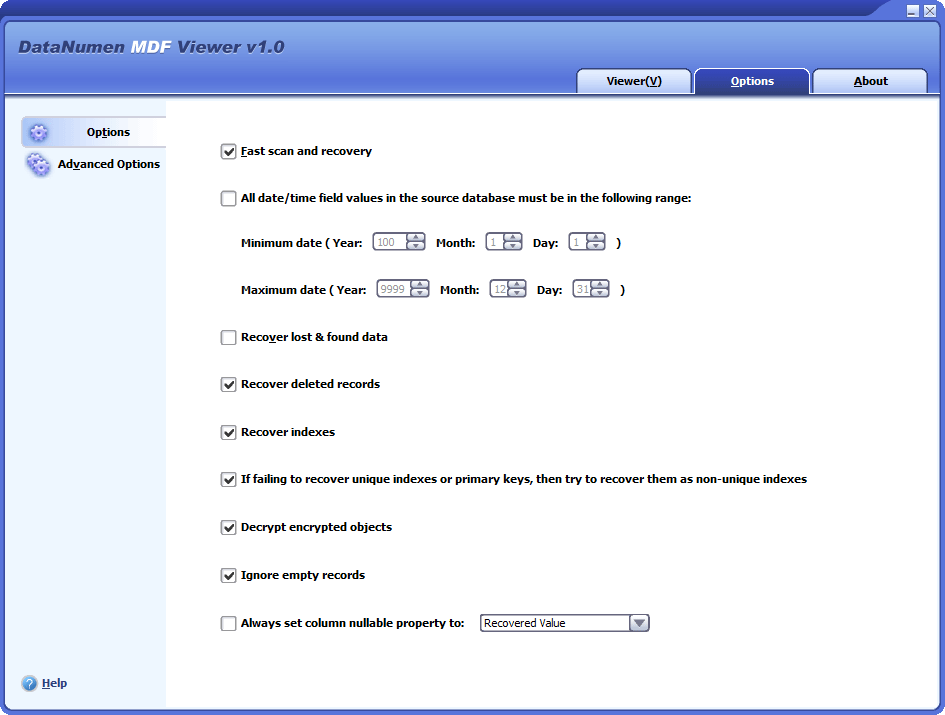
[](https://www.datanumen.com/wp-content/uploads/2024/07/datanumen-mdf-viewer-10-options.png) 

#### Options

[Free Download](https://download.datanumen.com/downloads/file/dmv.exe)20+ Years Of Experience

## Main Features

---

* Support [Microsoft SQL Server](https://www.microsoft.com/en-us/sql-server) 2005, 2008, 2008 R2, 2012, 2014, 2016, 2017, 2019, 2022.
* View the schema/structure and data in the tables.
* View all data types, including ASCII and Unicode XML data type.
* View sparse column.
* View deleted records in the database tables.
* View indexes and primary keys.
* View SQL database objects, including views, triggers, rules and defaults.
* View stored procedures, scalar functions, inline table-valued functions, and multistatement table-valued functions.
* View and decrypt encrypted objects in SQL Server databases.
* View the MDF file (primary data file) and the NDF files (secondary data files).
* View MS SQL Server database without an LDF file (transaction log file).
* View MDF/NDF data from undamaged or damaged VMWare VMDK(Virtual Machine Disk) files(\*.vmdk), Virtual PC VHD(Virtual Hard Disk) files(\*.vhd), Acronis True Image files(\*.tib), Norton Ghost files(\*.gho, \*.v2i), Windows NTBackup files(\*.bkf), ISO image files(\*.iso) and Nero image files(\*.nrg), with advanced algorithms.
* View SQL Server data from temporary tempdb.mdf file.

---

[Free Download](https://download.datanumen.com/downloads/file/dmv.exe)20+ Years Of Experience

## View SQL Server MDF Databases with DataNumen MDF Viewer

---

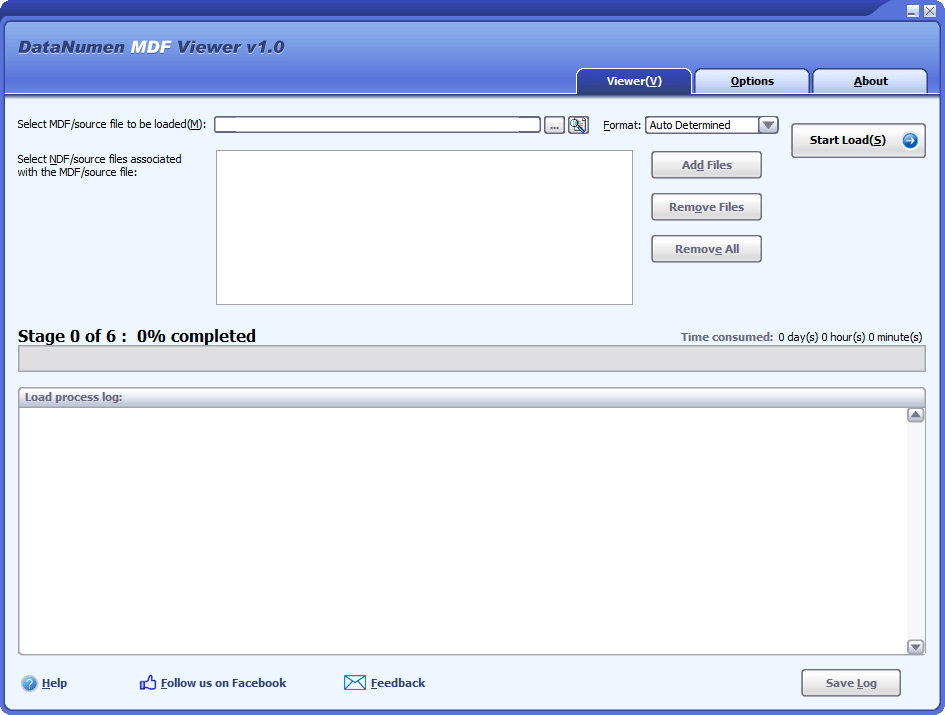
Launch DataNumen MDF Viewer.

![DataNumen MDF Viewer 1.0]()

**Attention:** Shut down other apps that could alter the MDF file before you start.

Choose the file that you would like to view, by entering the MDF file name or clicking the ![Browse]() button. Also, you can use the ![Find]() button to search for it.

In case there is one or multiple NDF files associated with the damaged MDF file, add them as well:

Specify the format of the source database file if you know it:

If you do not specify the format, then DataNumen MDF Viewer will try to analyze the source file to detect the format.

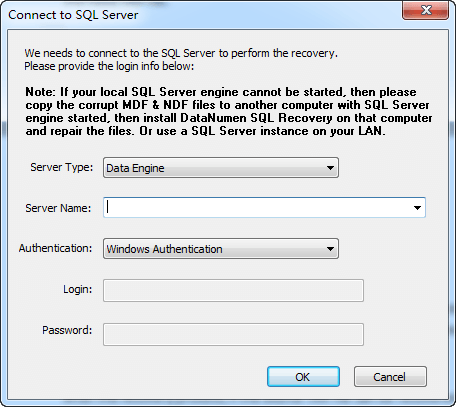
Click the "Start Load" button and DataNumen MDF Viewer will prompt a "Connect to SQL Server" dialog box, as it needs to connect to a SQL Server instance to view the MDF file:

![Connect to SQL Server Dialog Box]()

Set the **Server Name** and **Authentication** for the SQL Server instance on the local or remote computer. Then, click the **"OK"** button. Our MDF view software will try to detect the collation of the source database. If it cannot detect the collation, it will ask you about it. Then it will load the entire database and show the data in the MDF file.

The bar displays the progress of the load process.

Once the process is complete, you will see the data in the MDF file.

## More Information

---

![Specifications]() Specifications 

![Case Studies]() Case Studies 

![FAQ]() FAQ 

| **Version**                                               | 1.0 ([Version History](https://www.datanumen.com/news/))                                                                                                                        |
| --------------------------------------------------------- | ------------------------------------------------------------------------------------------------------------------------------------------------------------------------------- |
| **Release Date**                                          | July 25th, 2024                                                                                                                                                                 |
| **Bitness**                                               | 32-bit                                                                                                                                                                          |
| **Supported File Types**                                  | MDF, NDF                                                                                                                                                                        |
| **Supported SQL Server Versions**                         | Microsoft SQL Server 2005–2022                                                                                                                                                  |
| **Viewable Objects**                                      | Tables, indexes, primary keys, views, triggers, rules, defaults, stored procedures, scalar functions, inline table-valued functions, and multi-statement table-valued functions |
| **Table Schema and Record Viewing**                       | Supported                                                                                                                                                                       |
| **Viewable Data Types**                                   | All data types, including XML data in ASCII and Unicode formats                                                                                                                 |
| **Sparse Column Viewing**                                 | Supported                                                                                                                                                                       |
| **Deleted Data Viewing**                                  | Deleted records in tables                                                                                                                                                       |
| **Encrypted Object Viewing**                              | Supported                                                                                                                                                                       |
| **Database Object Viewing from Disk Image Files**         | Supported                                                                                                                                                                       |
| **Database Object Viewing from Temporary Database Files** | Supported for tempdb.mdf                                                                                                                                                        |
| **Database Object Viewing Without an LDF File**           | Supported                                                                                                                                                                       |
| **Supported Languages**                                   | 95 languages                                                                                                                                                                    |

#### Requirements

| **Operating System** | Windows                          |
| -------------------- | -------------------------------- |
| **Processor**        | Intel or equivalent (x86, x64)   |
| **Memory**           | 32 MB minimum (2 GB recommended) |
| **Disk Space**       | 21 MB                            |

[More Case Studies ](https://www.datanumen.com/case-studies/) 

[More Articles in Knowledgebase ](https://www.datanumen.com/knowledgebase/) 

## Related Products

---

![DataNumen SQL Recovery 7.3 Boxshot]() 

### [DataNumen SQL Recovery](https://www.datanumen.com/sql-recovery/)

Repair corrupt Microsoft SQL Server MDF databases.

[Details ](https://www.datanumen.com/sql-recovery/) 

### ![DataNumen MDF Viewer 1.0 Boxshot]() DataNumen MDF Viewer

[Free Download](https://download.datanumen.com/downloads/file/dmv.exe)

![DataNumen]() 

Follow or like us on Facebook, LinkedIn and Twitter to get all promotions, latest news and updates on our products and company.

* [ ](https://www.facebook.com/DataNumen)
* [ ](https://www.linkedin.com/company/datanumen)
* [ ](https://twitter.com/DataNumen)

### Featured Products

* [DataNumen Outlook Repair](https://www.datanumen.com/outlook-repair/)
* [DataNumen SQL Recovery](https://www.datanumen.com/sql-recovery/)
* [DataNumen Exchange Recovery](https://www.datanumen.com/exchange-recovery/)
* [DataNumen Access Repair](https://www.datanumen.com/access-repair/)
* [DataNumen Excel Repair](https://www.datanumen.com/excel-repair/)
* [DataNumen PDF Repair](https://www.datanumen.com/pdf-repair/)
* [DataNumen Word Repair](https://www.datanumen.com/word-repair/)
* [DataNumen Zip Repair](https://www.datanumen.com/zip-repair/)

### [Latest news](https://www.datanumen.com/news/)

  * [DataNumen Outlook Drive Recovery 10.2 is released on May 9th, 2025](https://www.datanumen.com/outlook-drive-recovery/)
  * [DataNumen Outlook Repair 10.2 is released on April 15th, 2025](https://www.datanumen.com/outlook-repair/)
  * [DataNumen SQL Recovery 7.3 is released on February 19th, 2025](https://www.datanumen.com/sql-recovery/)

[ ](#masthead)

```json
{"@context":"https:\/\/schema.org","@graph":[{"@type":"WebPage","@id":"https:\/\/www.datanumen.com\/mdf-viewer\/","url":"https:\/\/www.datanumen.com\/mdf-viewer\/","name":"MDF Viewer | MDF File Reader | DataNumen","isPartOf":{"@id":"https:\/\/www.datanumen.com\/#website"},"primaryImageOfPage":{"@id":"https:\/\/www.datanumen.com\/mdf-viewer\/#primaryimage"},"image":{"@id":"https:\/\/www.datanumen.com\/mdf-viewer\/#primaryimage"},"thumbnailUrl":"https:\/\/www.datanumen.com\/wp-content\/uploads\/2024\/07\/datanumen-mdf-viewer-10-boxshot.png","datePublished":"2024-07-24T11:11:59+00:00","dateModified":"2026-08-05T03:44:55+00:00","description":"Best MDF viewer to read and view MS SQL Server MDF database files, including corrupt databases. Support both MDF and NDF files.","breadcrumb":{"@id":"https:\/\/www.datanumen.com\/mdf-viewer\/#breadcrumb"},"inLanguage":"en-US","potentialAction":[{"@type":"ReadAction","target":["https:\/\/www.datanumen.com\/mdf-viewer\/"]}]},{"@type":"ImageObject","inLanguage":"en-US","@id":"https:\/\/www.datanumen.com\/mdf-viewer\/#primaryimage","url":"https:\/\/www.datanumen.com\/wp-content\/uploads\/2024\/07\/datanumen-mdf-viewer-10-boxshot.png","contentUrl":"https:\/\/www.datanumen.com\/wp-content\/uploads\/2024\/07\/datanumen-mdf-viewer-10-boxshot.png","width":241,"height":320,"caption":"DataNumen MDF Viewer 1.0 Boxshot"},{"@type":"BreadcrumbList","@id":"https:\/\/www.datanumen.com\/mdf-viewer\/#breadcrumb","itemListElement":[{"@type":"ListItem","position":1,"name":"Home","item":"https:\/\/www.datanumen.com\/"},{"@type":"ListItem","position":2,"name":"DataNumen MDF Viewer"}]},{"@type":"WebSite","@id":"https:\/\/www.datanumen.com\/#website","url":"https:\/\/www.datanumen.com\/","name":"DataNumen","description":"","publisher":{"@id":"https:\/\/www.datanumen.com\/#organization"},"potentialAction":[{"@type":"SearchAction","target":{"@type":"EntryPoint","urlTemplate":"https:\/\/www.datanumen.com\/?s={search_term_string}"},"query-input":{"@type":"PropertyValueSpecification","valueRequired":true,"valueName":"search_term_string"}}],"inLanguage":"en-US"},{"@type":"Organization","@id":"https:\/\/www.datanumen.com\/#organization","name":"DataNumen, Inc.","url":"https:\/\/www.datanumen.com\/","logo":{"@type":"ImageObject","inLanguage":"en-US","@id":"https:\/\/www.datanumen.com\/#\/schema\/logo\/image\/","url":"https:\/\/www.datanumen.com\/wp-content\/uploads\/2020\/03\/favicon.png","contentUrl":"https:\/\/www.datanumen.com\/wp-content\/uploads\/2020\/03\/favicon.png","width":600,"height":600,"caption":"DataNumen, Inc."},"image":{"@id":"https:\/\/www.datanumen.com\/#\/schema\/logo\/image\/"},"sameAs":["https:\/\/www.facebook.com\/DataNumen","https:\/\/x.com\/DataNumen","https:\/\/www.linkedin.com\/company\/datanumen","https:\/\/myspace.com\/datanumen\/","https:\/\/www.pinterest.com\/datanumen\/data-recovery\/","https:\/\/www.youtube.com\/c\/DataNumen"]}]}
{
  "@context": "https://schema.org",
  "@type": "SoftwareApplication",
  "@id": "https://www.datanumen.com/mdf-viewer/#software",
  "name": "DataNumen MDF Viewer",
  "url": "https://www.datanumen.com/mdf-viewer/",
  "downloadUrl": "https://download.datanumen.com/downloads/file/dmv.exe",
  "image": "https://www.datanumen.com/mdf-viewer/images/dmvboxst.jpg",
  "description": "DataNumen MDF Viewer is a free Windows database viewer for viewing Microsoft SQL Server MDF and NDF files, including database objects, table schemas, records, deleted data, sparse columns, encrypted objects, and database objects stored in disk image files or temporary database files.",
  "softwareVersion": "1.0",
  "dateModified": "2024-07-25",
  "releaseNotes": "https://www.datanumen.com/news/",
  "applicationCategory": "UtilitiesApplication",
  "applicationSubCategory": "SQL Server Database Viewer Software",
  "operatingSystem": "Windows",
  "processorRequirements": "Intel or equivalent (x86, x64)",
  "memoryRequirements": "32 MB minimum (2 GB recommended)",
  "storageRequirements": "21 MB",
  "inLanguage": [
    "English",
    "Bulgarian",
    "Czech",
    "Danish",
    "German",
    "Greek",
    "Spanish",
    "Estonian",
    "Finnish",
    "French",
    "Hungarian",
    "Indonesian",
    "Italian",
    "Japanese",
    "Korean",
    "Lithuanian",
    "Latvian",
    "Norwegian",
    "Dutch",
    "Polish",
    "Portuguese",
    "Romanian",
    "Russian",
    "Slovak",
    "Slovenian",
    "Swedish",
    "Turkish",
    "Ukrainian",
    "Chinese (Simplified)",
    "Afrikaans",
    "Albanian",
    "Amharic",
    "Arabic",
    "Armenian",
    "Assamese",
    "Azerbaijani",
    "Basque",
    "Belarusian",
    "Bengali",
    "Bosnian",
    "Catalan",
    "Chinese (Traditional)",
    "Corsican",
    "Croatian",
    "Divehi",
    "Filipino",
    "Frisian",
    "Galician",
    "Georgian",
    "Gujarati",
    "Hausa",
    "Hebrew",
    "Hindi",
    "Icelandic",
    "Igbo",
    "Irish",
    "Kannada",
    "Kazakh",
    "Khmer",
    "Kinyarwanda",
    "Kyrgyz",
    "Lao",
    "Luxembourgish",
    "Macedonian",
    "Malay",
    "Malayalam",
    "Maltese",
    "Maori",
    "Marathi",
    "Mongolian",
    "Nepali",
    "Oriya",
    "Pashto",
    "Persian",
    "Punjabi",
    "Sanskrit",
    "Scottish Gaelic",
    "Sesotho",
    "Serbian",
    "Sinhala",
    "Kiswahili",
    "Tajik",
    "Tamil",
    "Tatar",
    "Telugu",
    "Thai",
    "Turkmen",
    "Urdu",
    "Uyghur",
    "Uzbek",
    "Vietnamese",
    "Welsh",
    "isiXhosa",
    "Yoruba",
    "isiZulu"
  ],
  "publisher": {
    "@type": "Organization",
    "name": "DataNumen",
    "url": "https://www.datanumen.com/",
    "logo": "https://www.datanumen.com/images/logo.png"
  },
  "featureList": [
    "Available as a 32-bit application",
    "View MDF and NDF database files",
    "Support Microsoft SQL Server 2005–2022",
    "View tables, indexes, primary keys, views, triggers, rules, defaults, stored procedures, scalar functions, inline table-valued functions, and multi-statement table-valued functions",
    "View table schemas and records",
    "View all data types, including XML data in ASCII and Unicode formats",
    "View sparse columns",
    "View deleted records in database tables",
    "View encrypted database objects",
    "View database objects from disk image files",
    "View database objects from the temporary database file tempdb.mdf",
    "View database objects without an LDF transaction log file",
    "Support 95 languages"
  ],
  "aggregateRating": {
    "@type": "AggregateRating",
    "ratingValue": "4.9",
    "bestRating": "5",
    "worstRating": "1",
    "ratingCount": "1647"
  },
  "offers": {
    "@type": "Offer",
    "name": "Free Software",
    "url": "https://www.datanumen.com/mdf-viewer/",
    "priceCurrency": "USD",
    "price": "0",
    "availability": "https://schema.org/InStock"
  }
}
```