
이메일 작성 시 본문에 받는 사람 이름을 빠르게 삽입하고 싶다면 이 글을 읽어보세요. 편리한 방법을 소개해드리겠습니다.
이메일을 작성할 때 본문에 모든 수신자의 이름을 입력해야 하는 경우가 있습니다. 의심할 바 없이, 이름을 하나씩 추출하여 본문에 삽입하는 것은 상당히 지루하고 번거로운 작업입니다. 따라서 신속하게 목표를 달성할 수 있도록 효율적인 방법을 알려드리겠습니다. 자세한 단계를 알아보려면 계속 읽어보세요.
이메일 본문에 수신자 이름 삽입
- 우선 "Alt + F11" 키를 눌러 VBA 편집기를 엽니다.
- 그런 다음 "Microsoft Visual Basic for Applications" 창에서 "MS Word Object Library"를 다음과 같이 활성화합니다.VBA에서 개체 라이브러리 참조를 추가하는 방법".
- 다음으로 아래의 VBA 코드를 빈 모듈에 복사하십시오.
Sub CopyRecipientNamesToBody()
    Dim objMail As Outlook.MailItem
    Dim objRecipient As Outlook.Recipient
    Dim strRecipAddress As String
    Dim strRecipName As String
    Dim objContacts As Outlook.Items
    Dim i As Integer
    Dim strFilter As String
    Dim objFoundContact As Outlook.ContactItem
    Dim strRecipNames As String
    Dim objMailDocument As Word.Document

    'Get the current email
    Set objMail = Application.ActiveInspector.CurrentItem
    objMail.Recipients.ResolveAll

    For Each objRecipient In objMail.Recipients
        strRecipAddress = objRecipient.Address

        'Get the corresponding contact name
        Set objContacts = Application.Session.GetDefaultFolder(olFolderContacts).Items
        For i = 1 To 3
            strFilter = "[Email" & i & "Address] = " & strRecipAddress
            Set objFoundContact = objContacts.Find(strFilter)
            If Not (objFoundContact Is Nothing) Then
               strRecipNames = strRecipNames & objFoundContact.FullName & vbCr
               Exit For
            End If
        Next

        'If there isn't associated contact
        'Extract name from email address
        If objFoundContact Is Nothing Then
           strRecipName = Split(strRecipAddress, "@")(0)
           strRecipName = UCase(Left(strRecipName, 1)) & Right(strRecipName, Len(strRecipName) - 1)
           strRecipNames = strRecipNames & strRecipName & vbCr
        End If
    Next

    'Insert the names at the beginning of email
    Set objMailDocument = objMail.GetInspector.WordEditor
    objMailDocument.Range(0, 0).InsertAfter strRecipNames
End Sub
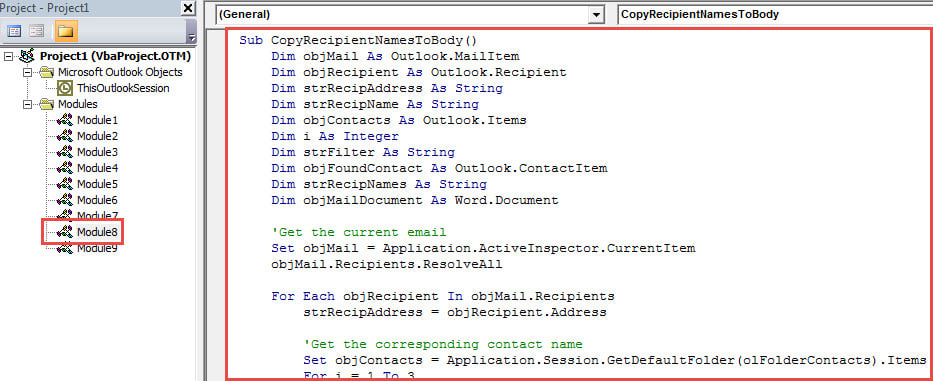
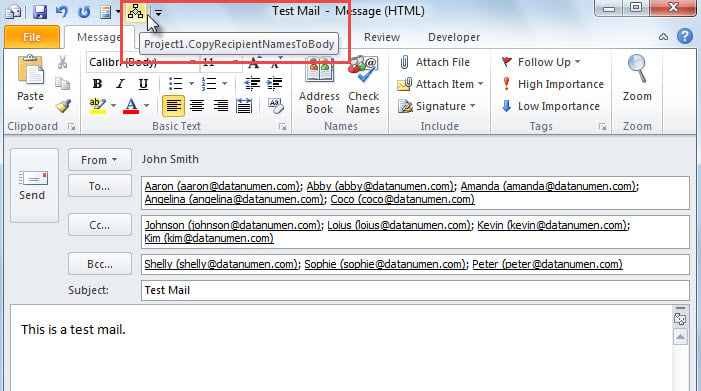
- 다음으로, "의 선택적 단계에 따라 메시지 창의 빠른 액세스 도구 모음에 이 매크로를 추가합니다.Outlook에서 VBA 코드를 실행하는 방법".
- 그 후 창을 종료하세요.
- 마지막으로 한 번 촬영해 보세요.
- 먼저 이메일을 작성하고 수신자를 입력하세요.
- 그런 다음 빠른 실행 도구 모음에서 매크로 버튼을 누르십시오.

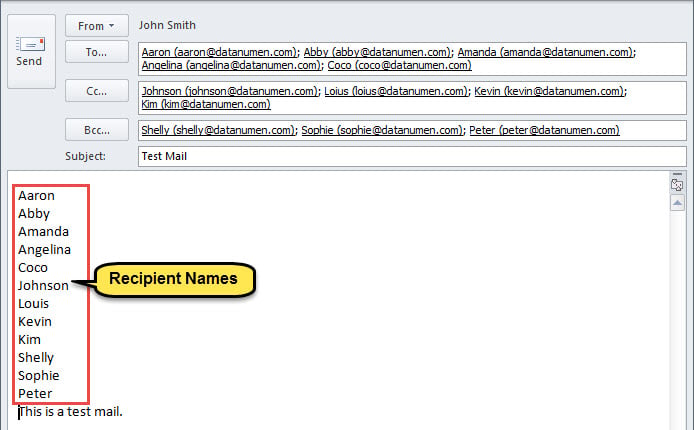
- 매크로가 완료되면 아래 그림과 같이 이메일 본문에 수신자 이름이 삽입됩니다.

Outlook 손상으로부터 보호
Outlook은 취약하므로 손상으로부터 Outlook을 보호하기가 어렵습니다. 의심할 바 없이, 당신은 만남을 꺼려할 것입니다. PST 손상. 따라서 몇 가지 효과적인 예방 조치를 취하는 것이 좋습니다. 예를 들어, Outlook에 대한 일관된 데이터 백업을 만들고 받은 편지함 오류 수정 도구를 사용하는 방법을 숙지해야 하며 다음과 같은 강력한 외부 도구를 근처에 유지해야 합니다. DataNumen Outlook Repair.
저자 소개 :
Shirley Zhang은 데이터 복구 전문가입니다. DataNumen, Inc.는 다음과 같은 데이터 복구 기술 분야의 세계적 리더입니다. SQL Server 고정 된 및 전망 수리 소프트웨어 제품. 자세한 내용은 WWW.datanumen.COM