---
description: In this article, we will majorly talk about 3 different methods to count the number of paragraphs in your Word document.
title: 3 Quick Ways to Count the Number of Paragraphs in Your Word Document
image: https://www.datanumen.com/blogs/wp-content/uploads/2016/12/click-Home-then-click-then-show-hide-icon-.jpg
---


* [ ](https://www.facebook.com/DataNumen)
* [ ](http://www.linkedin.com/company/datanumen)
* [ ](https://twitter.com/DataNumen)

[Home](https://www.datanumen.com/blogs/) \> [Solutions](https://www.datanumen.com/blogs/category/solutions/) \> [Office Solutions](https://www.datanumen.com/blogs/category/solutions/office-solutions/) \> [Word Solutions](https://www.datanumen.com/blogs/category/solutions/office-solutions/word-solutions/) \> 3 Quick Ways to Count the Number of Paragraphs in Your Word Document

# 3 Quick Ways to Count the Number of Paragraphs in Your Word Document

[Word Solutions](https://www.datanumen.com/blogs/category/solutions/office-solutions/word-solutions/)  September 28, 2025 

Share Now: 
* [ ](https://www.facebook.com/sharer.php?u=https%3A%2F%2Fwww.datanumen.com%2Fblogs%2F3-quick-ways-count-number-paragraphs-word-document%2F)
* [ ](https://x.com/share?url=https%3A%2F%2Fwww.datanumen.com%2Fblogs%2F3-quick-ways-count-number-paragraphs-word-document%2F&text=3+Quick+Ways+to+Count+the+Number+of+Paragraphs+in+Your+Word+Document)
* [ ](https://www.linkedin.com/sharing/share-offsite/?url=https%3A%2F%2Fwww.datanumen.com%2Fblogs%2F3-quick-ways-count-number-paragraphs-word-document%2F)
* [ ](javascript:void%28%28function%28%29%7Bvar%20e=document.createElement%28'script'%29;e.setAttribute%28'type','text/javascript'%29;e.setAttribute%28'charset','UTF-8'%29;e.setAttribute%28'src','//assets.pinterest.com/js/pinmarklet.js?r='+Math.random%28%29%2A99999999%29;document.body.appendChild%28e%29%7D%29%28%29%29;)
* [ ](https://www.reddit.com/submit?url=https%3A%2F%2Fwww.datanumen.com%2Fblogs%2F3-quick-ways-count-number-paragraphs-word-document%2F&title=3+Quick+Ways+to+Count+the+Number+of+Paragraphs+in+Your+Word+Document)
* [ ](https://www.tumblr.com/share/link?url=https%3A%2F%2Fwww.datanumen.com%2Fblogs%2F3-quick-ways-count-number-paragraphs-word-document%2F)
* [ ](https://vk.com/share.php?url=https%3A%2F%2Fwww.datanumen.com%2Fblogs%2F3-quick-ways-count-number-paragraphs-word-document%2F)
* [ ](https://www.xing.com/spi/shares/new?url=https%3A%2F%2Fwww.datanumen.com%2Fblogs%2F3-quick-ways-count-number-paragraphs-word-document%2F)

_In this article, we will majorly talk about 3 different methods to count the number of paragraphs in your Word document._

After we finish a Word document, we may have to pay attention to the statistics of the document, such as the number of words, paragraphs, sentences, etc. So today, we focus on introducing the tips to count the number of paragraphs.

## Method 1: Use “Find and Replace” Function

1. Firstly, make sure that you have saved your file.
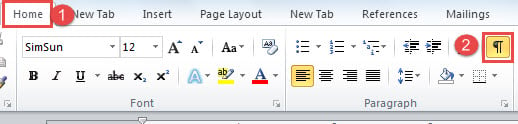
2. Then, click “Home” tab.
3. Next, click the “Show/Hide Marks” icon in “Paragraph” group. So you can see all the paragraph marks and other formatting symbols.![Click "Home" ->Click Show/Hide Icon](https://www.datanumen.com/blogs/wp-content/uploads/2016/12/click-Home-then-click-then-show-hide-icon-.jpg "Click \"Home\" ->Click Show/Hide Icon")

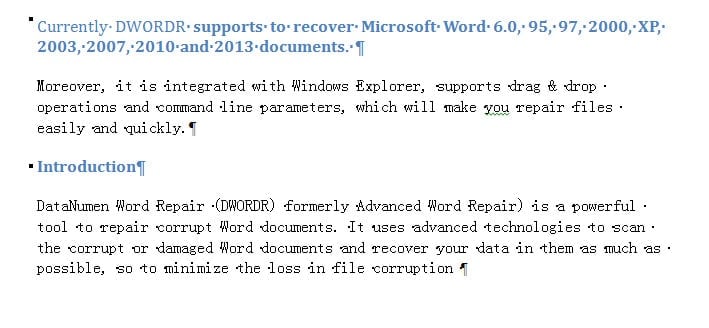
Below is a sample file of 4 paragraphs, with the first and third ones set in “Heading 2” style:![Sample File with 4 Paragraphs](https://www.datanumen.com/blogs/wp-content/uploads/2016/12/sample-file-with-4-paragraphs.jpg "Sample File with 4 Paragraphs")

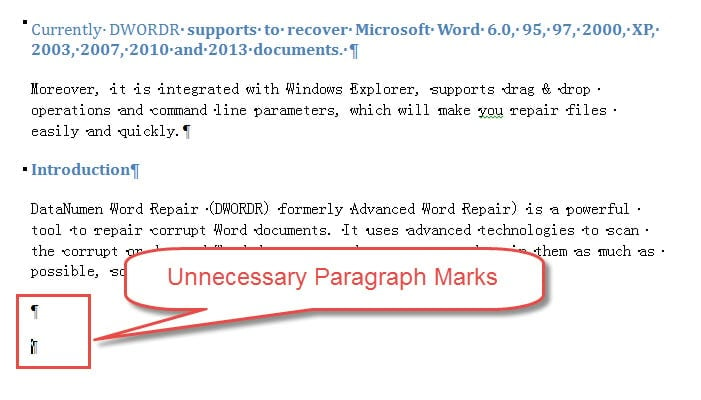
1. Now, delete the unnecessary paragraph marks.![Example of Unnecessary Paragraph Marks]()
2. Next, press “Ctrl+ H” to open the “Find and Replace” dialog box.
3. Be sure that you are under “Replace” tab first. Then enter “^p” in “Find what” text box.
4. Lastly, click “Replace All”. Now you will see a message box pop up, indicating 4 replacements have been made. The number of replacements means how many paragraphs you have in the document.![Enter "^p" ->Click "Replace All"]()

By the way, you should know that after the replacement, your document formatting will be changed. That’s why we suggest you should save your file first and probably make a backup even.

### Count the Number of Paragraphs with Same Style

Besides, you can also use this method to get the number of paragraphs with the same style. Here are detailed steps:

1. At the beginning, repeat first 6 steps aforementioned.
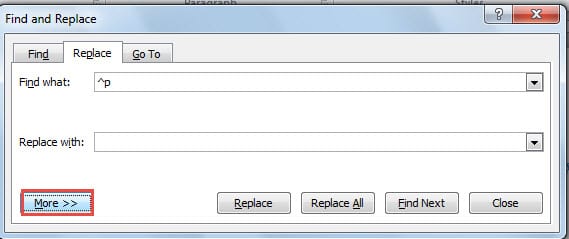
2. Then click “More” button to expand options in “Find and Replace” dialog box.![Click "More"]()
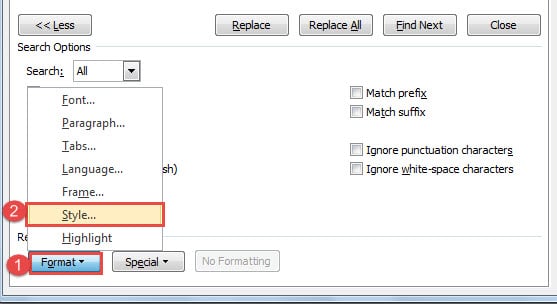
3. Next, click “Format” button on the left-down corner.
4. And choose “Style” on the list menu.![Click "Format" ->Click "Style"]()
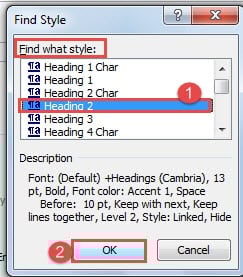
5. Now in “Find Style” dialog box, you choose a style in “Find what style” list boxes. For example, here we choose “Heading 2”.
6. Then click “OK”.![Choose a Style ->Click "OK"]()
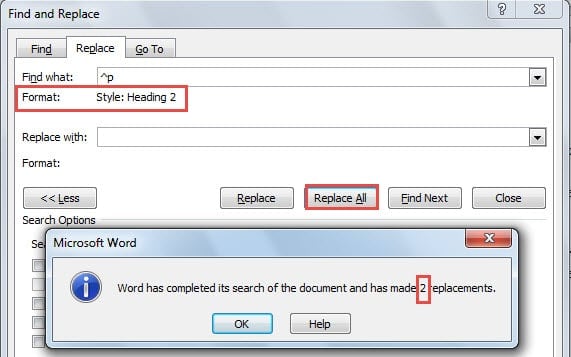
7. Next, go back to “Find and Replace” dialog box. Click “Replace All” finally. Likewise, in the message box, the number of replacement refers to how many paragraphs in “Heading 2” style.![Click "Replace All"]()

## Method 2: Use “Word Count” Function

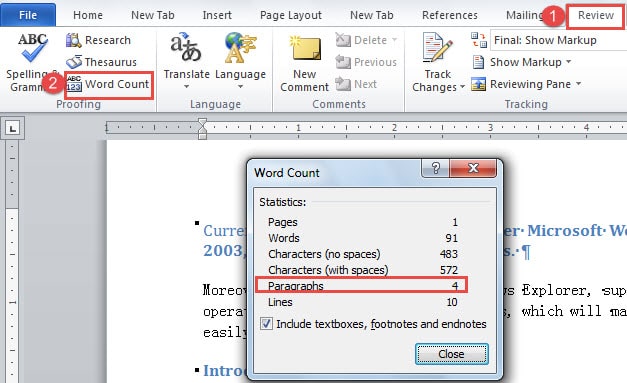
1. First of all, click “Review” tab.
2. Then click “Word Count” in “Proofing” group. And you shall see the “Word Count” box on your screen, manifesting the number of paragraphs along with other information.![Click "Review" ->Click "Word Count"]()

Actually, there is another way to view the “Word Count” box.

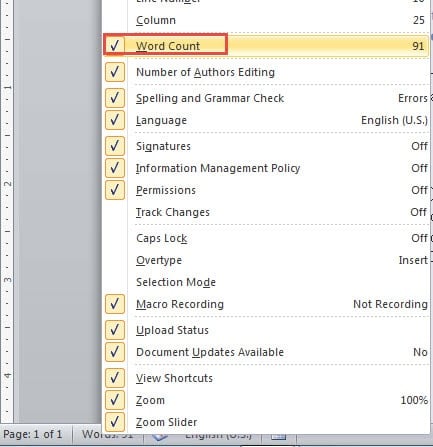
1. Firstly right click on the “Status Bar”.
2. Then check “Word Count” option to make it available on “Status Bar”.![Check "Word Count"]()
3. Then you just click “Word Count” on “Status Bar”, and the “Word Count” box shall show.

## Method 3: Show Readability Statistics

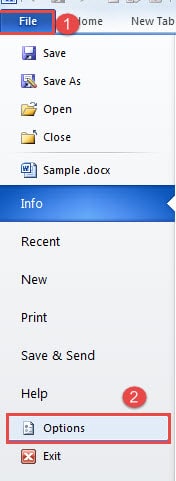
1. This time, click “File” tab first.
2. Then click ”Options”.![Click "File" ->Click "Options"]()
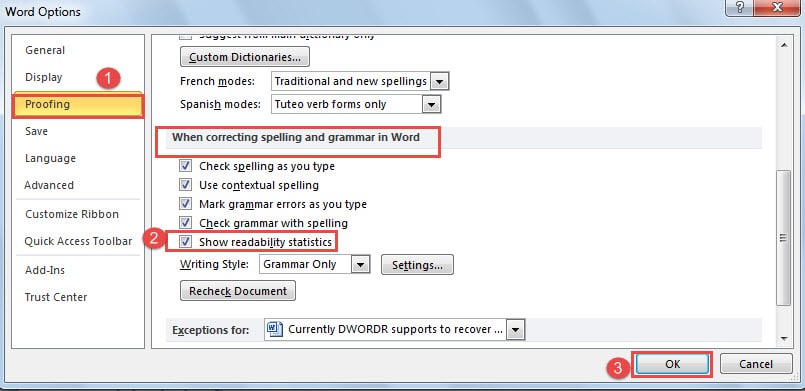
3. In “Word Options” dialog box, click “Proofing” first.
4. Then go to “When correcting spelling and grammar in Word” page. And check the “Show readability statistics” box.
5. Next click “OK” to save the change.![Click "Proofing" ->Check "Show readability statistics" Box ->Click "OK"]()
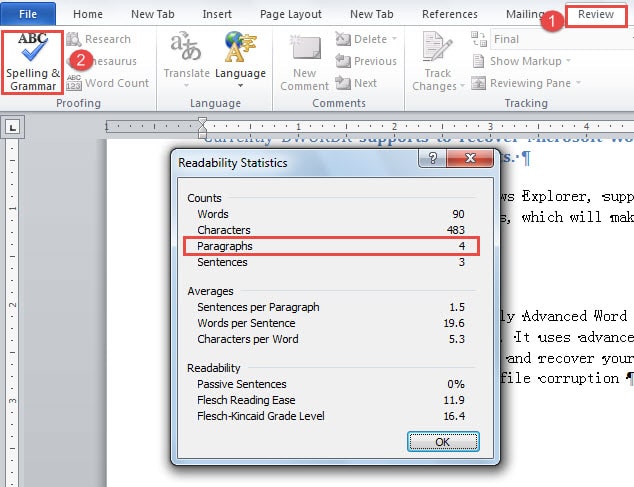
6. Now click “Review” tab.
7. Then click “Spelling and Grammar” in “Proofing” group. First you will have your document checked first. And seconds later, you will see the “Readability Statistics” box, in which there is the number of your document paragraphs.![Click "Review" ->Click "Spelling&Grammar"]()

## Comparison of 3 Methods

Methods

Advantages

Disadvantages

Use “Find and Replace” Function

You can count paragraphs with same style.

1\. You have to save the file first. 

2\. You have to delete the unnecessary paragraph marks in document or the accuracy of the number will get compromised.

3\. You can’t know other statistics.

4\. More steps comparatively 

Use “Word Count” Function

1\. You don’t have to save file first. 

2\. Fewer steps comparatively

3\. High accuracy

4\. You can know other statistics. 

You can’t count paragraphs with same style.

Show Readability Statistics

1\. You don’t have to save file first. 

2\. High accuracy

3\. You can know other statistics. 1\. More steps comparatively 

2\. You can’t count paragraphs with same style. 

## Make File Repair Easy

Nowadays, more and more people have the idea of file repair. And instead of getting mad at the bad luck, users of computers and digital devices have learned to take measures in advance or afterwards. Still, the choice of choosing an excellent [Word damage repair tool](https://www.datanumen.com/word-repair/) matters a lot for the program you purchase should be of high recovery rate.

## Author Introduction:

Vera Chen is a data recovery expert in DataNumen, Inc., which is the world leader in data recovery technologies, including [xls file repair tool](https://www.datanumen.com/excel-repair/) and pdf repair software products. For more information visit [www.datanumen.com](https://www.datanumen.com/)

Share Now: 
* [ ](https://www.facebook.com/sharer.php?u=https%3A%2F%2Fwww.datanumen.com%2Fblogs%2F3-quick-ways-count-number-paragraphs-word-document%2F)
* [ ](https://x.com/share?url=https%3A%2F%2Fwww.datanumen.com%2Fblogs%2F3-quick-ways-count-number-paragraphs-word-document%2F&text=3+Quick+Ways+to+Count+the+Number+of+Paragraphs+in+Your+Word+Document)
* [ ](https://www.linkedin.com/sharing/share-offsite/?url=https%3A%2F%2Fwww.datanumen.com%2Fblogs%2F3-quick-ways-count-number-paragraphs-word-document%2F)
* [ ](javascript:void%28%28function%28%29%7Bvar%20e=document.createElement%28'script'%29;e.setAttribute%28'type','text/javascript'%29;e.setAttribute%28'charset','UTF-8'%29;e.setAttribute%28'src','//assets.pinterest.com/js/pinmarklet.js?r='+Math.random%28%29%2A99999999%29;document.body.appendChild%28e%29%7D%29%28%29%29;)
* [ ](https://www.reddit.com/submit?url=https%3A%2F%2Fwww.datanumen.com%2Fblogs%2F3-quick-ways-count-number-paragraphs-word-document%2F&title=3+Quick+Ways+to+Count+the+Number+of+Paragraphs+in+Your+Word+Document)
* [ ](https://www.tumblr.com/share/link?url=https%3A%2F%2Fwww.datanumen.com%2Fblogs%2F3-quick-ways-count-number-paragraphs-word-document%2F)
* [ ](https://vk.com/share.php?url=https%3A%2F%2Fwww.datanumen.com%2Fblogs%2F3-quick-ways-count-number-paragraphs-word-document%2F)
* [ ](https://www.xing.com/spi/shares/new?url=https%3A%2F%2Fwww.datanumen.com%2Fblogs%2F3-quick-ways-count-number-paragraphs-word-document%2F)

[← Previous post](https://www.datanumen.com/blogs/clear-add-contacts-outlook-auto-complete-list/)

[Next post →](https://www.datanumen.com/blogs/2-ways-get-rid-configuration-progress-window-starting-word/)

Comments are closed.

![Data Recovery Blog]() 

Follow or like us on Facebook, LinkedIn and Twitter to get all promotions, latest news and updates on our products and company.

* [ ](https://www.facebook.com/DataNumen)
* [ ](http://www.linkedin.com/company/datanumen)
* [ ](https://twitter.com/DataNumen)

### Featured Products

* [DataNumen Outlook Repair](https://www.datanumen.com/outlook-repair/)
* [DataNumen SQL Recovery](https://www.datanumen.com/sql-recovery/)
* [DataNumen Exchange Recovery](https://www.datanumen.com/exchange-recovery/)
* [DataNumen Access Repair](https://www.datanumen.com/access-repair/)
* [DataNumen Excel Repair](https://www.datanumen.com/excel-repair/)
* [DataNumen PDF Repair](https://www.datanumen.com/pdf-repair/)
* [DataNumen Word Repair](https://www.datanumen.com/word-repair/)
* [DataNumen Zip Repair](https://www.datanumen.com/zip-repair/)

### Popular posts

[ ](#masthead)

```json
{"@context":"https:\/\/schema.org","@graph":[{"@type":"Article","@id":"https:\/\/www.datanumen.com\/blogs\/3-quick-ways-count-number-paragraphs-word-document\/#article","isPartOf":{"@id":"https:\/\/www.datanumen.com\/blogs\/3-quick-ways-count-number-paragraphs-word-document\/"},"author":{"name":"AuthorCCW","@id":"https:\/\/www.datanumen.com\/blogs\/#\/schema\/person\/33ded6c47c77587f9158d99f05e23957"},"headline":"3 Quick Ways to Count the Number of Paragraphs in Your Word Document","datePublished":"2016-12-08T06:10:34+00:00","dateModified":"2025-09-28T18:07:15+00:00","mainEntityOfPage":{"@id":"https:\/\/www.datanumen.com\/blogs\/3-quick-ways-count-number-paragraphs-word-document\/"},"wordCount":733,"commentCount":2,"publisher":{"@id":"https:\/\/www.datanumen.com\/blogs\/#organization"},"image":{"@id":"https:\/\/www.datanumen.com\/blogs\/3-quick-ways-count-number-paragraphs-word-document\/#primaryimage"},"thumbnailUrl":"https:\/\/www.datanumen.com\/blogs\/wp-content\/uploads\/2016\/12\/click-Home-then-click-then-show-hide-icon-.jpg","articleSection":["Word Solutions"],"inLanguage":"en-US","potentialAction":[{"@type":"CommentAction","name":"Comment","target":["https:\/\/www.datanumen.com\/blogs\/3-quick-ways-count-number-paragraphs-word-document\/#respond"]}]},{"@type":"WebPage","@id":"https:\/\/www.datanumen.com\/blogs\/3-quick-ways-count-number-paragraphs-word-document\/","url":"https:\/\/www.datanumen.com\/blogs\/3-quick-ways-count-number-paragraphs-word-document\/","name":"3 Quick Ways to Count the Number of Paragraphs in Your Word Document","isPartOf":{"@id":"https:\/\/www.datanumen.com\/blogs\/#website"},"primaryImageOfPage":{"@id":"https:\/\/www.datanumen.com\/blogs\/3-quick-ways-count-number-paragraphs-word-document\/#primaryimage"},"image":{"@id":"https:\/\/www.datanumen.com\/blogs\/3-quick-ways-count-number-paragraphs-word-document\/#primaryimage"},"thumbnailUrl":"https:\/\/www.datanumen.com\/blogs\/wp-content\/uploads\/2016\/12\/click-Home-then-click-then-show-hide-icon-.jpg","datePublished":"2016-12-08T06:10:34+00:00","dateModified":"2025-09-28T18:07:15+00:00","description":"In this article, we will majorly talk about 3 different methods to count the number of paragraphs in your Word document.","inLanguage":"en-US","potentialAction":[{"@type":"ReadAction","target":["https:\/\/www.datanumen.com\/blogs\/3-quick-ways-count-number-paragraphs-word-document\/"]}]},{"@type":"ImageObject","inLanguage":"en-US","@id":"https:\/\/www.datanumen.com\/blogs\/3-quick-ways-count-number-paragraphs-word-document\/#primaryimage","url":"https:\/\/www.datanumen.com\/blogs\/wp-content\/uploads\/2016\/12\/click-Home-then-click-then-show-hide-icon-.jpg","contentUrl":"https:\/\/www.datanumen.com\/blogs\/wp-content\/uploads\/2016\/12\/click-Home-then-click-then-show-hide-icon-.jpg","width":518,"height":124,"caption":"Click \"Home\" ->Click Show\/Hide Icon"},{"@type":"WebSite","@id":"https:\/\/www.datanumen.com\/blogs\/#website","url":"https:\/\/www.datanumen.com\/blogs\/","name":"Data Recovery Blog","description":"Discuss every aspect of data recovery","publisher":{"@id":"https:\/\/www.datanumen.com\/blogs\/#organization"},"potentialAction":[{"@type":"SearchAction","target":{"@type":"EntryPoint","urlTemplate":"https:\/\/www.datanumen.com\/blogs\/?s={search_term_string}"},"query-input":{"@type":"PropertyValueSpecification","valueRequired":true,"valueName":"search_term_string"}}],"inLanguage":"en-US"},{"@type":"Organization","@id":"https:\/\/www.datanumen.com\/blogs\/#organization","name":"Data Recovery Blog","url":"https:\/\/www.datanumen.com\/blogs\/","logo":{"@type":"ImageObject","inLanguage":"en-US","@id":"https:\/\/www.datanumen.com\/blogs\/#\/schema\/logo\/image\/","url":"https:\/\/www.datanumen.com\/blogs\/wp-content\/uploads\/2019\/02\/logowithouttext.jpg","contentUrl":"https:\/\/www.datanumen.com\/blogs\/wp-content\/uploads\/2019\/02\/logowithouttext.jpg","width":296,"height":397,"caption":"Data Recovery Blog"},"image":{"@id":"https:\/\/www.datanumen.com\/blogs\/#\/schema\/logo\/image\/"},"sameAs":["https:\/\/www.facebook.com\/DataNumen","https:\/\/x.com\/DataNumen","http:\/\/www.linkedin.com\/company\/datanumen","https:\/\/myspace.com\/datanumen\/","http:\/\/www.pinterest.com\/datanumen\/","https:\/\/www.youtube.com\/channel\/UCVIIuuKfUBHSJauUaVP13tw"]},{"@type":"Person","@id":"https:\/\/www.datanumen.com\/blogs\/#\/schema\/person\/33ded6c47c77587f9158d99f05e23957","name":"AuthorCCW","image":{"@type":"ImageObject","inLanguage":"en-US","@id":"https:\/\/secure.gravatar.com\/avatar\/3516ed90fc242780d3947a989f895bc46e70c3e83485d30f2b457a007906aa58?s=96&d=mm&r=g","url":"https:\/\/secure.gravatar.com\/avatar\/3516ed90fc242780d3947a989f895bc46e70c3e83485d30f2b457a007906aa58?s=96&d=mm&r=g","contentUrl":"https:\/\/secure.gravatar.com\/avatar\/3516ed90fc242780d3947a989f895bc46e70c3e83485d30f2b457a007906aa58?s=96&d=mm&r=g","caption":"AuthorCCW"},"sameAs":["https:\/\/www.datanumen.com\/"]}]}
```