
在本文中,我們將為您提供6種方法來將Word文檔中的所有腳註轉換為尾註,反之亦然。
眾所周知,默認情況下,腳註文本排列在單個頁面的底部,而尾註位於文檔的末尾。 但是,這樣的默認設置不能一直滿足人們的需求。 甚至Word也具有內置命令,供用戶將腳註轉換為尾註,反之亦然。 因此,我們生成6種方法供您選擇。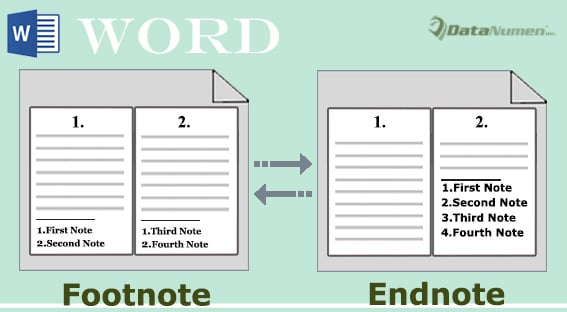
方法1:手動將所有腳註轉換為一個文檔中的尾註
這通常是腳註和尾註所在的位置: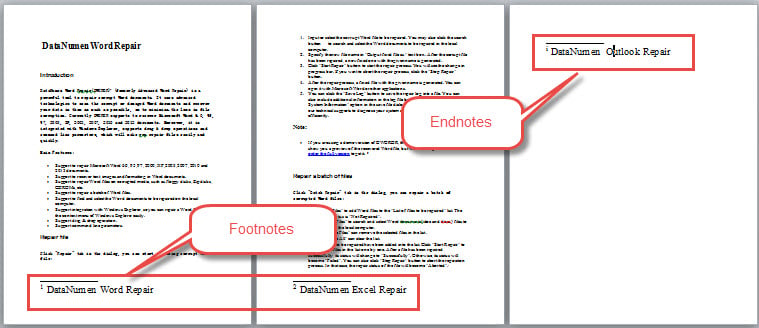
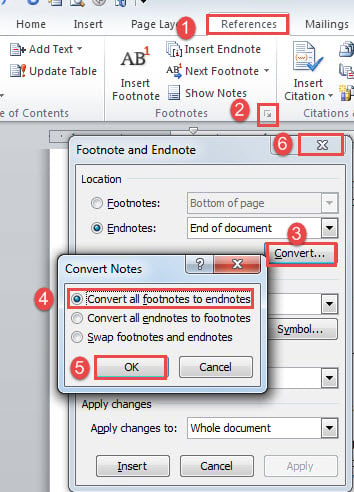
- 首先,單擊“參考”選項卡,然後單擊“腳註”組中的箭頭按鈕以打開“腳註和尾註”對話框。
- 接下來點擊“轉換”按鈕。
- 然後選擇“將所有腳註轉換為尾註”選項。
- 然後點擊“確定”。
- 最後,關閉“腳註和尾註”框。

這是效果: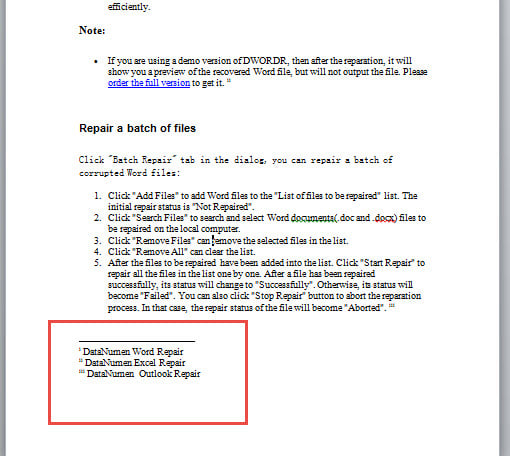
方法2:手動將所有尾註轉換為一個文檔中的腳註
將尾註轉換為腳註幾乎相同。
- 重複方法1中的步驟2和1。
- 這次改為選擇“將所有尾註轉換為腳註”選項。
- 仍然,重複方法4中的步驟5和1。
檢查以下結果: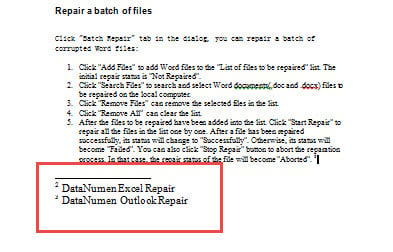
方法3:通過VBA將所有腳註轉換為一個文檔中的尾註
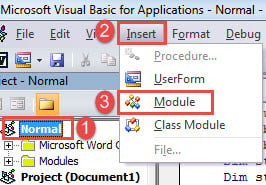
- 首先,按“ Alt + F11”以在Word中打開VBA編輯器。
- 接下來單擊“正常”。
- 點擊“插入”標籤。
- 然後在下拉菜單中選擇“模塊”。

- 然後雙擊該模塊以將其打開。
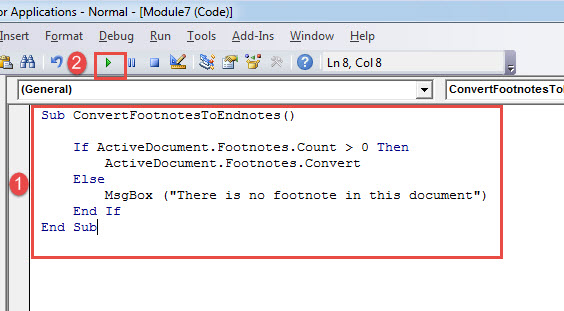
- 將以下代碼粘貼到此處:
Sub ConvertFootnotesToEndnotes()

  If ActiveDocument.Footnotes.Count > 0 Then
    ActiveDocument.Footnotes.Convert
  Else
    MsgBox ("There is no footnote in this document")
  End If
End Sub
- 最後,單擊“運行”。

方法4:通過VBA將所有尾註轉換為一個文檔中的腳註
同樣,請按照方法3中的相同步驟安裝和運行宏。 但是,將宏替換為以下宏:
Sub ConvertEndnotesToFootnotes()

 If ActiveDocument.Endnotes.Count > 0 Then
 ActiveDocument.Endnotes.Convert
 Else
 MsgBox ("There is no endnote in this document")
 End If
End Sub
 方法5:通過VBA將所有腳註批量轉換為多個文檔中的尾註
 方法5:通過VBA將所有腳註批量轉換為多個文檔中的尾註
如果您需要處理大量文件,請先將它們全部放在一個文件夾中。 然後安裝並運行此宏:
Sub BatchConvertFootnotesToEndnotes()
  Dim objWordApplication As New Word.Application
  Dim strFile As String
  Dim strFolder As String

  strFolder = InputBox("Enter the folder address", "Folder Address", "For example:E:\test word\test\")
  strFile = Dir(strFolder & "*.doc*", vbNormal)

  While strFile <> ""
    With objWordApplication
      .Documents.Open (strFolder & strFile)
      .ActiveDocument.Footnotes.Convert
      .ActiveDocument.Close
    End With
    strFile = Dir()
  Wend

  Set objWordApplication = Nothing

End Sub
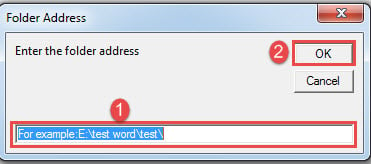
運行此宏將彈出一個輸入框,您應在其中輸入文件夾路徑。 並且不要忘記文件夾地址的末尾應該有一個“ \”。
方法6:通過VBA將所有尾註批量轉換為多個文檔中的腳註
最後,這是將多個文檔中的尾註自動批量轉換為腳註的宏:
Sub BatchConvertEndnotesToFootnotes()
  Dim objWordApplication As New Word.Application
  Dim strFile As String
  Dim strFolder As String

  strFolder = InputBox("Enter the folder address", "Folder Address", "For example:E:\test word\test\")
  strFile = Dir(strFolder & "*.doc*", vbNormal)

  While strFile <> ""
    With objWordApplication
      .Documents.Open (strFolder & strFile)
      .ActiveDocument.Endnotes.Convert
      .ActiveDocument.Close
    End With
    strFile = Dir()
  Wend

  Set objWordApplication = Nothing

End Sub
如何解決單詞問題
單詞可能會失敗而沒有任何跡象。 儘管您可能會感到運氣這麼大,這真是令人難以置信,但您別無選擇,只能求助於合格的維修工具進行修復。 損壞的文件.
作者簡介:
陳薇薇(Vera Chen)是 DataNumen,Inc.是數據恢復技術的全球領導者,包括 損壞的Excel 以及 pdf 維修軟件產品。 欲了解更多信息,請訪問 萬維網。datanumen.COM