
当您收到附件时,“.zip如果要解压缩文件,通常需要将扩展名为“.txt”的文件保存到本地驱动器并解压缩。但许多用户希望直接在 Outlook 中解压缩。本文将教您如何通过 VBA 实现这一目标。
您一定收到过“附件”.zip“ 文件扩展名。 为了访问一个内部文件 zip 要打开文件,首先需要解压缩。在这种情况下,和往常一样,您必须先保存文件。 zip 将文件解压缩到本地驱动器,然后右键单击该文件,从上下文菜单中选择“全部提取”。实际上,许多用户更喜欢直接在 Outlook 中解压缩文件。然而,Outlook 本身并不提供此功能。幸运的是,您可以按照以下步骤使用 VBA 轻松实现此功能。
解压 .Zip 附件直接在 Outlook 中
- 首先,启动您的 Outlook 应用程序。
- 然后在 Outlook 窗口中按“Alt + F11”快捷键访问 VBA 编辑器。
- 接下来在“Microsoft Visual Basic for Applications”窗口中,打开一个未使用的模块。
- 随后,将以下 VBA 代码复制并粘贴到该模块中。
Public Sub UnzipFileInOutlook()
    Dim objMail As Outlook.MailItem
    Dim objAttachments As Outlook.attachments
    Dim objAttachment As Outlook.Attachment
    Dim objShell As Object
    Dim objFileSystem As Object
    Dim strTempFolder As String
    Dim strFilePath As String
    Dim strFileName As String

    Set objMail = Outlook.Application.ActiveInspector.CurrentItem
    Set objAttachments = objMail.attachments

    'Save & Unzip the zip file in local drive
    Set objShell = CreateObject("Shell.Application")
    Set objFileSystem = CreateObject("Scripting.FileSystemObject")
    strTempFolder = objFileSystem.GetSpecialFolder(2).Path & "\Temp" & Format(Now, "yyyy-mm-dd-hh-mm-ss")
    MkDir (strTempFolder)

    For Each objAttachment In objAttachments
        If Right(objAttachment.FileName, 3) = "zip" Then
           strFilePath = strTempFolder & "\" & objAttachment.FileName
           objAttachment.SaveAsFile (strFilePath)
           objShell.NameSpace((strTempFolder)).CopyHere objShell.NameSpace((strFilePath)).Items
        End If
    Next

    'Reattach the files extracted from the zip file
    strFileName = Dir(strTempFolder & "\")

    While Len(strFileName) > 0
          objMail.attachments.Add (strTempFolder & "\" & strFileName)
          strFileName = Dir
          objMail.Save
    Wend

    'Delete the attachments in “.zip” file extension
    Set objAttachments = objMail.attachments
    For Each objAttachment In objAttachments
        If Right(objAttachment.FileName, 3) = "zip" Then
           objAttachment.Delete
           objMail.Save
        End If
    Next

    'Delete the temp folder and files
    objFileSystem.DeleteFolder (strTempFolder)
End Sub
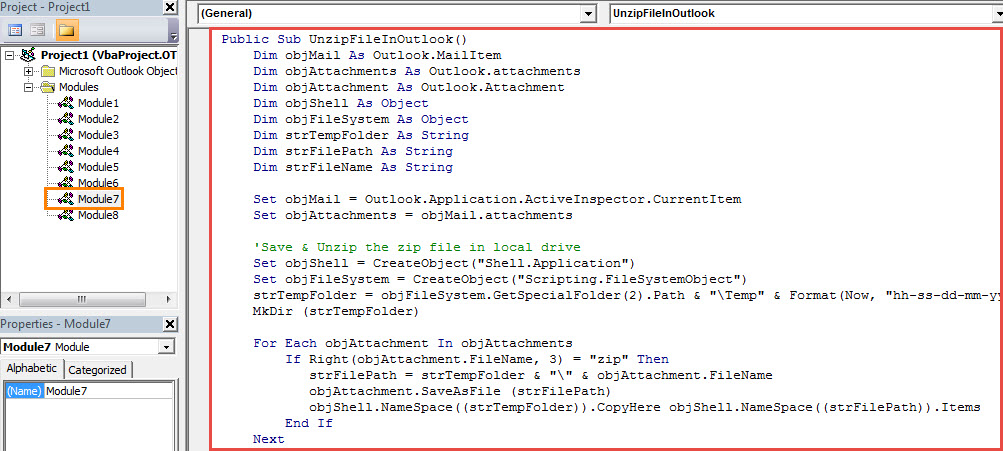
- 之后,您可以像往常一样将新的 VBA 项目添加到消息窗口的快速访问工具栏中。
- 最后,你可以试试看。
- 首先,打开一条消息 zip 文件在自己的窗口中。
- 然后单击“操作”>“编辑消息”。
- 接下来单击快速访问工具栏中的新宏按钮。
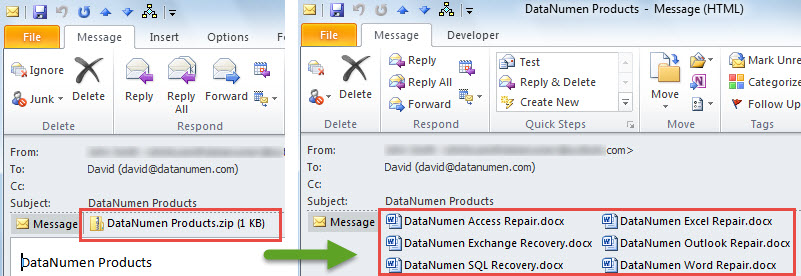
- 一下子, zip 文件将解压缩,如下图所示:

摆脱烦人的 PST 问题
虽然新 Unicode 格式的 PST 文件支持 20 GB 文件大小,但保持文件尽可能小仍然是明智的。 这是因为大型 PST 文件更容易损坏。 一旦您的 PST 文件遭到破坏,您将不得不努力 恢复 PST 数据。 在这种情况下,您别无选择,只能重新使用经过充分验证且信誉良好的工具,例如 DataNumen Outlook Repair.
作者简介:
Shirley Zhang 是一位数据恢复专家 DataNumen, Inc.,它是数据恢复技术领域的世界领先者,包括 sql修复 和 outlook 修复软件产品。 欲了解更多信息,请访问 datanumen.com