
如果要替换 Outlook 项目的颜色类别,则需要在分配新类别时删除原始类别。 因此,在本文中,我们将教您如何通过 VBA 自动执行此操作。
我们在 Outlook 中使用颜色类别的主要原因是为了更好地分类和管理您的 Outlook 项目。 另外,Outlook 允许我们为一个项目分配一个或多个颜色类别。 但是,分配给单个项目的类别太多有时可能会使您的分类规则混乱。 因此,很多用户希望替换颜色类别而不是叠加类别。 在这里,我们将向您展示一种有效的方法。
替换 Outlook 项目的颜色类别
- 首先,启动您的 Outlook 应用程序。
- 然后切换到“开发人员”选项卡并单击“Visual Basic”按钮或按“Alt + F11”快捷键。
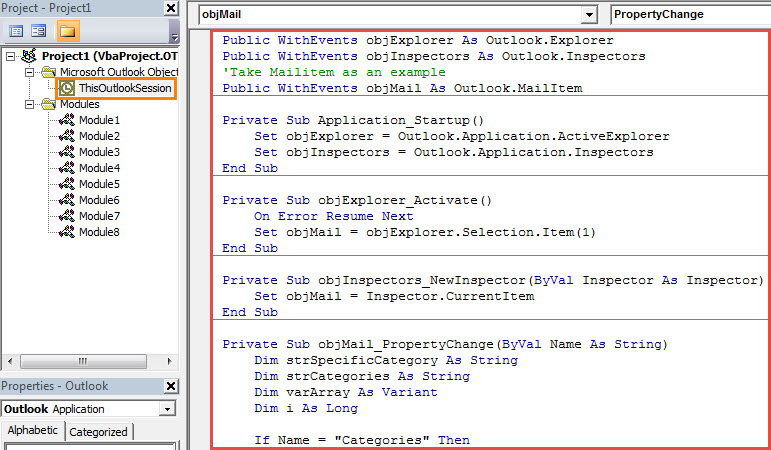
- 接下来您将进入“Microsoft Visual Basic for Applications”窗口。
- 此时,您应该双击左侧的“ThisOutlookSession”项目将其打开。
- 随后,将以下 VBA 代码复制到该项目窗口中。
Public WithEvents objExplorer As Outlook.Explorer
Public WithEvents objInspectors As Outlook.Inspectors
'Take Mailitem as an example
Public WithEvents objMail As Outlook.MailItem

Private Sub Application_Startup()
    Set objExplorer = Outlook.Application.ActiveExplorer
    Set objInspectors = Outlook.Application.Inspectors
End Sub

Private Sub objExplorer_Activate()
    On Error Resume Next
    Set objMail = objExplorer.Selection.Item(1)
End Sub

Private Sub objInspectors_NewInspector(ByVal Inspector As Inspector)
    Set objMail = Inspector.CurrentItem
End Sub

Private Sub objMail_PropertyChange(ByVal Name As String)
    Dim strSpecificCategory As String
    Dim strCategories As String
    Dim varArray As Variant
    Dim i As Long

    If Name = "Categories" Then
       strCategories = objMail.Categories
       varArray = Split(objMail.Categories, ",")
       If UBound(varArray) >= 1 Then
          'If want to get a confirmation before removing the original category
          'Add the following lines
          'Dim strPrompt As String
          'Dim nResponse As Integer
          'strPrompt = "Do you want to remove the original color category?"
          'nResponse = MsgBox(strPrompt, vbQuestion + vbYesNo, "Color Category Assignment")
          'If nResponse = vbYes Then
          For i = 0 To UBound(varArray)
              'Remove the previous color categories
              varArray(1) = ""
              'Rebuild the categories
              objMail.Categories = Join(varArray, ",")
              Exit Sub
          Next i
          'End If
       End If
    End If
End Sub
- 之后,您应该为这个新宏分配一个数字证书。
- 稍后您需要检查 Outlook 宏设置以确保已启用已签名的宏。
- 最后,您需要重启 Outlook 以激活新的 VBA 项目。
- 从现在开始,每次你为一个项目分配一个新的类别时,以前的类别将被自动删除。
处理烦人的 Outlook 问题
由于 Outlook 容易出错和损坏,您会在 Outlook 中遇到各种问题。 因此,您应该做好充分的防范。 例如,建议定期备份您的 PST 文件。 此外,你应该掌握一个强大的 PST修复 工具,例如 DataNumen Outlook Repair.
作者简介:
Shirley Zhang 是一位数据恢复专家 DataNumen, Inc.,它是数据恢复技术领域的世界领先者,包括 恢复 Sql Server 和 outlook 修复软件产品。 欲了解更多信息,请访问 datanumen.com