
使用“全部回复”时,回复邮件还将在“CC”字段中包含原始邮件的“CC”收件人。 但是,如果您希望排除此类收件人,则可以使用本文介绍的方法。
有时,您希望将电子邮件回复给原始发件人和“收件人”。 在这种情况下,您肯定会想到使用“全部回复”选项。 但是,通过这种方式,如果原始邮件也有“抄送”收件人,“全部回复”邮件会自动将“抄送”收件人复制到“抄送”字段。 如果你不想回复他们,你必须手动删除它们,这有点麻烦。 现在,在下文中,我们将教您如何让 Outlook 自动根据您的需要完成它。
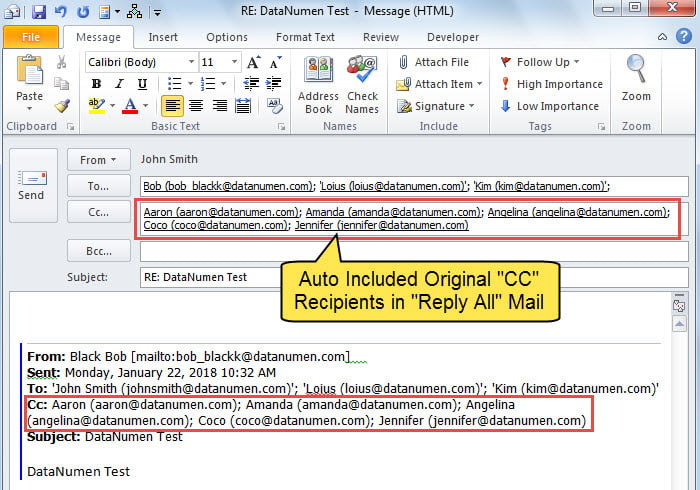
使用“全部回复”时快速排除原始“抄送”收件人
- 首先,启动 Outlook。
- 然后,通过阅读上一篇文章访问 VBA 编辑器——》如何在 Outlook 中运行 VBA 代码“。
- 接下来,将以下 VBA 代码复制到“ThisOutlookSession”项目中。
Public WithEvents objInspectors As Outlook.Inspectors
Public WithEvents objExplorer As Outlook.Explorer
Public WithEvents objMail As Outlook.MailItem

Private Sub Application_Startup()
    Set objInspectors = Outlook.Application.Inspectors
    Set objExplorer = Outlook.Application.ActiveExplorer
End Sub

Private Sub objExplorer_Activate()
    On Error Resume Next
    If TypeOf objExplorer.Selection.Item(1) Is MailItem Then
       Set objMail = objExplorer.Selection.Item(1)
    End If
End Sub

Private Sub objInspectors_NewInspector(ByVal Inspector As Inspector)
    If TypeOf Inspector.CurrentItem Is MailItem Then
       Set objMail = Inspector.CurrentItem
    End If
End Sub

'Occurs when you click "Reply All"
Private Sub objMail_ReplyAll(ByVal Response As Object, Cancel As Boolean)
    Dim objRecipient As Outlook.Recipient
    Dim i As Long

    'Ask you if to exclude CC recipients
    If MsgBox("Do you want to exclude original CC recipients? " , vbQuestion + vbYesNo) = vbYes Then
       'If select Yes, remove CC recipients
       For i = Response.Recipients.Count To 1 Step -1
           If Response.Recipients(i).Type = olCC Then
              Response.Recipients.Remove (i)
           End If
       Next
    End If
End Sub
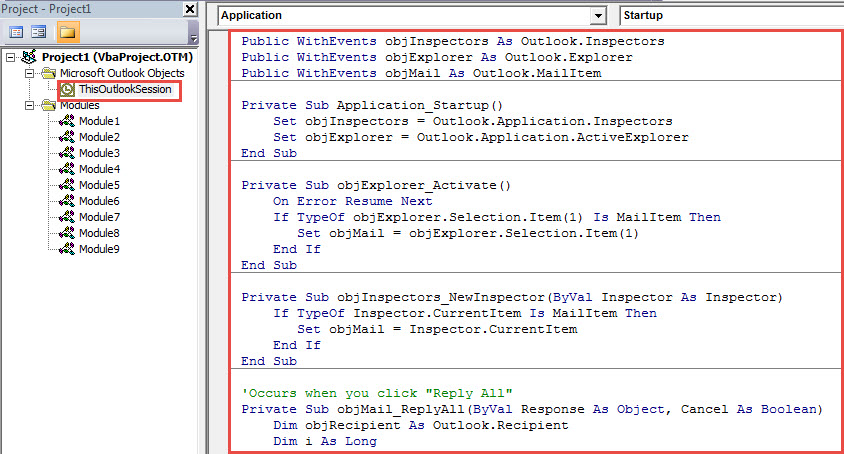
- 然后,重启 Outlook 以激活此新项目。
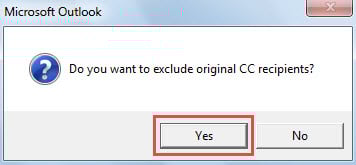
- 此后,每次点击“全部回复”按钮时,您都会收到如下图所示的提示,询问您是否要排除原始抄送收件人。

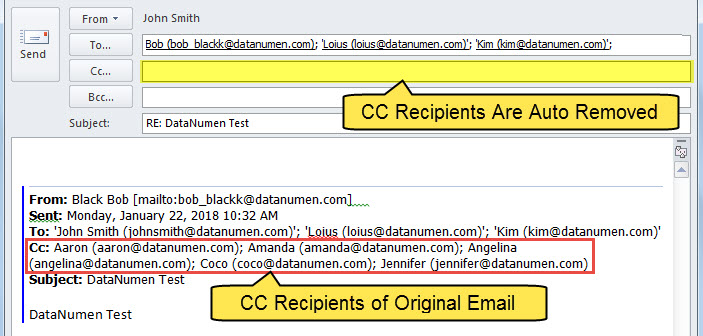
- 如果您选择“是”,Outlook 将自动删除“抄送”字段中的收件人。

为 Outlook 损坏做好充分准备
众所周知,没有人能百分之百保证自己免受 Outlook 损坏的影响。因此,所有 Outlook 的常用用户都必须采取多项预防措施。首先,最重要的措施之一是定期备份并更新 Outlook 数据。其次,学习如何使用收件箱修复工具也十分必要。最后,与经验丰富的 Outlook 管理员保持联系是明智之举。 展望修复 附近的工具,例如 DataNumen Outlook Repair.
作者简介:
Shirley Zhang 是一位数据恢复专家 DataNumen, Inc.,它是数据恢复技术领域的世界领先者,包括 恢复 mdf 和 outlook 修复软件产品。 欲了解更多信息,请访问 datanumen.com