
有些用户希望快速从多个保存的 Outlook 邮件文件中提取所有收件人。本文将介绍一种快速的方法。
要从单个 Outlook 邮件文件中提取收件人,只需双击打开它,然后在打开的邮件窗口中复制收件人。 但是,如果您需要处理一批 Outlook 邮件文件,手动方法效率不够。 因此,您可能会寻找一种更有效的方法。 在这里,我们将向您介绍这样一个。 继续阅读以获取其详细信息。
从多个 Outlook 邮件 (.msg) 文件中提取所有收件人
- 首先,根据“获取 Outlook VBA 编辑器的访问权限”的说明进行操作。如何在 Outlook 中运行 VBA 代码“。
- 接下来,将以下 VBA 代码复制并粘贴到一个空模块中。
Dim strRecipients As String

Sub ExtractRecipientsFromOutlookMSGFiles()
    Dim objShell, objWindowsFolder As Object

    strRecipients = ""
    'Select a Windows folder
    Set objShell = CreateObject("Shell.Application")
    Set objWindowsFolder = objShell.BrowseForFolder(0, "Select a Windows Folder:", 0, "")

    If Not objWindowsFolder Is Nothing Then
       Call ProcessWindowsFolders(objWindowsFolder.self.Path & "\")
       'Display a Message
       MsgBox "Recipients: " & vbCrLf & strRecipients, vbInformation + vbOKOnly
    End If
End Sub

Sub ProcessWindowsFolders(strFolderPath As String)
    Dim objFileSystem As Object
    Dim objFolder As Object
    Dim objFile As Object
    Dim objItem As Object
    Dim objMail As Outlook.MailItem
    Dim objRecipient As Outlook.Recipient
    Dim objSubfolder As Object

    Set objFileSystem = CreateObject("Scripting.FileSystemObject")
    Set objFolder = objFileSystem.GetFolder(strFolderPath)

    For Each objFile In objFolder.Files
        If objFileSystem.GetExtensionName(objFile) = "msg" Then
           Set objItem = Session.OpenSharedItem(objFile.Path)

           If TypeName(objItem) = "MailItem" Then
              Set objMail = objItem
              'Extract recipients' email addresses
              For Each objRecipient In objMail.Recipients
                  strRecipients = strRecipients & objRecipient.Address & vbCr
              Next
           End If
        End If
    Next

    'Process all subfolders recursively
    If objFolder.SubFolders.Count > 0 Then
       For Each objSubfolder In objFolder.SubFolders
           If ((objSubfolder.Attributes And 2) = 0) And ((objSubfolder.Attributes And 4) = 0) Then
               Call ProcessWindowsFolders(objSubfolder.Path)
           End If
       Next
    End If
End Sub
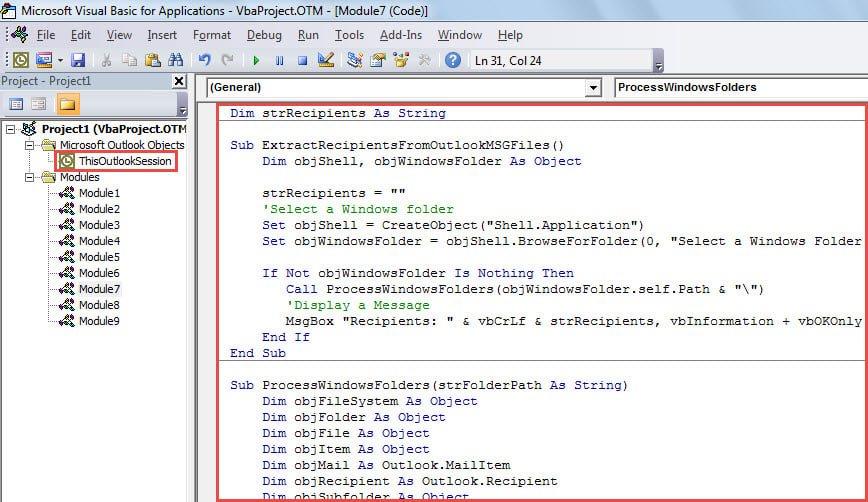
- 然后,将光标移动到第一个子程序中。
- 随后,单击“运行”按钮或按“F5”键。
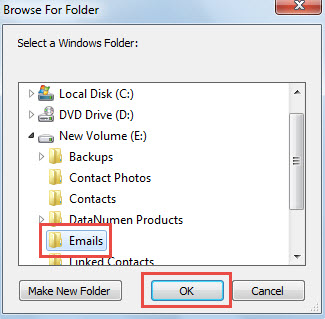
- 然后,在弹出的对话框中,选择包含源 Outlook 消息 (.msg) 文件的 Windows 文件夹。

- 选择后,点击“确定”,让宏继续运行。
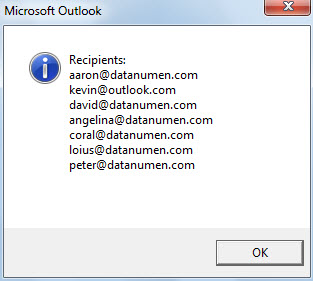
- 宏完成后,将显示一条列出所有提取的收件人电子邮件地址的消息,如以下屏幕截图所示。

保护您的 Outlook 数据免受威胁
不可否认,Outlook 数据很容易损坏。 因此,保护 Outlook 数据是一项相当繁重的任务。 它需要您坚持不懈地定期备份 Outlook 数据。 此外,如果可能,谨慎并建议准备一份经验丰富且专业的 Outlook PST修复 工具,例如 DataNumen Outlook Repair,以便您在 Outlook 损坏时能够立即获得及时的救援。
作者简介:
Shirley Zhang 是一位数据恢复专家 DataNumen, Inc.,它是数据恢复技术领域的世界领先者,包括 恢复 Sql Server 和 outlook 修复软件产品。 欲了解更多信息,请访问 datanumen.com