
在查看正文中包含大量超链接的 Outlook 电子邮件时,有时您可能只想快速打开特定域的超链接。 在这里我们将分享一种批量打开此类超链接的方法。
面对一封电子邮件中的多个超链接,您可能希望检查其中的一些,而不是全部。 例如,您只想批量打开特定域的超链接。 通常,您必须一个一个地单击才能打开它们。 很麻烦。 因此,接下来,我们将教大家一个更方便的方法。
批量打开电子邮件中具有特定域的所有超链接
- 首先,按照以下步骤访问 Outlook VBA 编辑器:“如何在 Outlook 中运行 VBA 代码“。
- 随后,在“Microsoft Visual Basic for Applications”窗口中,启用对“MS Word 对象库”的引用,并引用“如何在 VBA 中添加对象库引用“。
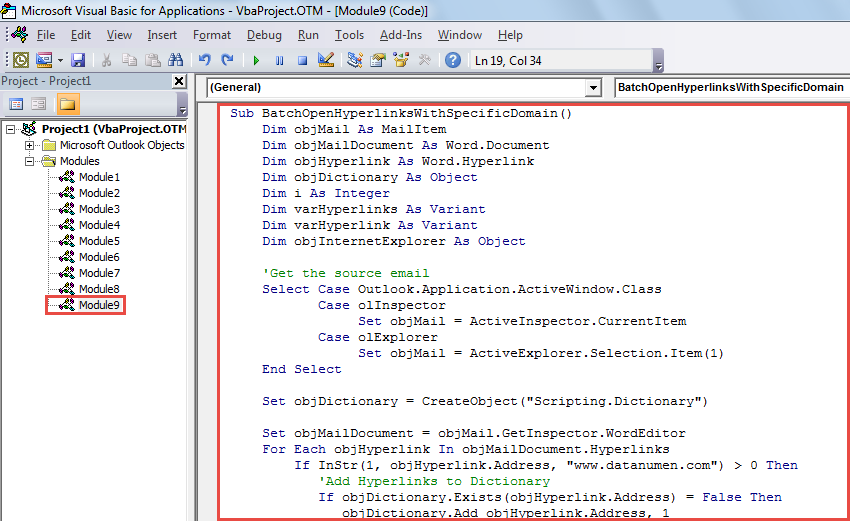
- 然后,将以下 VBA 代码复制到未使用的模块或项目中。
Sub BatchOpenHyperlinksWithSpecificDomain()
    Dim objMail As MailItem
    Dim objMailDocument As Word.Document
    Dim objHyperlink As Word.Hyperlink
    Dim objDictionary As Object
    Dim i As Integer
    Dim varHyperlinks As Variant
    Dim varHyperlink As Variant
    Dim objInternetExplorer As Object

    'Get the source email
    Select Case Outlook.Application.ActiveWindow.Class
           Case olInspector
                Set objMail = ActiveInspector.CurrentItem
           Case olExplorer
                Set objMail = ActiveExplorer.Selection.Item(1)
    End Select

    Set objDictionary = CreateObject("Scripting.Dictionary")

    Set objMailDocument = objMail.GetInspector.WordEditor
    For Each objHyperlink In objMailDocument.Hyperlinks
        If InStr(1, objHyperlink.Address, "www.datanumen.com") > 0 Then
           'Add Hyperlinks to Dictionary
           If objDictionary.Exists(objHyperlink.Address) = False Then
              objDictionary.Add objHyperlink.Address, 1
           End If
        End If
    Next

    'Batch Open Hyperlinks on different tabs in same Internet Explorer window
    Set objInternetExplorer = CreateObject("InternetExplorer.Application")
    varHyperlinks = objDictionary.Keys
    For i = LBound(varHyperlinks) To UBound(varHyperlinks)
        varHyperlink = varHyperlinks(i)

        If i = 0 Then
           objInternetExplorer.Visible = True
           objInternetExplorer.navigate varHyperlink
        Else
           objInternetExplorer.navigate varHyperlink, CLng(2048)
        End If
    Next
End Sub
- 接下来,将此宏添加到快速访问工具栏或功能区。
- 最后,按照以下步骤试一试。
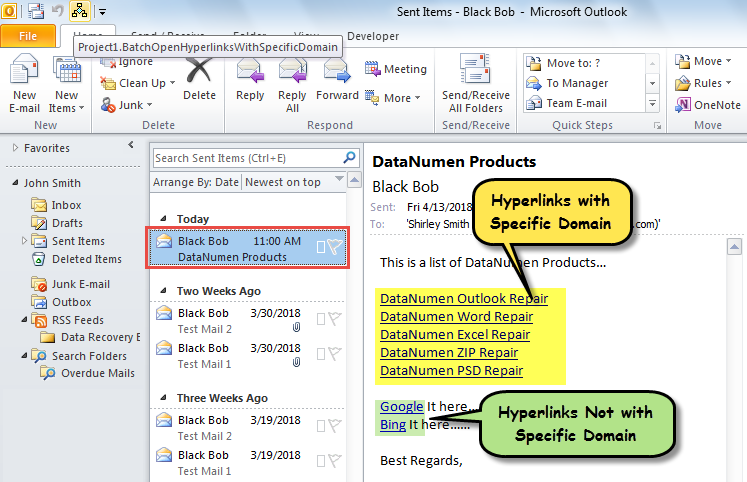
- 首先,选择或打开 Outlook 电子邮件。
- 然后,单击宏按钮。

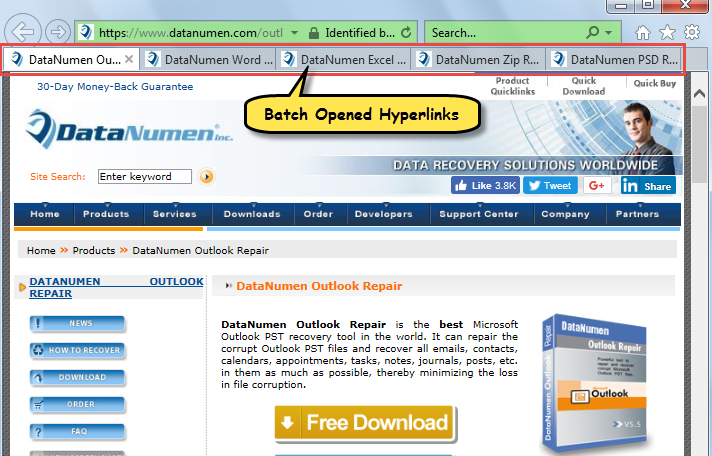
- 邮件中预定义域的超链接会立即在Internet Explorer中批量打开,如下图所示:

摆脱恼人的前景腐败
尽管 Outlook 容易出错和损坏,但实际上,只要您注意所有风险,就可以轻松摆脱它们。 例如,您需要定期为 Outlook 进行数据备份。 此外,您应该提防可能包含病毒的可疑电子邮件。 最后但同样重要的是,你最好准备一个 Outlook修复 实用程序,例如 DataNumen Outlook Repair. 它能够在 Outlook 损坏的情况下帮助您。
作者简介:
Shirley Zhang 是一位数据恢复专家 DataNumen, Inc.,它是数据恢复技术领域的世界领先者,包括 腐败 SQL Server 和 outlook 修复软件产品。 欲了解更多信息,请访问 datanumen.com