
有些用户希望 Outlook 在发送没有主题的电子邮件时自动将电子邮件正文的第一行作为主题。 现在,在本文中,我们将介绍一种通过 VBA 代码实现它的方法。
多个用户在撰写和发送电子邮件时经常忘记输入主题。 因此,通常,他们希望如果外发邮件没有主题,Outlook 可以自动将主题填充到邮件正文的第一行。 下面,我们将与您分享一个简单易用的方法。
在发送无主题的电子邮件之前自动将正文的第一行作为主题
- 首先,启动 Outlook 应用程序。
- 然后,按照“如何在 Outlook 中运行 VBA 代码“,你可以进入 VBA 编辑器。
- 接下来,在 VBA 编辑器中,按照“……”的说明添加对“MS Word 对象库”的引用。如何在 VBA 中添加对象库引用“。
- 稍后,将下面的代码复制到“ThisOutlookSession”项目中。
Private WithEvents objInspectors As Outlook.Inspectors

Private Sub Application_Startup()
    Set objInspectors = Outlook.Application.Inspectors
End Sub

Private Sub objInspectors_NewInspector(ByVal Inspector As Inspector)
    If Inspector.CurrentItem.Class = olMail And Inspector.CurrentItem.Subject = "" Then
       Inspector.CurrentItem.Subject = " "
    End If
End Sub

Private Sub Application_ItemSend(ByVal Item As Object, Cancel As Boolean)
    Dim objMail As Outlook.MailItem
    Dim objMailDocument As Word.Document
    Dim objMailSelection As Word.Selection

    If TypeOf Item Is MailItem Then
       Set objMail = Item

       If Len(Trim(objMail.Subject)) = 0 Then
          If MsgBox("No subject! Whether to take first line as subject?", vbQuestion + vbYesNo) = vbYes Then
             Set objMailDocument = objMail.GetInspector.WordEditor
             Set objMailSelection = objMailDocument.Application.Selection

             objMailDocument.Range(0, 0).Select
             objMailSelection.MoveEnd wdLine

             'Take first line of body as subject
             objMail.Subject = objMailSelection.Text
          End If
       End If
     End If
End Sub
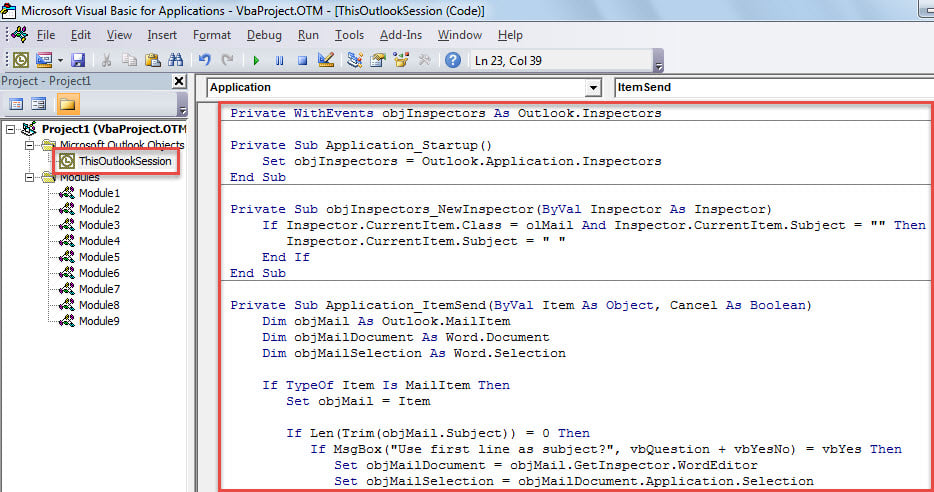
- 之后,将光标置于“Application_Startup”子程序中,然后按“F5”。
- 最后,你可以试试看。
- 首先,创建并撰写一封主题为空的电子邮件。
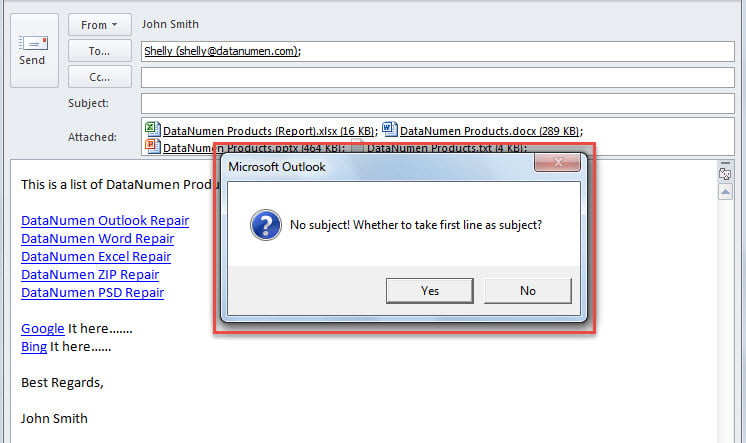
- 然后,单击“发送”按钮。
- 稍后,您会收到一条消息,询问是否将正文的第一行作为主题。

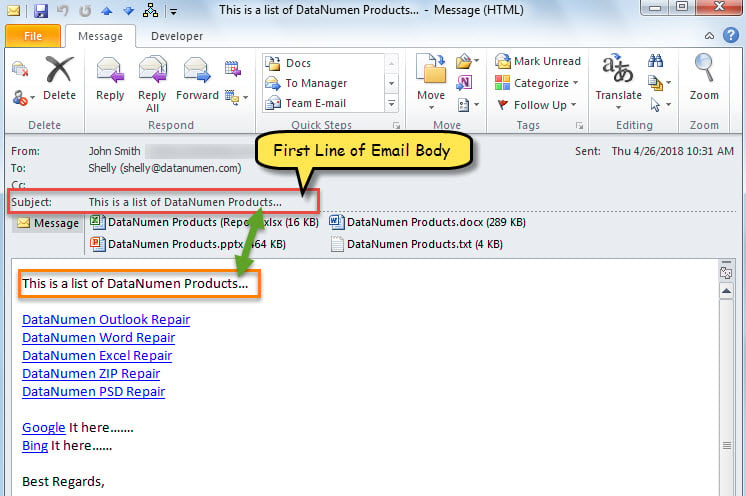
- 只要选择“是”按钮,邮件正文的第一行将被提取并作为主题,邮件将被发送出去。

保护您的 Outlook 数据安全
当然,您的 Outlook 中有多个重要的电子邮件和其他项目。 因此,您一定不愿意遇到 Outlook 数据丢失的情况。 然后,您必须采取一些措施,例如定期备份您的 Outlook 数据,学习使用内置的修复工具来修复 修复Outlook 错误并准备强大的外部恢复实用程序。 DataNumen Outlook Repair 由于其高 PST 恢复率,是一个不错的选择。
作者简介:
Shirley Zhang 是一位数据恢复专家 DataNumen, Inc.,它是数据恢复技术领域的世界领先者,包括 sql恢复 和 outlook 修复软件产品。 欲了解更多信息,请访问 datanumen.com