
从 Microsoft Access 导出信息非常简单——假设您只想生成一个导出文件。 但是,当您需要将一个查询(或表)拆分为多个导出文件时,您会怎么做呢? 例如,如果您需要每月导出一份客户交易清单——每个客户都有自己的导出文件? 这就是本文可以为您提供帮助的地方。 生成 2 个、10 个或 XNUMX 个不同的导出文件就像运行一小段 VBA 代码片段一样简单,工作将在几秒钟内完成,而不需要数小时的手动剪切/粘贴。 那么让我们开始吧……
该方法
因为我们希望它尽可能灵活和可用,所以本文的代码将比平时稍长一些,但您很快就会明白为什么。
首先——让我们概述一下我们希望能够实现的目标:
给定一个查询,每次指定字段中的值发生变化时输出一个新文件。
面临挑战
 为了实现这一点,我们需要能够逐步遍历查询结果,将当前行中的相关字段与上一行中的值进行比较——如果它们不同,则创建一个新文件,并将查询结果输出到该文件中。
这不适合什么
正如我已经提到的——您想要导出部分数据库的原因有很多,但将其用作备份/存档目的的形式并不是其中之一——当然不是我采用的方法在这里使用——如果你面临从一个错误中恢复过来,你最不想做的事情 损坏的 mdb 数据库 正在研究如何将大量导出拼接在一起!
该如何解决?
条条大路通罗马,这只是其中一种方法——但我认为这种方法效果相当不错。首先,我们将查询结果读取到一个数组中,以便于后续操作。接下来,我们将遍历该数组,检查相关字段中是否出现了新值。如果没有新值,我们将整个记录输出到当前正在写入的文件中;如果有新值,我们将关闭当前文件并创建一个新文件。
还有代码……
Sub DoExport(fieldName As String, queryName As String, filePath As String, Optional delim As Variant = vbTab)
    Dim db As Database
    Dim objRecordset As ADODB.Recordset
    Dim qdf As QueryDef

    Dim fldcounter, colno, numcols As Integer
    Dim numrows, loopcount As Long
    Dim data, fs, fwriter As Variant
    Dim fldnames(), headerString As String

    'get details of the query we'll be exporting
    Set objRecordset = New ADODB.Recordset
    Set db = CurrentDb
    Set qdf = db.QueryDefs(queryName)

    'load the query into a recordset so we can work with it
    objRecordset.Open qdf.SQL, CurrentProject.Connection, adOpenDynamic, adLockReadOnly

    'load the recordset into an array
    data = objRecordset.GetRows

    'close the recordset as we're done with it now
    objRecordset.Close

    'get details of the size of array, and position of the field we're checking for in that array
    colno = qdf.Fields(fieldName).OrdinalPosition
    numrows = UBound(data, 2)
    numcols = UBound(data, 1)


    'as we'll need to write out a header for each file - get the field names for that header
    'and construct a header string
    ReDim fldnames(numcols)
    For fldcounter = 0 To qdf.Fields.Count - 1
        fldnames(fldcounter) = qdf.Fields(fldcounter).Name
    Next
    headerString = Join(fldnames, delim)

    'prepare the file scripting interface so we can create and write to our file(s)
    Set fs = CreateObject("Scripting.FileSystemObject")

    'loop through our array and output to the file
    For loopcount = 0 To numrows
        If loopcount > 0 Then
            If data(colno, loopcount) <> data(colno, loopcount - 1) Then
                If Not IsEmpty(fwriter) Then fwriter.Close
                Set fwriter = fs.createTextfile(filePath & data(colno, loopcount) & ".txt", True)
                fwriter.writeline headerString
                writetoFile data, queryName, fwriter, loopcount, numcols
            Else
                writetoFile data, delim, fwriter, loopcount, numcols
            End If
        Else
            Set fwriter = fs.createTextfile(filePath & data(colno, loopcount) & ".txt", True)
            fwriter.writeline headerString
            writetoFile data, delim, fwriter, loopcount, numcols
        End If
    Next

    'tidy up after ourselves
    fwriter.Close
    Set fwriter = Nothing
    Set objRecordset = Nothing
    Set db = Nothing
    Set qdf = Nothing

End Sub


'parameters are passed "by reference" to prevent moving potentially large objects around in memory
Sub writetoFile(ByRef data As Variant, ByVal delim As Variant, ByRef fwriter As Variant, ByVal counter As Long, ByVal numcols As Integer)
    Dim loopcount As Integer
    Dim outstr As String

    For loopcount = 0 To numcols
        outstr = outstr & data(loopcount, counter)
        If loopcount < numcols Then outstr = outstr & delim
    Next
    fwriter.writeline outstr
End Sub
代码在做什么——关键点
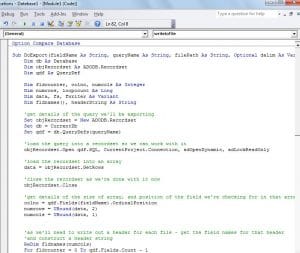 我在代码的大部分关键位置都添加了注释,但还有几点值得强调。
首先——我们将代码分成两个例程。 第一个检查当前记录是否应该写入我们当前正在处理的同一个文件,或者是否应该写入一个新文件。 第二个例程将整个记录的详细信息输出到文件中。 这样做是为了减少代码中的重复,否则您会在很多地方看到相同的循环。
其次——我正在使用“查询定义”来获取我们正在处理的查询的详细信息——如果你希望能够使它适应表,你会考虑交换它,以便它使用“表定义”。
话虽如此,我非常有信心这是一段您会经常参考并经常使用的代码!
作者简介:
Mitchell Pond 是一位数据恢复专家 DataNumen, Inc.,它是数据恢复技术领域的世界领先者,包括 修复 SQL Server data 和 excel 恢复软件产品。 欲了解更多信息,请访问 datanumen.com