
许多用户希望 Outlook 能够为邮件中的不同收件人自动选择不同的签名。 因此,本文将教授如何通过VBA 实现它。
默认情况下,Outlook 只允许您将不同的签名自动插入到新电子邮件、回复和转发中。 然而,很多人甚至希望Outlook能够为不同的收件人自动选择不同的签名。 不幸的是,Outlook 不提供这种直接的功能。 因此,您必须寻求其他方式,例如任何第三方加载项或 VBA 代码。 下面,就为大家揭晓一段VBA代码,让大家轻松实现。
为不同的收件人自动选择不同的签名
- 首先,您应该启动 Outlook 程序。
- 那你最好禁用自动插入签名功能。

- 首先,转到“文件”菜单并选择“选项”。
- 在“Outlook 选项”窗口中,切换到“邮件”选项卡。
- 然后找到并单击“签名”按钮。
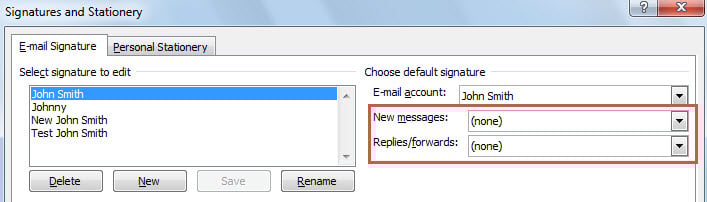
- 接下来在弹出的对话框中,在“新消息”和“回复/转发”中都设置“(无)”。
- 之后,单击一系列“确定”以保存更改。
- 之后,您可以返回 Outlook 主窗口并按“Alt + F11”键。
- 接下来,在“Microsoft Visual Basic for Applications”窗口中,找到并打开“ThisOutlookSession”项目。
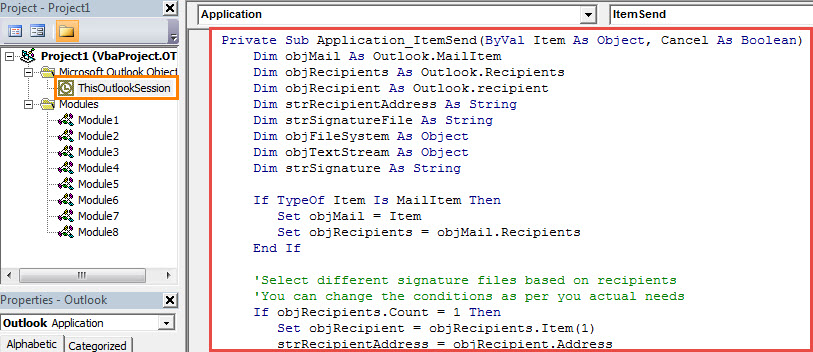
- 随后,将以下 VBA 代码复制并粘贴到该项目中。
Private Sub Application_ItemSend(ByVal Item As Object, Cancel As Boolean)
    Dim objMail As Outlook.MailItem
    Dim objRecipients As Outlook.Recipients
    Dim objRecipient As Outlook.recipient
    Dim strRecipientAddress As String
    Dim strSignatureFile As String
    Dim objFileSystem As Object
    Dim objTextStream As Object
    Dim strSignature As String

    If TypeOf Item Is MailItem Then
       Set objMail = Item
       Set objRecipients = objMail.Recipients
    End If

    'Select different signature files based on recipients
    'You can change the conditions as per you actual needs
    If objRecipients.Count = 1 Then
       Set objRecipient = objRecipients.Item(1)
       strRecipientAddress = objRecipient.Address
       If strRecipientAddress = "mandy@datanumen.com" Then
          strSignatureFile = CStr(Environ("USERPROFILE")) & "\AppData\Roaming\Microsoft\Signatures\Test John Smith.htm"
       ElseIf strRecipientAddress = "anne@datanumen.com" Or strRecipientAddress = "tony@datanumen.com" Then
          strSignatureFile = CStr(Environ("USERPROFILE")) & "\AppData\Roaming\Microsoft\Signatures\Johnny.htm"
       ElseIf strRecipientAddress = "abby@datanumen.com" Then
          strSignatureFile = CStr(Environ("USERPROFILE")) & "\AppData\Roaming\Microsoft\Signatures\New John Smith.htm"
       End If
    Else
       strSignatureFile = CStr(Environ("USERPROFILE")) & "\AppData\Roaming\Microsoft\Signatures\John Smith.htm"
    End If

    'Read the specific signature file
    Set objFileSystem = CreateObject("Scripting.FileSystemObject")
    Set objTextStream = objFileSystem.OpenTextFile(strSignatureFile)
    strSignature = objTextStream.ReadAll

    'Insert the signature to this email
    objMail.HTMLBody = objMail.HTMLBody & "<HTML><BODY><br>" & strSignature & "</br></HTML></BODY>"
End Sub
- 之后,您应该签署此代码。
- 稍后更改您的 Outlook 宏设置以允许签名的宏。
- 从现在开始,每次点击“发送”按钮发送邮件时,Outlook 都会识别收件人并自动在邮件正文末尾插入相应的签名。
在收到的电子邮件中寻找隐藏的恶意宏
现在病毒已经变得非常成熟和强大。 他们总是在电子邮件中将它们伪装成无害的东西。 因此,既然你打算在Outlook中使用宏,就应该提高对恶意宏的警惕。 否则,您的 PST 数据将处于风险之中。 如果 PST 被破坏,你会尽力 恢复 PST 数据。 在这种情况下,建议应用一个强大的工具,例如 DataNumen Outlook Repair.
作者简介:
Shirley Zhang 是一位数据恢复专家 DataNumen, Inc.,它是数据恢复技术领域的世界领先者,包括 修复 和 outlook 修复软件产品。 欲了解更多信息,请访问 datanumen.com