
一些用户希望 Outlook 在打开和阅读特定邮件时能够自动打开邮件正文中插入的超链接。 现在,在本文中,我们将分享一种可以轻松实现它的方法。
在打开和阅读特定邮件时,比如你老板的非常重要的邮件,如果邮件中包含多个超链接,你肯定会打开这些链接。 与手动打开嵌入的超链接相比,让 Outlook 自动打开它们肯定会方便得多。 在这里,我们将详细教您如何实现它。
阅读特定电子邮件时自动打开所有嵌入式超链接
- 首先,启动 Outlook 应用程序。
- 进入Outlook窗口后,按“Alt+F11”快捷键。
- 在随后的 VBA 编辑器窗口中,您需要启用“Microsoft VBScript 正则表达式”对象。 点击“工具”并选择“参考”来实现它。
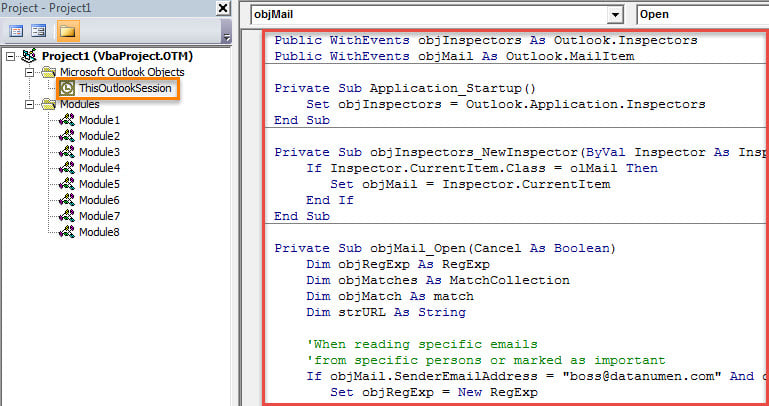
- 接下来,打开“ThisOutlookSession”项目。
- 然后,将以下 VBA 代码复制到该项目中。
Public WithEvents objInspectors As Outlook.Inspectors
Public WithEvents objMail As Outlook.MailItem

Private Sub Application_Startup()
 Set objInspectors = Outlook.Application.Inspectors
End Sub

Private Sub objInspectors_NewInspector(ByVal Inspector As Inspector)
 If Inspector.CurrentItem.Class = olMail Then
 Set objMail = Inspector.CurrentItem
 End If
End Sub

Private Sub objMail_Open(Cancel As Boolean)
    Dim objRegExp As RegExp
    Dim objMatches As MatchCollection
    Dim objMatch As match
    Dim strURL As String

    'When opening specific emails
    'From specific persons or marked as important
    If objMail.SenderEmailAddress = "boss@datanumen.com" And objMail.Importance = olImportanceHigh Then
       Set objRegExp = New RegExp

       With objRegExp
            .Pattern = "(([0-9a-z=\?:/\.&-^!#$;_])*)"
            .Global = True
            .IgnoreCase = True
       End With

       If objRegExp.Test(objMail.Body) Then

          Set objMatches = objRegExp.Execute(objMail.Body)
          For Each objMatch In objMatches
              strURL = objMatch.SubMatches(0)

              'Exclude hyperlinks of email addresses
              If InStr(strURL, "@") = 0 Then

                 'Get the Internet Explorer
                 'Change the path as per your own case
                 Shell (Chr(34) & "C:\Program Files\Internet Explorer\iexplore.exe" & Chr(34) & strURL)
                 DoEvents
              End If
          Next
       End If
    End If
End Sub
- 之后,您应该签署这个宏。 点击“工具”>“数字签名”即可完成。
- 接下来,退出当前窗口并更改您的 Outlook 宏设置。
- 最后,您需要重启 Outlook 以启用新的 VBA 项目。
- 从那时起,每次当你双击特定的电子邮件在它自己的消息窗口中阅读它时,Outlook 将自动识别电子邮件正文中的超链接并立即在 Internet Explorer 中打开它们。
从不绕过 Outlook 错误
也许您遇到过各种 Outlook 错误。 尽管消除 Outlook 问题很困难,但您也不能忽视它们。 累积的错误会导致 Outlook 出现严重的灾难,例如 PST 损坏。 因此,你最好准备一个强大的外部 展望修复 实用程序,例如 DataNumen Outlook Repair. 它可以最大限度地减少损坏,从而毫不费力地提取最大的 PST 数据。
作者简介:
Shirley Zhang 是一位数据恢复专家 DataNumen, Inc.,它是数据恢复技术领域的世界领先者,包括 损坏的中密度纤维板 和 outlook 修复软件产品。 欲了解更多信息,请访问 datanumen.com