
有些用户想要导入幻灯片 PowerPoint 将演示文稿添加到电子邮件中,而不是将演示文稿添加为电子邮件附件。 现在,在本文中,我们将介绍一种实现它的简便方法。
在微软 PowerPoint 应用程序,有一个本机功能支持用户快速发送 PowerPoint 作为电子邮件附件的演示文稿。 然而,大多数用户希望将演示文稿作为电子邮件发送,即将演示文稿的幻灯片导入到邮件的消息正文中。 现在 MS Outlook 和 PowerPoint 不提供这样的功能,可以用下面的VBA代码来实现。 至于如何运行VBA代码,可以参考文章——》如何在 Outlook 中运行 VBA 代码“。
导入幻灯片 PowerPoint 演示文稿到电子邮件
- 到tart 启动 Outlook 应用程序。
- 然后,通过“Alt + F11”键按钮访问 Outlook VBA 编辑器。
- 接下来,在新窗口中,启用“Microsoft PowerPoint 对象库rary” 参考文章 – “如何添加对象库rary VBA 中的引用“。
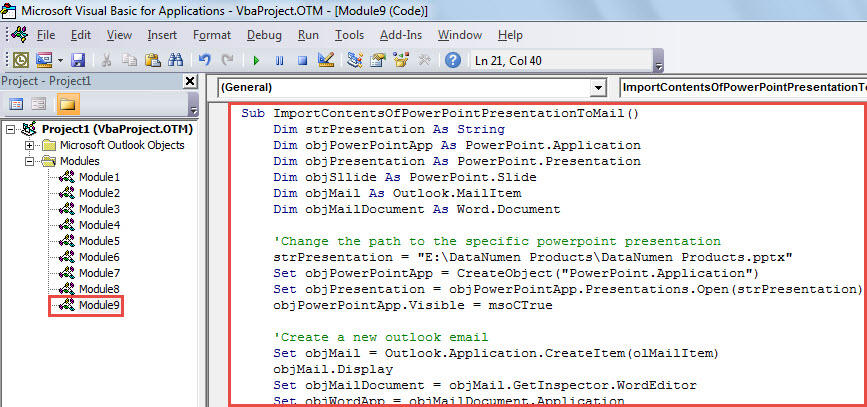
- 随后,将下面的 VBA 代码复制到项目或模块中。
Sub ImportSlidesOfPowerPointPresentationToMail()
    Dim strPresentation As String
    Dim objPowerPointApp As PowerPoint.Application
    Dim objPresentation As PowerPoint.Presentation
    Dim objSllide As PowerPoint.Slide
    Dim objMail As Outlook.MailItem
    Dim objMailDocument As Word.Document

    'Change the path to the specific PowerPoint presentation
    strPresentation = "E:\DataNumen Products\DataNumen Products.pptx"
    Set objPowerPointApp = CreateObject("PowerPoint.Application")
    Set objPresentation = objPowerPointApp.Presentations.Open(strPresentation)
    objPowerPointApp.Visible = msoCTrue

    'Create a new outlook email
    Set objMail = Outlook.Application.CreateItem(olMailItem)
    objMail.Display
    Set objMailDocument = objMail.GetInspector.WordEditor
    Set objWordApp = objMailDocument.Application

    'Copy the contents of presentation into the message body
    For Each objSlide In objPresentation.Slides
        objSlide.Copy
        objWordApp.Selection.Paste
    Next
End Sub
- 之后,您可以运行此宏。 按“F5”键按钮。
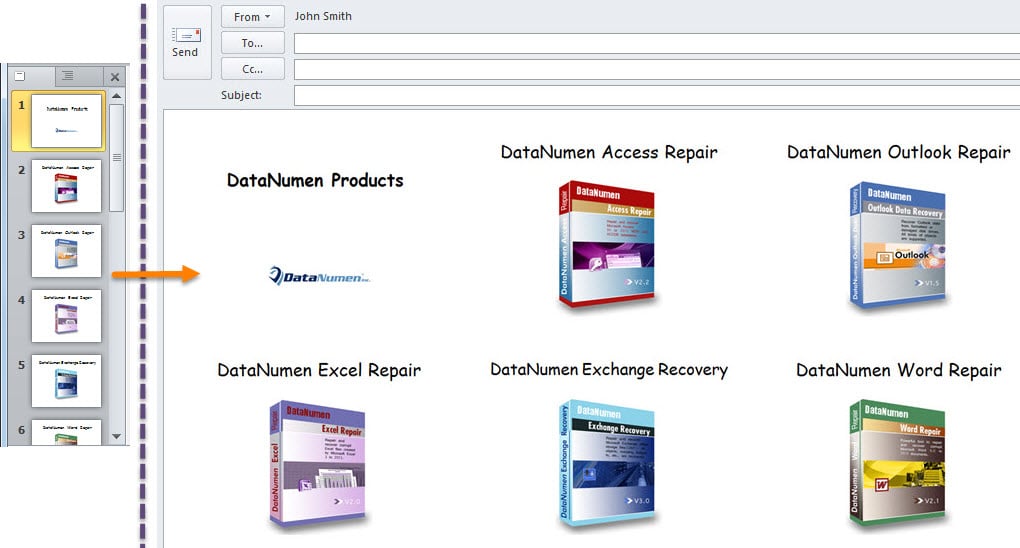
- 宏完成后,您将收到一封新电子邮件。 它包含源的所有幻灯片 PowerPoint 邮件正文中的演示,如下图所示:

留意 PST 腐败
许多用户抱怨 Outlook 问题和损坏。 老实说,很难预测或防止 Outlook 中出现此类问题。 您可以做的是采取充分的预防措施,以减少发生此类事件的可能性。 例如,您应该留意 PST 文件周围的所有潜在风险,包括恶意软件、病毒等。 此外,强烈建议您在附近获得出色的 PST 修复工具,例如 DataNumen Outlook Repair. 它能够帮助您从 损坏的 PST 毫不费力地归档。
作者简介:
Shirley Zhang 是一位数据恢复专家 DataNumen, Inc.,它是数据恢复技术领域的世界领先者,包括 损坏的中密度纤维板 和 outlook 修复软件产品。 欲了解更多信息,请访问 datanumen.com