
이 문서에서는 워크 시트 또는 차트를 정기적으로 새로 고치는 방법을 보여줍니다. 이 연습에서는 원본 데이터의 변경 사항을 반영하여 XNUMX 분마다 워크 시트를 새로 고치는 타이머를 작성합니다.
이 문서에서는 독자에게 개발자 리본이 표시되고 VBA 편집기에 익숙하다고 가정합니다. 그렇지 않은 경우 Google "Excel 개발자 탭"또는 "Excel 코드 창"을 사용하십시오.
이 연습에 사용 된 통합 문서의 예를 찾을 수 있습니다. 여기에서 확인하세요.
동적보고의 용도는 다음과 같습니다.
- 귀사 전화 시스템에 제공된 전용 데이터베이스를 읽어 통화를 분석합니다.
- 상품이나 추첨을 위해 15 분마다 임의의 숫자를 생성합니다.
- 특정 수준이 충족되면 로컬 데이터베이스에서 이메일을 자동으로 보냅니다. (여기서 타이머는 달성 한 레벨에 따라 프로세스를 실행할지 여부를 결정합니다).
또는 우리가 사용할 것 :
- 인터넷에서 최신 USD / EUR 환율을 표시합니다.
데이터는 Yahoo Finance 웹 사이트 XNUMX 분마다. 성공적으로 테스트되면 더 긴 처리 간격으로 대체해야합니다.
인터페이스
새 통합 문서를 엽니 다.
첫 번째 시트의 이름을 "디스플레이"로 지정합니다. 테이블 D8 ~ E11이 웹에서 채워 지므로 값이나 행 머리글을 입력 할 필요가 없습니다. 나머지는 선택 사항입니다.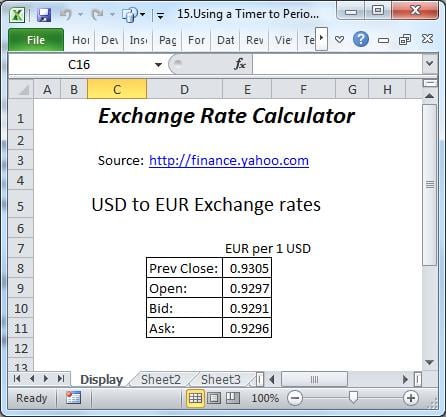
코드
VBA 코드 창을 열고 모듈을 삽입하십시오. 아래 코드를 모듈에 복사하십시오.
Auto_Open 이벤트는 통합 문서가 열릴 때 타이머를 시작하고 통합 문서가 닫힐 때 타이머를 중지합니다. 단, 개발 중에 개발자가 코드를 중단하는 경우는 예외입니다.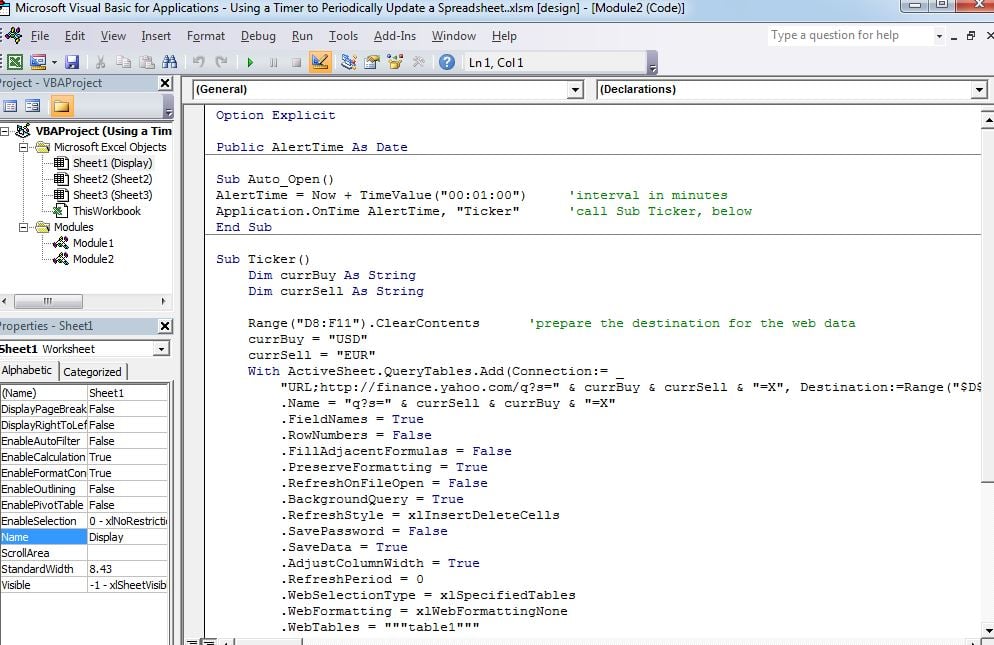
Sub Auto_Open()
AlertTime = Now + TimeValue("00:01:00") 'interval in minutes
Application.OnTime AlertTime, "Ticker"      'call Sub Ticker, below
End Sub

Sub Ticker()
    Dim currBuy As String
    Dim currSell As String

    Range("D8:F11").ClearContents            'prepare the destination for the web data
    currBuy = "USD"
    currSell = "EUR"
    With ActiveSheet.QueryTables.Add(Connection:= _
        "URL;http://finance.yahoo.com/q?s=" & currBuy & currSell & "=X", Destination:=Range("$D$8"))
        .Name = "q?s=" & currSell & currBuy & "=X"
        .FieldNames = True
        .RowNumbers = False
        .FillAdjacentFormulas = False
        .PreserveFormatting = True
        .RefreshOnFileOpen = False
        .BackgroundQuery = True
        .RefreshStyle = xlInsertDeleteCells
        .SavePassword = False
        .SaveData = True
        .AdjustColumnWidth = True
        .RefreshPeriod = 0
        .WebSelectionType = xlSpecifiedTables
        .WebFormatting = xlWebFormattingNone
        .WebTables = """table1"""
        .WebPreFormattedTextToColumns = True
        .WebConsecutiveDelimitersAsOne = True
        .WebSingleBlockTextImport = False
        .WebDisableDateRecognition = False
        .WebDisableRedirections = False
        .Refresh BackgroundQuery:=False
    End With
    AlertTime = Now + TimeValue("00:01:00") ‘move trigger on a minute
    Application.OnTime AlertTime, "Ticker"
End Sub
결과
매 n 분마다 "디스플레이"시트의 표가 Yahoo 웹 사이트에서 업데이트됩니다. 보다 복잡한 데이터 연결은 Microsoft 웹 사이트를 참조하십시오.
손상된 통합 문서 복구
엑셀은 예기치 않은 순간에 충돌하는 경우가 있는데, 이는 아마도 당시의 리소스 부족과 관련이 있을 것입니다. 이러한 경우 원본 파일이 복구 불가능하게 손상되어 다시 열리지 않을 수 있습니다. 정기적인 백업이 없는 경우, 파일을 복구할 수 있는 도구가 필요합니다. 손상된 엑셀 파일은 매우 중요합니다.
저자 소개 :
Felix Hooker는 데이터 복구 전문가입니다. DataNumen, Inc.는 다음과 같은 데이터 복구 기술 분야의 세계적 리더입니다. rar 수정 및 SQL 복구 소프트웨어 제품. 자세한 내용은 WWW.datanumen.COM