
엑셀을 사용하면 손쉽게 자신만의 WHOIS 조회 도구를 만들 수 있습니다. 이 도구는 웹사이트 개발자나 호스팅 업체가 도메인을 잠재 고객으로 전환하는 데 도움이 됩니다. 이 도구는 다양한 도메인을 소유한 개인이나 조직의 이름을 표시합니다.
다운로드
소프트웨어를 최대한 빨리 사용하고 싶으시다면 다음 방법을 이용하실 수 있습니다.
그렇지 않고 DIY를 원한다면 아래 내용을 읽을 수 있습니다.
GUI를 준비합시다
이 도구의 GUI는 매우 간단합니다. 이미지에서 볼 수 있듯이 필요한 머리글과 열이있는 시트 하나만 있으면 충분합니다. 이 예에서 지정된 도메인에 대해 도구는 등록자 이름 및 등록자 조직을 스크 레이 핑합니다. 사용자가 매크로를 실행할 수 있도록하려면 동일한 시트에 단추를 만듭니다.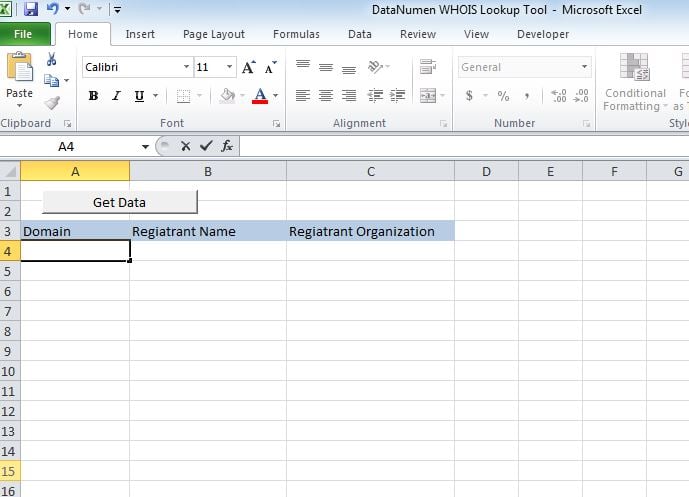
기능적으로 만들자
스크립트를 새 모듈에 붙여넣고 Sheet1에서 만든 버튼에 하위 "whoismacor"를 첨부합니다.
테스트 해보자
A 열에 도메인을 추가하고 매크로를 실행합니다. 값은 각 열에 표시됩니다.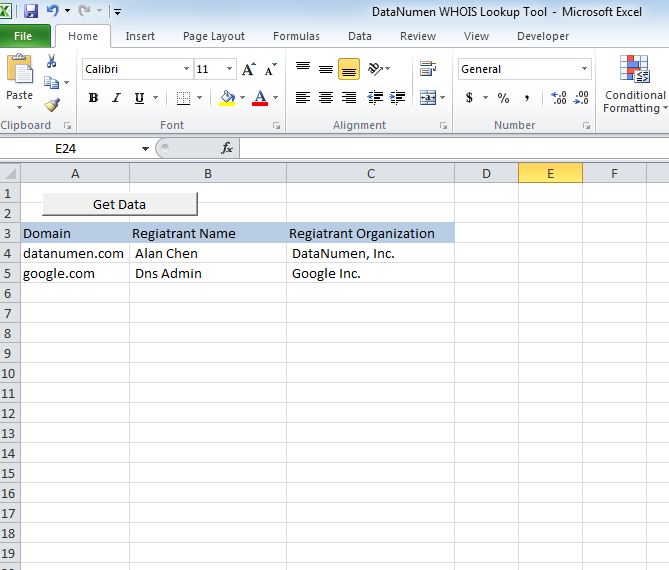
수정
현재이 도구는 등록자 이름과 등록자 조직이라는 2 개의 헤더를 보여줍니다. 다음 헤더 중 하나를 가져 오도록 도구를 사용자 정의 할 수 있습니다.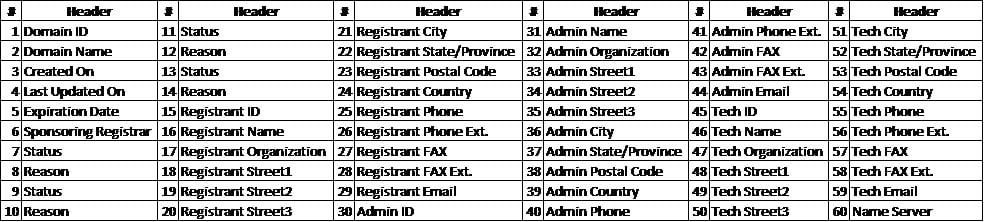
xlsm 파일 복구
이 도구를 열거 나 저장하는 데 문제가있는 경우 큰 변경 사항이 있습니다. 손상된 Excel 파일 그리고 그것을 사용하기 전에 그것을 고쳐야합니다.
스크립트
Sub whoismacro()
    Dim v_lrow As Long
    Application.DisplayStatusBar = True
    v_lrow = Sheets("whois").Range("A" & Rows.Count).End(xlUp).Row
    Dim r As Long
    Dim v_string As String
    For r = 4 To v_lrow
        Application.StatusBar = "Macro is running... Now fetching Registrant Name and Organization info for domain at Row : " & r & " /// Total Rows : " & v_lrow
        Sheets("whois").Range("B" & r).Value = WhoIsName(Sheets("whois").Range("A" & r).Value)
        Sheets("whois").Range("C" & r).Value = WhoIsorganization(Sheets("whois").Range("A" & r).Value)
    Next r
    Application.StatusBar = "Ready"
End Sub

Function WhoIsName(v_string As String) As String
    Application.DisplayStatusBar = True
    v_string = Replace(v_string, "http://www.", "")
    v_string = Replace(v_string, "https://www.", "")
    v_string = Replace(v_string, "http://", "")
    v_string = Replace(v_string, "https://", "")
    Dim I As Long
    Dim browobj As Object
    Dim obj1 As Object
    Dim obj2 As Object
    Dim obj3 As Object
    Dim v_website As String
    Dim ws As Worksheet
    Dim rng As Range
    Dim tbl As Object
    Dim rw As Object
    Dim cl As Object
    Dim tabno As Long
    Dim nextrow As Long
    Dim URl As String
    Dim lastRow As Long
    Dim xmlobj As Object
    Dim htmobj As Object
    Dim divobj As Object
    Dim objH3 As Object
    Dim linkobj As Object
    Dim vv_startrow As Integer
    Dim vv_lastrow As Integer
    Application.DisplayAlerts = False
    Application.DisplayStatusBar = True
    URl = "https://www.whois.com/whois/" & v_string
    Set xmlobj = CreateObject("MSXML2.XMLHTTP")
    xmlobj.Open "GET", URl, False
    xmlobj.setRequestHeader "Content-Type", "text/xml"
    xmlobj.setRequestHeader "Cache-Control", "no-cache"
    xmlobj.send
    Set htmobj = CreateObject("htmlfile")
    htmobj.body.innerHTML = xmlobj.responseText
    x = InStr(htmobj.body.innertext, "Registrant Name:")
    y = InStr(x, htmobj.body.innertext, Chr(10))
    WhoIsName = Replace(Mid(htmobj.body.innertext, x, y - x), "Registrant Name:", "")
End Function

Function WhoIsorganization(v_string As String) As String
    Application.DisplayStatusBar = True
    v_string = Replace(v_string, "http://www.", "")
    v_string = Replace(v_string, "https://www.", "")
    v_string = Replace(v_string, "http://", "")
    v_string = Replace(v_string, "https://", "")
    Dim I As Long
    Dim browobj As Object
    Dim obj1 As Object
    Dim obj2 As Object
    Dim obj3 As Object
    Dim v_website As String
    Dim ws As Worksheet
    Dim rng As Range
    Dim tbl As Object
    Dim rw As Object
    Dim cl As Object
    Dim tabno As Long
    Dim nextrow As Long
    Dim URl As String
    Dim lastRow As Long
    Dim xmlobj As Object
    Dim htmobj As Object
    Dim divobj As Object
    Dim objH3 As Object
    Dim linkobj As Object
    Dim vv_startrow As Integer
    Dim vv_lastrow As Integer
    Application.DisplayAlerts = False
    Application.DisplayStatusBar = True
    URl = "https://www.whois.com/whois/" & v_string
    Set xmlobj = CreateObject("MSXML2.XMLHTTP")
    xmlobj.Open "GET", URl, False
    xmlobj.setRequestHeader "Content-Type", "text/xml"
    xmlobj.setRequestHeader "Cache-Control", "no-cache"
    xmlobj.send
    Set htmobj = CreateObject("htmlfile")
    htmobj.body.innerHTML = xmlobj.responseText
    x = InStr(htmobj.body.innertext, "Registrant Organization:")
    Debug.Print x
    y = InStr(x, htmobj.body.innertext, Chr(10))
    Debug.Print y
    WhoIsorganization = Replace(Mid(htmobj.body.innertext, x, y - x), "Registrant Organization:", "")
End Function
저자 소개 :
Nick Vipond는 데이터 복구 전문가입니다. DataNumen, Inc.는 다음과 같은 데이터 복구 기술 분야의 세계적 리더입니다. docx 문제 복구 그리고 전망 회복 소프트웨어 제품. 자세한 내용은 WWW.datanumen.COM