
많은 사용자는 Outlook이 첨부 파일 이름에 따라 수신 전자 메일을 특정 메일 폴더로 자동으로 이동하고 보관할 수 있기를 바랍니다. 따라서이 기사에서는 Outlook VBA를 사용하는 데 도움이되는 빠른 방법을 제공합니다.
첨부 파일의 파일 이름에 따라 수신 전자 메일을 특정 폴더로 자동 이동하려면 먼저 Outlook 규칙을 사용하는 것이 좋습니다. 그러나 마침내 Outlook 규칙에 첨부 파일 파일 이름을 확인하는 기능이 없다는 것을 알게 될 것입니다. 따라서 실제로 실현하고 싶다면 타사 추가 기능 또는 Outlook VBA를 통해 다른 방법을 사용해야합니다. 그래서 여기서 우리는 VBA로 그것을 달성하는 방법을 알려줄 것입니다. 자세한 작업과 구체적인 VBA 코드를 얻으려면 계속 읽으십시오.

첨부 파일을 기반으로 수신 이메일을 특정 폴더로 자동 이동
- 우선 평소처럼 Outlook 프로그램을 실행하세요.
- 그런 다음 "Alt + F11"키 버튼을 눌러 VBA 편집기에 액세스합니다.
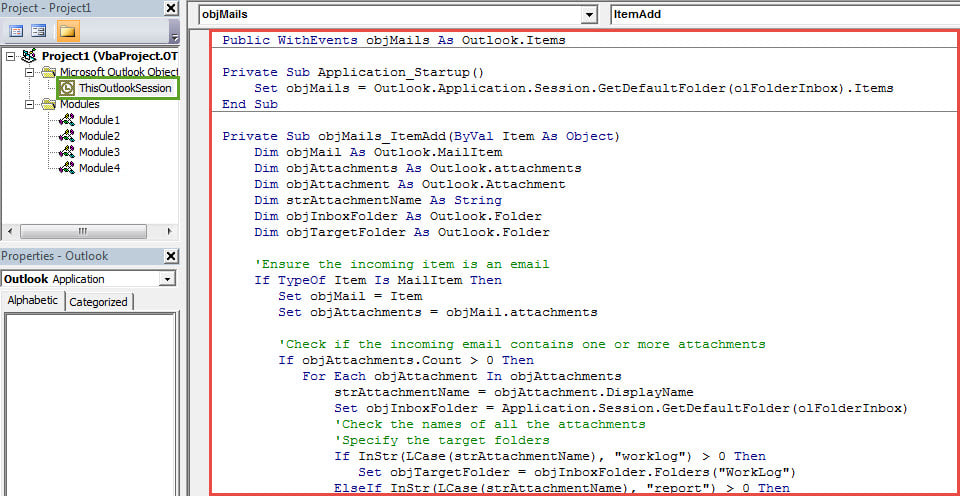
- 다음 "Microsoft Visual Basic for Applications"창에서 왼쪽에있는 "ThisOutlookSession"프로젝트를 찾아 두 번 클릭 할 수 있습니다.
- 열린 "ThisOutlookSession"프로젝트 창에서 다음 VBA 코드를 복사하여 붙여 넣습니다.
Public WithEvents objMails As Outlook.Items

Private Sub Application_Startup()
 Set objMails = Outlook.Application.Session.GetDefaultFolder(olFolderInbox).Items
End Sub

Private Sub objMails_ItemAdd(ByVal Item As Object)
    Dim objMail As Outlook.MailItem
    Dim objAttachments As Outlook.attachments
    Dim objAttachment As Outlook.Attachment
    Dim strAttachmentName As String
    Dim objInboxFolder As Outlook.Folder
    Dim objTargetFolder As Outlook.Folder

    'Ensure the incoming item is an email
    If TypeOf Item Is MailItem Then
       Set objMail = Item
       Set objAttachments = objMail.attachments

       'Check if the incoming email contains one or more attachments
       If objAttachments.Count > 0 Then
          For Each objAttachment In objAttachments
              strAttachmentName = objAttachment.DisplayName
              Set objInboxFolder = Application.Session.GetDefaultFolder(olFolderInbox)
              'Check the names of all the attachments
              'Specify the target folders
              If InStr(LCase(strAttachmentName), "worklog") > 0 Then
                 Set objTargetFolder = objInboxFolder.Folders("WorkLog")
              ElseIf InStr(LCase(strAttachmentName), "report") > 0 Then
                 Set objTargetFolder = objInboxFolder.Folders("Report")
              ElseIf InStr(LCase(strAttachmentName), "statistics") > 0 Then
                 Set objTargetFolder = objInboxFolder.Folders("Statistics")
              End If
         Next
         'Move the email to specific folder
          objMail.Move objTargetFolder
       End If
    End If
End Sub
- 그런 다음 새 VBA 프로젝트에 디지털 서명해야합니다.
- 첫째, 내장 도구 인 VBA 프로젝트 용 디지털 인증서를 사용하여 개인 인증서를 만들 수 있습니다.
- 그런 다음 VBA 편집기에서 도구 모음에서 "도구"> "디지털 서명"을 클릭합니다.
- 다음으로 화면의 지시에 따라 서명하십시오.
- 그런 다음 VBA 편집기를 종료하고 Outlook 매크로 보안을 낮음으로 변경할 수 있습니다.
- 나중에 Outlook을 다시 시작하여 새 VBA 프로젝트를 활성화해야 합니다.
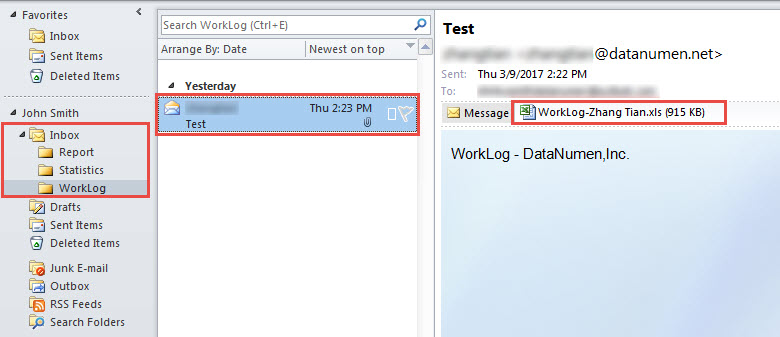
- 결국 Outlook은 이제부터 모든 수신 전자 메일의 첨부 파일 파일 이름을 자동으로 확인하고 특정 전자 메일을 특정 폴더로 이동합니다.

PST 데이터 보호
Outlook이 손상되기 쉽다는 것은 거의 기정사실입니다. 따라서 PST 데이터 손상을 방지하는 것은 매우 어려운 일입니다. 하지만 몇 가지 규칙과 팁을 활용할 수 있습니다. 예를 들어, PST 데이터 손실을 방지하려면 정기적으로 데이터를 백업하는 것이 좋습니다. 또한 Outlook 오류 발생 시 즉시 복구할 수 있도록 경험이 풍부한 전문가를 미리 준비해 두는 것도 도움이 됩니다. PST 수정 도구, 같은 DataNumen Outlook Repair.
저자 소개 :
Shirley Zhang은 데이터 복구 전문가입니다. DataNumen, Inc.는 다음과 같은 데이터 복구 기술 분야의 세계적 리더입니다. SQL Server 회복 및 전망 수리 소프트웨어 제품. 자세한 내용은 WWW.datanumen.COM