
一部のユーザーは、のスライドをインポートしたい PowerPoint プレゼンテーションを電子メールの添付ファイルとして追加するのではなく、電子メールに送信します。 今回はそれを実現する便利な方法を紹介します。
マイクロソフトで PowerPoint アプリケーションには、ユーザーがすばやく送信できるようにサポートするネイティブ機能があります PowerPoint 電子メールの添付ファイルとしてのプレゼンテーション。 ただし、大多数のユーザーは、プレゼンテーションを電子メールとして送信すること、つまり、プレゼンテーションのスライドをメールのメッセージ本文にインポートすることを希望します。 これで、MS Outlook と PowerPoint このような関数を提供しない場合は、次の VBA コードを使用してそれを実現できます。 VBA コードを実行する方法については、記事「」を参照してください。OutlookでVBAコードを実行する方法"。
のスライドをインポートする PowerPoint 電子メールでのプレゼンテーション
- まず、Outlookアプリケーションを起動してください。
- 次に、「Alt + F11」キー ボタンで Outlook VBA エディタにアクセスします。
- 次に、新しいウィンドウで「Microsoft」を有効にします。 PowerPoint 記事「オブジェクトライブラリ」を参照。VBAでオブジェクトライブラリ参照を追加する方法"。
- 次に、以下の VBA コードをプロジェクトまたはモジュールにコピーします。
Sub ImportSlidesOfPowerPointPresentationToMail()
    Dim strPresentation As String
    Dim objPowerPointApp As PowerPoint.Application
    Dim objPresentation As PowerPoint.Presentation
    Dim objSllide As PowerPoint.Slide
    Dim objMail As Outlook.MailItem
    Dim objMailDocument As Word.Document

    'Change the path to the specific PowerPoint presentation
    strPresentation = "E:\DataNumen Products\DataNumen Products.pptx"
    Set objPowerPointApp = CreateObject("PowerPoint.Application")
    Set objPresentation = objPowerPointApp.Presentations.Open(strPresentation)
    objPowerPointApp.Visible = msoCTrue

    'Create a new outlook email
    Set objMail = Outlook.Application.CreateItem(olMailItem)
    objMail.Display
    Set objMailDocument = objMail.GetInspector.WordEditor
    Set objWordApp = objMailDocument.Application

    'Copy the contents of presentation into the message body
    For Each objSlide In objPresentation.Slides
        objSlide.Copy
        objWordApp.Selection.Paste
    Next
End Sub
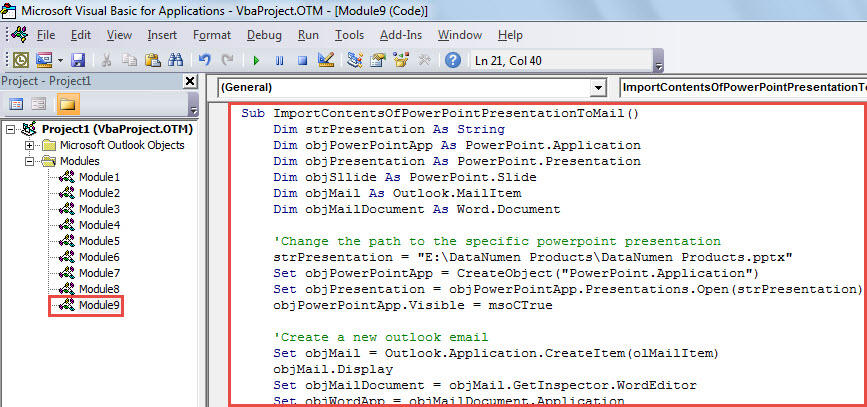
- その後、このマクロを実行できます。 「F5」キーボタンを押します。
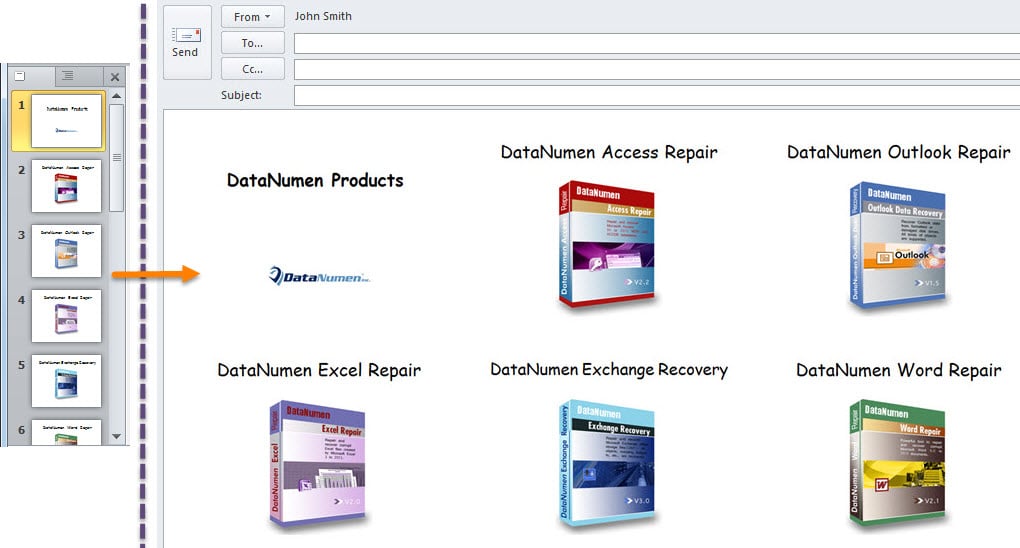
- マクロが完了すると、新しいメールが届きます。 ソースのすべてのスライドが含まれています PowerPoint 次のスクリーンショットのような、電子メール本文のプレゼンテーション。

PST の破損に注意してください
多くのユーザーが Outlook の問題や破損について多くの苦情を述べています。 正直に言うと、Outlook でこのような問題を予測したり防ぐことは困難です。 できることは、そのような事態が発生する可能性を減らすために適切な予防措置を講じることです。 たとえば、マルウェア、ウイルスなど、PST ファイルに関するあらゆる潜在的なリスクに注意を払う必要があります。 さらに、近くにある優れた PST 修正ツールを入手することを強くお勧めします。 DataNumen Outlook Repair。 からデータを取り戻すのに役立ちます 破損したPST 簡単にファイルできます。
著者紹介:
Shirley Zhangは、のデータ復旧の専門家です。 DataNumen、Inc。は、以下を含むデータ復旧技術の世界的リーダーです。 破損したmdf と見通し修理ソフトウェア製品。 詳細については、次のWebサイトをご覧ください。 WWW。datanumen.com