
Avec Excel, vous pouvez facilement créer votre propre outil de recherche Whois. Cet outil aidera les développeurs web et les hébergeurs à convertir les noms de domaine en prospects. Il affiche le nom des personnes ou organisations propriétaires de différents domaines.
Téléchargez
Si vous souhaitez commencer à utiliser le logiciel dès que possible, vous pouvez :
Téléchargez le logiciel maintenant
Sinon, si vous voulez bricoler, vous pouvez lire le contenu ci-dessous.
Préparons l'interface graphique
L'interface graphique de cet outil est très simple. Comme le montre l'image, une seule feuille avec les en-têtes et les colonnes nécessaires suffit. Dans cet exemple, pour un domaine donné, l'outil récupère le nom du titulaire et l'organisation du titulaire. Pour permettre aux utilisateurs d'exécuter la macro, créez un bouton sur la même feuille.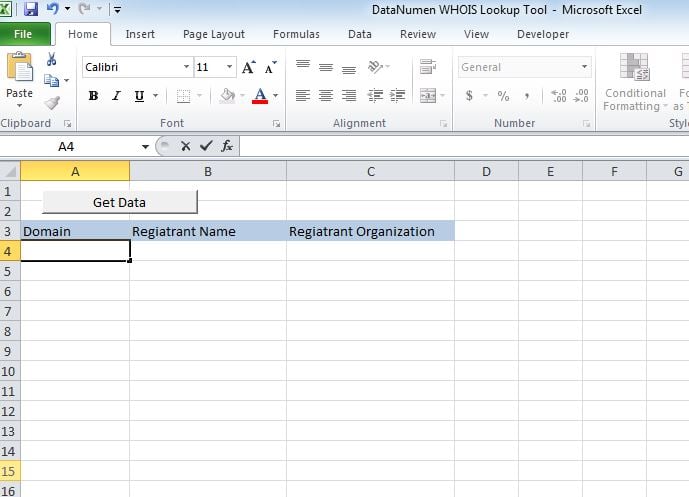
Rendons-le fonctionnel
Collez le script dans un nouveau module et attachez le sous "whoismacor" au bouton que nous avons créé sur Sheet1.
Testons-le
Ajoutez des domaines dans la colonne A et exécutez la macro. Les valeurs seront affichées sur les colonnes respectives.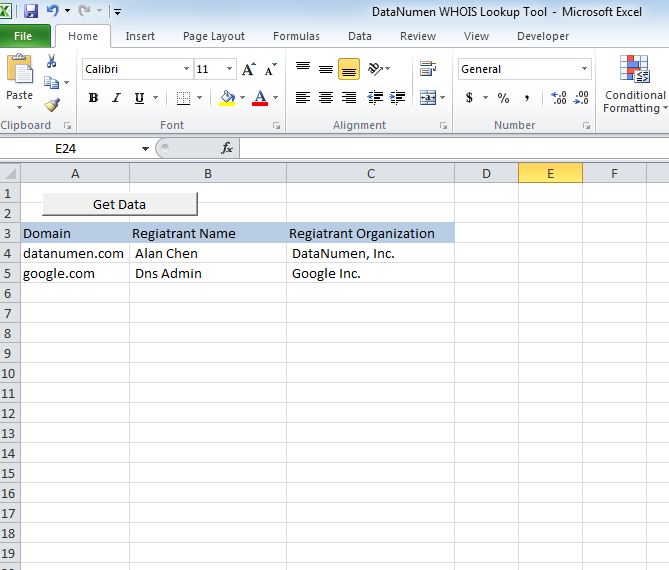
Modifiez-le
À partir de maintenant, l'outil affiche 2 en-têtes, à savoir le nom du titulaire et l'organisation du titulaire. Vous pouvez personnaliser l'outil pour récupérer l'un des en-têtes suivants.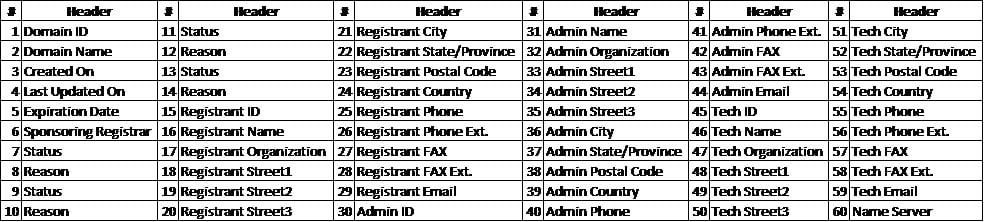
Récupérer le fichier xlsm
Si vous rencontrez des difficultés pour ouvrir ou enregistrer cet outil, il y a des changements importants que vous avez un fichier excel corrompu et vous devez le réparer avant de l'utiliser.
scénario
Sub whoismacro()
    Dim v_lrow As Long
    Application.DisplayStatusBar = True
    v_lrow = Sheets("whois").Range("A" & Rows.Count).End(xlUp).Row
    Dim r As Long
    Dim v_string As String
    For r = 4 To v_lrow
        Application.StatusBar = "Macro is running... Now fetching Registrant Name and Organization info for domain at Row : " & r & " /// Total Rows : " & v_lrow
        Sheets("whois").Range("B" & r).Value = WhoIsName(Sheets("whois").Range("A" & r).Value)
        Sheets("whois").Range("C" & r).Value = WhoIsorganization(Sheets("whois").Range("A" & r).Value)
    Next r
    Application.StatusBar = "Ready"
End Sub

Function WhoIsName(v_string As String) As String
    Application.DisplayStatusBar = True
    v_string = Replace(v_string, "http://www.", "")
    v_string = Replace(v_string, "https://www.", "")
    v_string = Replace(v_string, "http://", "")
    v_string = Replace(v_string, "https://", "")
    Dim I As Long
    Dim browobj As Object
    Dim obj1 As Object
    Dim obj2 As Object
    Dim obj3 As Object
    Dim v_website As String
    Dim ws As Worksheet
    Dim rng As Range
    Dim tbl As Object
    Dim rw As Object
    Dim cl As Object
    Dim tabno As Long
    Dim nextrow As Long
    Dim URl As String
    Dim lastRow As Long
    Dim xmlobj As Object
    Dim htmobj As Object
    Dim divobj As Object
    Dim objH3 As Object
    Dim linkobj As Object
    Dim vv_startrow As Integer
    Dim vv_lastrow As Integer
    Application.DisplayAlerts = False
    Application.DisplayStatusBar = True
    URl = "https://www.whois.com/whois/" & v_string
    Set xmlobj = CreateObject("MSXML2.XMLHTTP")
    xmlobj.Open "GET", URl, False
    xmlobj.setRequestHeader "Content-Type", "text/xml"
    xmlobj.setRequestHeader "Cache-Control", "no-cache"
    xmlobj.send
    Set htmobj = CreateObject("htmlfile")
    htmobj.body.innerHTML = xmlobj.responseText
    x = InStr(htmobj.body.innertext, "Registrant Name:")
    y = InStr(x, htmobj.body.innertext, Chr(10))
    WhoIsName = Replace(Mid(htmobj.body.innertext, x, y - x), "Registrant Name:", "")
End Function

Function WhoIsorganization(v_string As String) As String
    Application.DisplayStatusBar = True
    v_string = Replace(v_string, "http://www.", "")
    v_string = Replace(v_string, "https://www.", "")
    v_string = Replace(v_string, "http://", "")
    v_string = Replace(v_string, "https://", "")
    Dim I As Long
    Dim browobj As Object
    Dim obj1 As Object
    Dim obj2 As Object
    Dim obj3 As Object
    Dim v_website As String
    Dim ws As Worksheet
    Dim rng As Range
    Dim tbl As Object
    Dim rw As Object
    Dim cl As Object
    Dim tabno As Long
    Dim nextrow As Long
    Dim URl As String
    Dim lastRow As Long
    Dim xmlobj As Object
    Dim htmobj As Object
    Dim divobj As Object
    Dim objH3 As Object
    Dim linkobj As Object
    Dim vv_startrow As Integer
    Dim vv_lastrow As Integer
    Application.DisplayAlerts = False
    Application.DisplayStatusBar = True
    URl = "https://www.whois.com/whois/" & v_string
    Set xmlobj = CreateObject("MSXML2.XMLHTTP")
    xmlobj.Open "GET", URl, False
    xmlobj.setRequestHeader "Content-Type", "text/xml"
    xmlobj.setRequestHeader "Cache-Control", "no-cache"
    xmlobj.send
    Set htmobj = CreateObject("htmlfile")
    htmobj.body.innerHTML = xmlobj.responseText
    x = InStr(htmobj.body.innertext, "Registrant Organization:")
    Debug.Print x
    y = InStr(x, htmobj.body.innertext, Chr(10))
    Debug.Print y
    WhoIsorganization = Replace(Mid(htmobj.body.innertext, x, y - x), "Registrant Organization:", "")
End Function
Introduction de l'auteur:
Nick Vipond est un expert en récupération de données dans DataNumen, Inc., qui est le leader mondial des technologies de récupération de données, y compris réparer le problème docx et produits logiciels de récupération Outlook. Pour plus d'informations, visitez www.datanumen.com