
ほとんどのユーザーにとって、週末に予定されている予定は通常プライベートなものです。そのため、Outlookでそのような予定を自動的にプライベートとしてマークして表示したいと考えるユーザーが多いでしょう。この記事では、スクリプトを使ってこれを実現する方法をご紹介します。
ビジネスとプライベートの予定をより簡単に区別できるように、Outlookではユーザーが予定をプライベートとしてマークすることができます。 このように、私的な予定なしでカレンダーを印刷することは非常に便利で簡単であることがわかります。 この状況では、Outlookが特定の予定を自動的に認識し、非公開としてマークすることを希望する場合があります。 たとえば、通常、週末の予定は非公開であるため、Outlookでそれらを非公開として自動的にマークする必要があります。 以下、それを実現するためのご案内をさせていただきます。
週末の予定をプライベートとして自動マーク
- 最初に、「次のようにOutlookVBAエディターを起動します。OutlookでVBAコードを実行する方法"
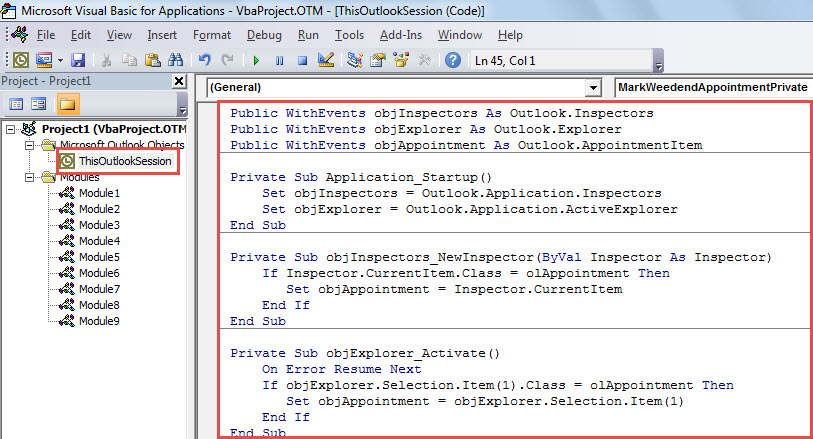
- 次に、「Microsoft Visual Basic for Applications」ウィンドウで、次のコードを「ThisOutlookSession」プロジェクトに配置します。
Public WithEvents objInspectors As Outlook.Inspectors
Public WithEvents objExplorer As Outlook.Explorer
Public WithEvents objAppointment As Outlook.AppointmentItem

Private Sub Application_Startup()
    Set objInspectors = Outlook.Application.Inspectors
    Set objExplorer = Outlook.Application.ActiveExplorer
End Sub

Private Sub objInspectors_NewInspector(ByVal Inspector As Inspector)
    If Inspector.CurrentItem.Class = olAppointment Then
       Set objAppointment = Inspector.CurrentItem
    End If
End Sub

Private Sub objExplorer_Activate()
    On Error Resume Next
    If objExplorer.Selection.Item(1).Class = olAppointment Then
       Set objAppointment = objExplorer.Selection.Item(1)
    End If
End Sub

Private Sub objAppointment_Open(Cancel As Boolean)
    Call MarkWeedendAppointmentPrivate(objAppointment)
End Sub

Private Sub objAppointment_PropertyChange(ByVal Name As String)
    If Name = "Start" Or Name = "End" Then
       Call MarkWeedendAppointmentPrivate(objAppointment)
    End If
End Sub

Private Sub MarkWeedendAppointmentPrivate(ByVal objAppointment As Outlook.AppointmentItem)
    Dim dStartDate As Date

    dStartDate = Format(objAppointment.Start, "Short Date")

    'If the appointment start falls on weekend
    Select Case Weekday(dStartDate)
           Case 7, 1
                'Mark it private
                objAppointment.Sensitivity = olPrivate
    End Select
End Sub
- その後、Outlookを再起動してマクロを有効にしてください。
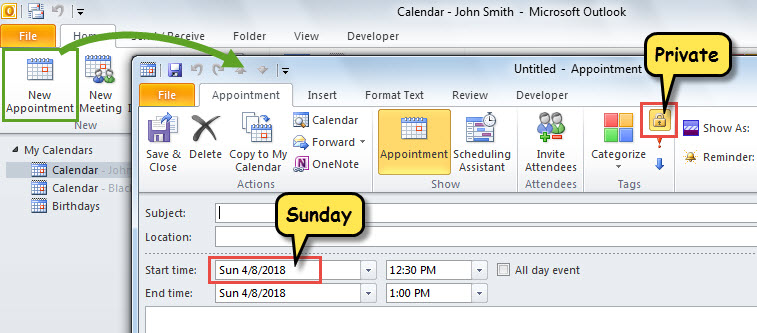
- これ以降、新しい予定を作成したり、既存の予定を週末に変更したりするたびに、Outlookはそれを非公開として自動的にマークします。

厄介なOutlookの問題を解決する
Outlookの処理中に、予期しないアプリケーションのフリーズ、ポップアップエラーメッセージなどの問題が発生した可能性があります。 それらに苦しむとき、あなたは心配するでしょう。 落ち着いてください! パニックは何の役にも立たないが、事件を悪化させる。 まず、通常どおりPSTファイルにアクセスできるかどうかを確認できます。 もしそうなら、あなたはPSTファイルを修復する必要があります。これは 受信トレイ修復ツール またはのようなより強力な外部ツール DataNumen Outlook Repair.
著者紹介:
Shirley Zhangは、のデータ復旧の専門家です。 DataNumen、Inc。は、以下を含むデータ復旧技術の世界的リーダーです。 mdf修理 と見通し修理ソフトウェア製品。 詳細については、次のWebサイトをご覧ください。 WWW。datanumen.com