
1. Introduction
1.1 What is Scanpst.exe
Scanpst.exe, commonly known as the Microsoft Outlook Inbox Repair Tool, is a built-in utility designed to diagnose and repair corrupted PST (Personal Storage Table) files in Microsoft Outlook. Furthermore, this essential tool comes bundled with all versions of Microsoft Outlook and therefore serves as the first line of defense when users encounter issues with their Outlook data files.
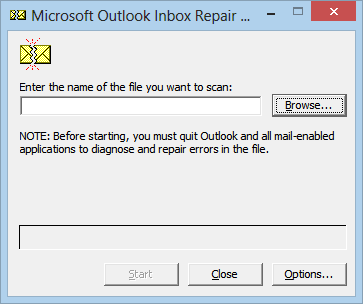
1.2 Why it’s important for Outlook users
The importance of Scanpst.exe cannot be overstated for Outlook users for several reasons:
- First, it provides a free, official solution for repairing corrupted PST files
- Additionally, it helps recover inaccessible emails, contacts, and other Outlook items
- Moreover, it prevents data loss due to file corruption
- Furthermore, it maintains the integrity of Outlook data files
- Finally, it serves as an immediate troubleshooting tool for common Outlook issues
1.3 When you need to use it
Users should consider running Scanpst.exe when encountering the following situations:
- Outlook crashes or freezes when attempting to open
- Error messages appear when accessing specific folders
- Missing or incomplete emails and other items
- Unexpected Outlook behavior or performance issues
- After improper Outlook shutdowns or system crashes
- When receiving “The file xxxx.pst is not a personal folders file” or other error messages.

While Scanpst.exe is primarily a repair tool, nevertheless it can also be used proactively as part of regular maintenance to ensure the health of Outlook data files. As a result, understanding when and how to use this tool effectively can save users from potential data loss and consequently minimize disruptions to their email communications.
2. Where is Scanpst.exe
2.1 Default Scanpst locations by Windows & Outlook versions
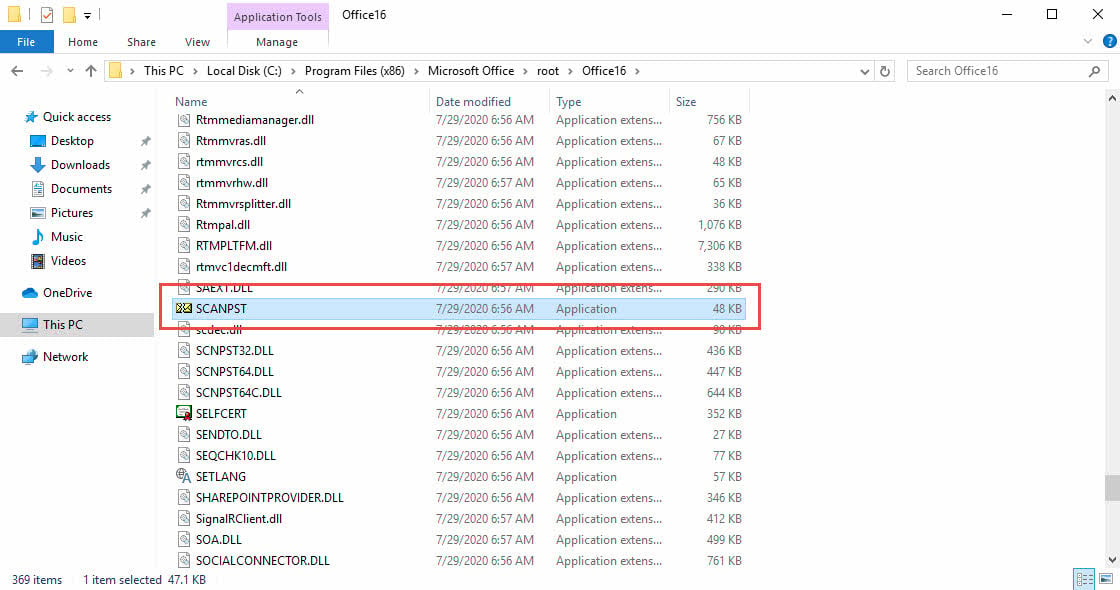
The location of Scanpst.exe varies depending on your Windows architecture and Outlook version. Here are the common paths where you can find the tool:
(1) Windows 32-bit locations
- Outlook 2021/2019/2016: C:\Program Files\Microsoft Office\root\Office16
- Outlook 2013: C:\Program Files\Microsoft Office\Office15
- Outlook 2010: C:\Program Files\Microsoft Office\Office14
- Outlook 2007: C:\Program Files\Microsoft Office\Office12
- Outlook 2003: C:\Program Files\Microsoft Office\Office11
(2) Windows 64-bit locations
- Outlook 2021/2019/2016: C:\Program Files (x86)\Microsoft Office\root\Office16
- Outlook 2013: C:\Program Files (x86)\Microsoft Office\Office15
- Outlook 2010: C:\Program Files (x86)\Microsoft Office\Office14
- Outlook 2007: C:\Program Files (x86)\Microsoft Office\Office12
2.2 Find it in Click-to-Run versions
For Microsoft 365 (formerly Office 365) and Click-to-Run installations, the location might be different:
- The typical path is C:\Program Files\Microsoft Office\root\Office16 or similar variations.
- The exact folder might include version numbers or additional subdirectories.
2.3 Find it via Windows Search
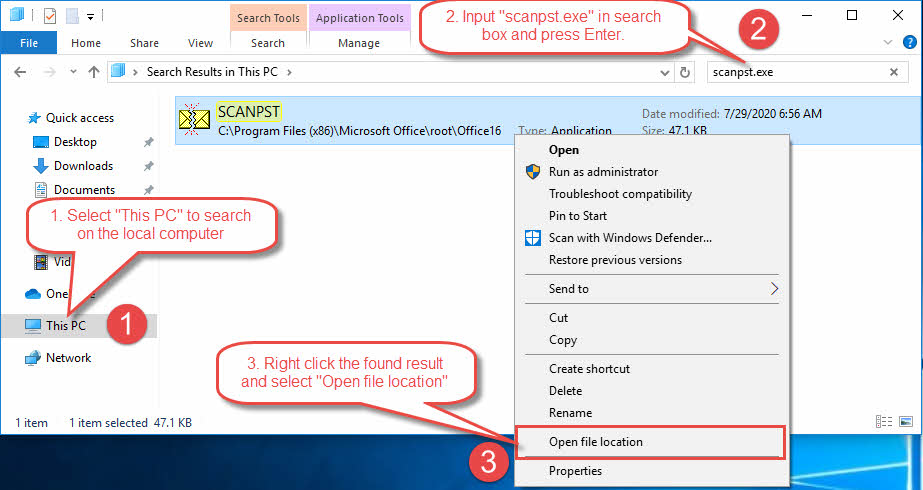
Users can use Windows Search to locate the file by typing “scanpst.exe”, as below:
- Select “This PC” to search on the local computer.
- Input “scanpst.exe” in the search box and press Enter.
- After “scanpst.exe” is found, right click it and choose “Open file location” to open the location of scanpst.exe.

<h3 “scanpst-missing”>
2.4 What to do if Scanpst.exe is missing
If you cannot find Scanpst.exe in the default locations, try these solutions:
- Perform a system-wide search using Windows Search
- Verify your Office installation is complete and not corrupted
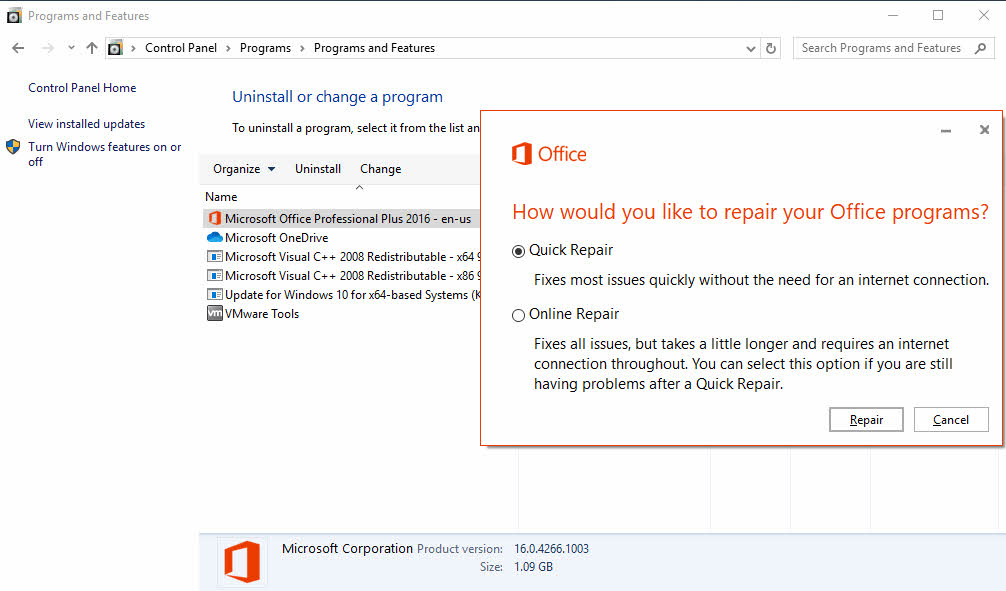
- Repair your Office installation through the “Control Panel”, as below:
-
- Input “Control Panel” in Windows search box to find and launch “Control Panel”
- Go to Control Panel > Programs > Programs and Features
- Right click on “Microsoft Office xxx” entry and select “Change”.
- Select “Quick Repair” to repair your Office installation.
- If “Quick Repair” does not work, try “Online Repair” instead.

-
- Download and install the latest Office updates
- If necessary, perform a clean reinstallation of Microsoft Office
- Download a copy of scanpst.exe from our website.
For convenience, many users create a shortcut to Scanpst.exe on their desktop or in an easily accessible location once they’ve found the executable. This saves time when the tool is needed for future repairs.
Note: The exact location might vary slightly depending on your specific Office version and installation settings. Always ensure you’re using the version of Scanpst.exe that corresponds to your Outlook version for optimal compatibility and performance.
3. How to Run Scanpst.exe
3.1 Buttons explained
When running Scanpst.exe, you’ll encounter several important buttons:
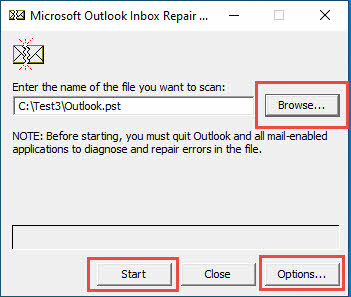
- “Browse” Button: Allows you to locate and select the PST file for scanning
- “Start” Button: Begins the scanning process
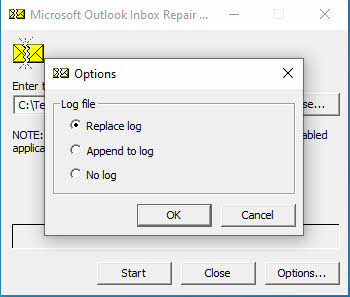
- “Options” Button: Set the log options, as below:
- Replace log: Replace the existing log file. This is the default option.
- Append to log: Append the log to the existing log file, instead of overwriting it.
- No log: Do not output log.
 Note: Indeed, the log file is extremely important for us to get extra information, including the scanpst version, the issues in the PST file, as well as what scanpst.exe has done with that file. Therefore, whenever possible, always let scanpst generate the log by selecting “Replace log”(default) or “Append to log”. Subsequently, we will tell you how to analyze the log file in the following section.
 Note: Indeed, the log file is extremely important for us to get extra information, including the scanpst version, the issues in the PST file, as well as what scanpst.exe has done with that file. Therefore, whenever possible, always let scanpst generate the log by selecting “Replace log”(default) or “Append to log”. Subsequently, we will tell you how to analyze the log file in the
 3.2 Best practices before running
Before using Scanpst.exe, follow these important preparatory steps:
- Close Microsoft Outlook completely
- Create a backup copy of your PST file. Note: scanpst.exe will also prompt you to create a backup PST file before it tries to repair the original one. So this step is optional.
- Ensure enough disk space (at least 2x the size of your PST file)
- Verify you have appropriate permissions to access the file
- Disable antivirus software temporarily if it interferes
- Note down the original PST file location
3.3 Step-by-step guide to run the tool
Follow these steps to run Scanpst.exe effectively:
Step 1: Launch the tool
- Navigate to Scanpst.exe location
- Double-click to open the program
- Run as administrator if necessary

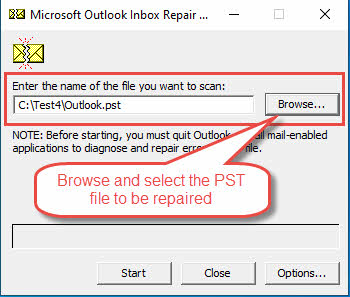
Step 2: Select the PST file
- Click “Browse” to locate your PST file
- Select the file you want to repair
- Verify the correct file path is displayed
- Click “Options” button and make sure you have chosen either “Replace Log” or “Append to Log”, as we recommend above.
Step 3: Begin the scan
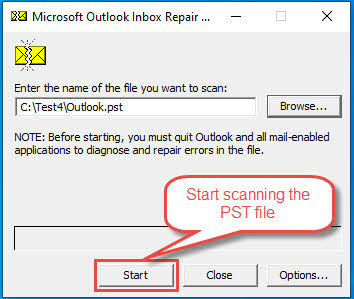
- Click “Start” to begin the scanning process:

- Wait for the initial scan to complete
- Review the scan results and error report
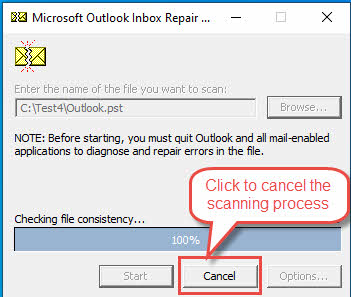
- If you want to abort the scanning process, please click “Cancel”:
 After the scanning process, you will see a brief report of the scan result, as below:
 More detailed information can be found in the log file. We will analyze a sample log file in the next section.
 After the scanning process, you will see a brief report of the scan result, as below:
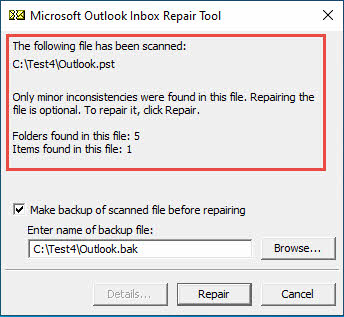 More detailed information can be found in the log file. We will analyze a sample log file in the next section.
Step 4: Repair process
- If you have not made a backup of your PST file, then before repairing, make sure the “Make backup of scanned file before repairing” option is selected(default).
- If errors are found, click “Repair”
- Monitor the repair progress
- Wait for the completion message
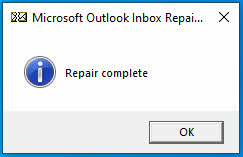
- After the file is repaired, you will see the following message:

Step 5: Verification
- Check the repair log for details. We will show you how to analyze the repair log in the next section.
- Launch Outlook to verify the fixes
- Confirm all items are accessible
During the repair process, you may see progress bars indicating the completion percentage. The time required depends on the file size and extent of corruption. For large PST files, the process might take several hours.
If multiple passes are needed, the tool will automatically suggest additional scans. It’s recommended to run the scan multiple times until no fatal errors are reported, but generally no more than 4-5 times. In the following section, we will introduce a way to run scanpst.exe for multiple passes automatically.
4. Run Scanpst for Multiple Passes
4.1 Version Supports Multiple Passes
In versions earlier than Outlook 2016 version 1807, the Inbox Repair Tool (Scanpst.exe) could only run a single pass to scan a damaged PST or OST file. Since Outlook 2016 version 1807 (build 16.0.10325.20082), the tool gained the ability to perform multiple passes automatically via command line operation until reaching a steady state.
4.2 Understanding Steady State
A steady state is reached when any of the following conditions are met:
- Zero (0) errors are found in the scan
- No new errors are reported (two consecutive passes show identical results)
- The maximum number of passes is reached (default 10, maximum 20 passes)
4.3 Command Line Arguments
To enable the multiple pass functionality, you must use one of these command line arguments:
-force: Run without requiring user interaction for UI options-silent: Run with no UI display-rescan: Specify maximum number of scan iterations-no repair: Run scan without performing repairs
Additional useful command line arguments include:
-log: Control log file creation (options: append, replace, none)-backupfile: Specify backup file name-file: Specify PST/OST file path to scan
4.4 Running Multiple Passes
To run multiple passes:
- Open Command Prompt as administrator
- Navigate to the scanpst.exe location
- Run the command with desired arguments, for example:
scanpst.exe -rescan 15 -log replace -file "C:\path\to\outlook.pst"4.5 Tracking Progress
The tool shows progress differently for multiple passes:
- Initial pass: Phases 1 to 8
- Second pass: Phases 9 to 16
- Third pass: Phases 17 to 24
- And so on…
When using the log file option, each pass is numbered sequentially (Scan Number 1, Scan Number 2, etc.) for easy tracking.
4.6 Important Considerations
- PST files on network drives are not supported for multiple passes
- Without command line arguments, the tool reverts to legacy single-pass mode
- Silent mode requires external monitoring through log files or Task Manager
- The maximum limit of 20 passes helps prevent infinite loops
- Use the
-forceargument for unattended operation
5. Analyze the Log File
The scanpst log file provides much more information than the scan results shown in its interface. It is extremely important and helpful for us to understand what happens in the PST file and what scanpst has done with it.

5.1 Basic Structure of a PST File
Before analyzing the log file, we need to have a basic understanding of the PST file structure. The complete PST file specification can be downloaded from the official Microsoft site  .
.
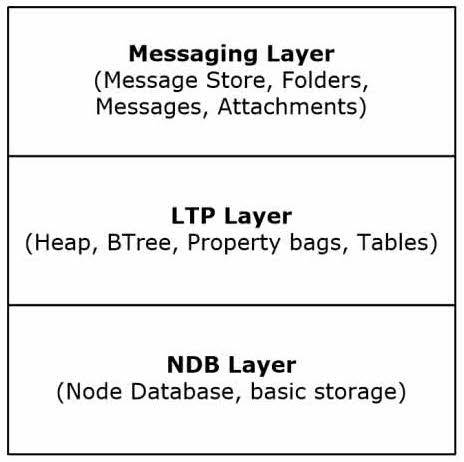
The PST file structure consists of three logic layers:
- The bottom layer: The NDB (Node Database) layer, containing the basic data structures, including blocks, nodes, BBT, and NBT, etc.
- The middle layer: The LTP (Lists, Tables, and Properties) layer, containing data structures used by the Messaging layer, such as the message properties, tables, etc.
- The top layer: The Messaging layer, containing the top-level objects, including messages and other objects.
5.2 Terminologies Used in PST File
Now we need to get familiar with the terminologies that may appear in the log file:
- NDB (Node Database): The lowest layer of the PST file, as described above.
- Block: The basic unit of storage in a PST file.
- Node: A logical container in the PST file that stores actual object data like emails, folders, etc. It can contain subnodes to construct a hierarchy.
- BBT (Block BTree): A special data structure to manage all the blocks in the PST file.
- NBT (Node BTree): A special data structure to manage all the nodes in the PST file.
- RBT: The root page of the BBT.
- AMap (Allocation Map): A page used to track the data allocations follows that page.
- NID (Node ID): A unique identifier assigned to each node in the PST file
- High-water mark: The highest block number and NID used in the PST file.
- HMP (HNPAGEMAP): A map used to track the allocations in a page.
- FLT (Folder Lookup Table): A critical data structure serves as a directory for all folders in the PST file.
5.3 Analyze a Real Log File:
Below is a real sample file:
Original PST file: Outlook.pst
Scanpst log file: Outlook.log
PST file fixed by scanpst: Outlook_fixed.pst
Now with the knowledges in section 4.1 and 4.2, we can explain the log file easily. Below is the log file with my highlighted comment:
Microsoft (R) Inbox Repair Tool The official name of scanpst
? 2021 Microsoft Corporation. All rights reserved. Copyright information. We can also know the released time of the scanpst. Some versions of scanpst will include the following version information, which is more accurate. But some will NOT, so in such a case, the release time can also help us determine the scanpst version.
Version 16.0.18129.20030 Version information. Can help us to know:
- Whether it is the version we need.
- Whether this version of scanpst.exe is compatible with the local installation of Outlook.
**Beginning NDB recovery Start the recovery in the low level first, i.e., the NDB(Node database) level.
**Attempting to open database
**Attempting to validate header
**Attempting to validate AMap
**Attempting to validate BBT
**Attempting to validate NBT
**Attempting to validate BBT refcounts Try to validate the reference count of the BBT in the Node database.
??Couldn’t find BBT entry in the RBT (CC) Cannot find a BBT entry in the root page of the BBT
**Attempting to validate header NID high-water marks
**Beginning PST/OST recovery Start the recovery in the high levels, i.e., LTP and Messaging levels.
**Attempting to recover all top-level objects
**Store created by build: 161.8129 A PST file is called a message store. This line provides the version of scanpst that create the PST file, which is consistent with the above version inform, i.e., Version 16.0.18129.20030. Note the split dot is different in this line and the version information, that is normal.
**Attempting to walk all folders
**Attempting to locate any orphaned folders/messages Recover orphaned folders/messages that are not belong to any existing folders.
**Performing final HMP validation
**Attempting to check top-level objects for consistency
**Updating folder hierarchy
**Attempting to fix original file
**Attempting to copy back BBT
**Attempting to copy back NBT
With such an analysis, you can have a much more in-depth understanding of your PST file and what scanpst does on it. scanpst will start the recovery from the low NDB level first, check the consistencies of all the main data structures, and then proceed with the high level recovery. For any inconsistencies, it will try to fix them, and the copy the fixed data back to the output file.
This analysis is just for demonstration. For a large PST file that has been used for many years, the log file will be much more complex and you need to spend more time analyzing it.
6. Common Scanpst.exe Errors and Solutions
When using scanpst.exe to scan and repair your PST files, you may encounter various error messages. We try to list all of them below:
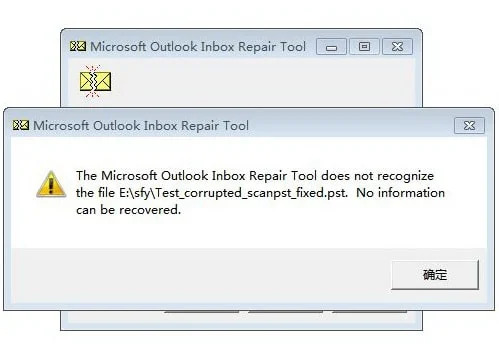
6.1 Inbox Repair Tool does not recognize the file
Complete error message:
The Microsoft Inbox Repair Tool does not recognize the file xxxx.pst. No information can be recovered.
Screenshot:
Common reasons of this error:
- The PST file is severely corrupted.
- You do not have permission to access the PST file.
- The file extension has been changed incorrectly.
- The file is not actually a PST file.
Solutions:
- Verify the file extension is correct.
- Check if the file is properly accessible.
- Try to make a backup copy of the PST file, then repair on the copy instead.
- Ensure the file isn’t locked by another process.
- If all the above solutions fail, try DataNumen Outlook Repair below to repair the file.
Sample File:
Corrupt File: Test2.pst
File fixed by DataNumen Outlook Repair: Test2_fixed.pst
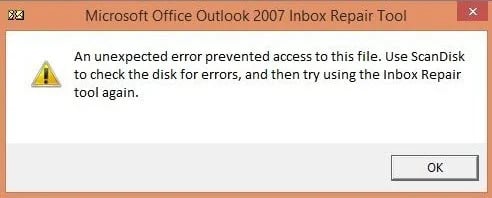
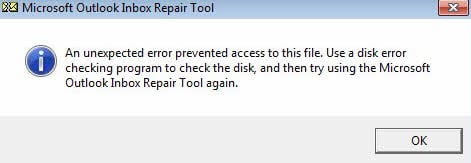
6.2 Unexpected error prevented access to file
Complete error message:
An unexpected error prevented access to this file. Use ScanDisk to check the disk for errors, and then try using the Inbox Repair tool again.
or
An unexpected error prevented access to this file. Use a disk error checking program to check the disk, and then try using the Microsoft Outlook Inbox Repair Tool again.
or
An unknown error prevented access to the file. Error 0x80070570: The file or directory is corrupted and unreadable.
Screenshot:
or
Common reasons of this error:
- You do not have permission to access the PST file.
- The PST file is locked by another process.
- The PST file is located on the bad sectors of the hard disk or storage media.
- The PST file is located on a shared network drive.
- There are errors in your file system.
- Incomplete file transfers.
Solutions:
- Check if the file is properly accessible.
- Ensure the file isn’t locked by another process.
- Try to make a backup copy of the PST file, or copy the PST file to another disk/storage media, then repair on the copy instead.
- Copy the PST file from the shared network drive to the local disk, then repair the local copy.
- Use ScanDisk
 , ChkDsk or other kinds of disk checking program to check your disk and fix errors in the file system.
 - Check disk for hardware issues.
- Re-transfer/copy the file.
- If all the above solutions fail, try DataNumen Outlook Repair below to repair the file.
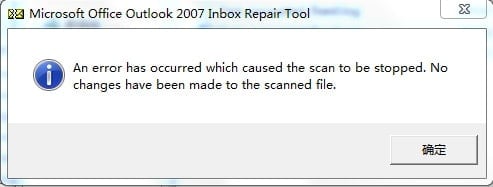
6.3 Scan Stopped Unexpectedly
Complete error message:
An error has occurred which caused the scan to be stopped. No changes have been made to the scanned file.
Screenshot:
Common reasons of this error:
- The PST file is severely corrupted.
- The basic structure of the PST file is completely damaged.
- The file is not actually a PST file.
- Insufficient system resources.
- Antivirus interference.
Solutions:
- Close unnecessary applications.
- Temporarily disable the antivirus program.
- If all the above solutions fail, try DataNumen Outlook Repair below to repair the file.
Sample File:
Corrupt File: Test5.pst
File fixed by DataNumen Outlook Repair: Test5_fixed.pst
6.4 Fatal errors (80040818/80040900)
Complete error message:
Fatal Error: 80040818
or
Fatal Error: 80040900
Common reasons of this error:
- For Outlook 2002 and earlier versions, PST file uses the old ANSI format, which has a 2GB size limit. Since Outlook 2003, a new PST format called Unicode format is used instead, eliminating the 2GB size restriction. It is possible that your PST file is in old ANSI format, and it has reached the 2GB size limit or close the limit(>= 1.8GB), that is the reason why scanpst cannot fix it and report “Fatal Error: 80040818”.
- The PST file is severely corrupted.
- Header damage.
- File structure issues.
- The PST file contains malware.
Solutions:
- If the file is in ANSI format and its size is closing the 2GB limit, you can:
- Convert it to Unicode format.
- Split it into small pieces.
- Reduce its size by removing useless items.
- Run multiple repair passes.
- Use an Antivirus program to scan and remove the malware from it.
- Restore from backup if possible.
- If all the above solutions fail, try DataNumen Outlook Repair below to repair the file.
6.5 Failed to add row to the FLT
This error appears in the scanpst log. Below is the complete error message:
Failed to add row to the FLT, RowID = ###
or
Failed to add row to the FLT, irow = ###, RowID = ###
where ### is a decimal or hexadecimal number.
Common reasons for this error:
FLT is the Folder Lookup Table, which is used as a directory for all folders. This error means scanpst cannot add new entries to the table. Below is the common reasons
- The Folder Lookup Table is damaged or oversized.
- The PST file is severely corrupted.
- Large PST file size.
- Bad sectors or file integrity issues.
- The PST file is on the network drive.
- The PST file is compromised.
Solutions:
- Split the large PST file.
- Use ScanDisk , ChkDsk or other kinds of disk checking program to check your disk and fix errors in the file system.
- Copy the PST file to the local drive, then repair the copy.
- Use an antivirus program to scan and check the PST file.
- If all the above solutions fail, try DataNumen Outlook Repair below to repair the file.
Sample error log:
**Attempting to walk all folders
Failed to add row to the FLT, irow = 2537, RowID = D15AB0
Failed to add row to the FLT, irow = 2536, RowID = D15ACF
Failed to add row to the FLT, irow = 2533, RowID = D159CD
Failed to add row to the FLT, irow = 2545, RowID = D158A1
Failed to add row to the FLT, irow = 2544, RowID = D158DB
6.6 Scanpst.exe Hangs Endlessly
Symptom:
Scanpst appears to hang or freeze endlessly and does not respond to user operations. If you open Windows Task Manager, you will find the application’s status is “Not Responding”. If you shut down the application abnormally and restart it to re-repair the same file, you will always get the same results.

Common reasons of this error:
- Large PST file processing.
- System resource constraints.
- Conflicting processes.
- The PST file is badly damaged.
- The corruption situation is so complex that scanpst runs into dead loops.
- Bugs in scanpst.
Solutions:
- Allow more time for large files.
- Split large PST files if possible.
- Close all other applications before running scanpst.
- Restart the computer and try again.
- Monitor system resource usage.
- Repair on another computer with the latest version of Outlook and scanpst.
- If all the above solutions fail, try DataNumen Outlook Repair below to repair the file.
6.7 Wanted Items Not Recovered
Symptom:
The fixed PST file is empty. Or the wanted items are not recovered.

Common reasons of this error:
- Incomplete repairs.
- Partial data recovery.
- Failed item restoration.
- The PST file is badly damaged.
Solutions:
- Attempt multiple repair cycles.
- Try DataNumen Outlook Repair below to repair the file.
Sample Files:
| Corrupt File | File Fixed by scanpst | File Fixed by DataNumen Outlook Repair |
| Test1_2.pst | Test1_2_fixed.pst | Test1_2_fixed(dolkr).pst |
| Test1_3.pst | Test1_3_fixed.pst | Test1_3_fixed(dolkr).pst |
| Test1_4.pst | Test1_4_fixed.pst | Test1_4_fixed(dolkr).pst |
| Test1_5.pst | Test1_5_fixed.pst | Test1_5_fixed(dolkr).pst |
6.8 Entry Point Not Found
Symptom:
Scanpst shows error “Scanpst.exe – entry point not found” with the detailed information “The procedure entry point RCVR_Scan32@28 could not be located in the dynamic link library SCNPST32.dll”
Common reasons of this error:
- SCNPST32.dll file corruption
- Outlook application corruption
- Incomplete installation of Outlook
Solutions:
- Repair the Office installation.
- Reinstall Outlook.
- Repair the PST file on another computer with Outlook and ScanPST.exe installed.
- Use an alternative solution to repair the file.
6.9 Other common errors
Additional issues you might encounter:
- “Internal errors were found in this file. They must be repaired for this file to work correctly.” error.
- Access denied errors
- File in use messages
- Memory allocation problems
- Unexpected error messages

General solutions:
- Check file permissions.
- Make a copy of the file on the local disk and repair the copy instead.
- Ensure Outlook is completely closed
- Clear temporary files
- Close any other applications.
- Restart the system.
- Run in compatibility mode if needed.
- Disable the antivirus program temporarily.
- If all the above solutions fail, try DataNumen Outlook Repair below to repair the file.
7. Scanpst Version History
Let’s see the scanpst version history and its relationship to the Outlook versions.
7.1 Get Scanpst Version Information
There are two ways to get the scanpst version information:
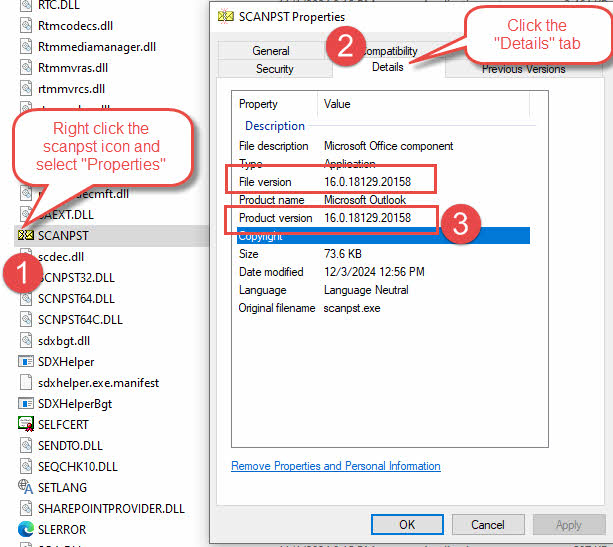
- From the properties of scanpst.exe, as below:
- Find the location of scanpst.exe.
- Right click scanpst.exe and select “Properties”.
- In the popup “Properties” dialog, select “Details” tab.
- Get the version information from “Product version”.

Note: There will be a “File version” and “Product version” in the “Details” tab. Normally they will be the same. If they are different, then we can use “Product version”.
- From the repair log, as below:
-
- Start scanpst. Make sure the log option is enabled.
- Scan and repair a PST file.
- Open the log file and check the version information line, like below:
Version 16.0.18129.20030
We have described how to analyze a sample log file above.
-
7.2 Version History
Below is the scanpst version history and the corresponding Outlook version information:
| Scanpst version | Outlook version |
| 14.0.7268.5000 | Office 2010 (14.0.7268.5000) |
| 16.0.4266.1003 | Office 2016 MSO (16.0.4266.1003) |
| 16.0.10325.20082 (From this version on, support to perform multiple scans from the command line automatically) | Outlook 2016, version 1807 (build 16.0.10325.20082) |
| 16.0.15601.20148 | Outlook for Microsoft 365 MSO (Version 2208 Build 16.0.15601.20148) |
| 16.0.18129.20030 | Outlook 2019 MSO (Version 2410 Build 16.0.18129.20158) |
| 16.0.18129.20158 | Office 365 (16.0.18129.20158) |
From this table, we can see for most of the time, the scanpst version is same as the Outlook version.
8. Limitations of Scanpst.exe

8.1 Structure-based rebuilding limitations
As described in the log analysis section, Scanpst.exe performs the recovery based on the three logic layers in the PST file structure. Thus it has several structural limitations in its repair capabilities:
- Cannot repair if the bottom logic layer or all logic layers are completely damaged.
- Unable to reconstruct severely damaged file headers.
- Limited ability to repair folder hierarchies
- May not preserve folder properties and custom views
These limitations mean that:
- Heavily corrupted files might only be partially recovered or cannot be recovered at all.
- Some complex folder structures might be lost during repair.
- Custom folder settings may need to be recreated.
8.2 Inability to recover permanently deleted items
Scanpst.exe cannot recover:
- Items deleted from the Deleted Items folder
- Items removed using Shift+Delete
- Data purged after compacting PST files
- Items deleted beyond retention periods
Important considerations:
- No built-in undelete functionality
- Cannot recover from emptied Deleted Items folder
- No deep scanning for deleted content
8.3 2GB PST file size limit
Size-related restrictions include:
- Cannot effectively handle ANSI PST files close to the 2GB limit (>= 1.8 GB).
- May struggle with large Unicode PST files
- Processing limitations for oversized files
Impact on users:
- Potential data loss in large files
- Increased repair time for big PST files
- Risk of incomplete repairs
- Need for file splitting before repair
Scanpst.exe has significant limitations regarding password protection:
- Cannot repair password-protected PST files
- No built-in password recovery features
- Unable to bypass encryption
Consequences for users:
- Must remove passwords before repair
- Risk of data loss if password is forgotten
- Additional steps required for protected files
8.5 Additional general limitations:
- No preview functionality before repair
- Limited reporting capabilities
- No selective repair options
- Basic logging functionality only
- No repair scheduling features
- Limited backup options
These limitations highlight why it’s essential to:
- Develop a business continuity plan (BCP) for potential data disasters.
- Implement preventive maintenance practices
- Prepare appropriate backup strategies
- Monitor PST file sizes
- Use appropriate file formats for different Outlook versions
- Set realistic expectations for repair outcomes
- Consider professional alternatives for severe corruption
9. When Scanpst.exe Isn’t Enough
In the previous section, we described situations where Scanpst.exe may prove insufficient. In such cases, we need to consider professional-grade solutions.

9.1 Introduction to DataNumen Outlook Repair
DataNumen Outlook Repair offers a more robust solution with:
- Best recovery rate in the industry.
- Recover severely corrupted PST files.
- Recover permanently deleted items.
- Support oversized and huge PST files.
- Recover encrypted PST files.
- Recover all kinds of objects with the hierarchy.
- Recover all properties in the objects.
- Repair PST files in batch.
- Support multiple output formats.
- Comprehensive repair options.
- Advanced logging and reporting.
- Support for all Outlook versions.
- Technical support availability
- Regular updates and improvements
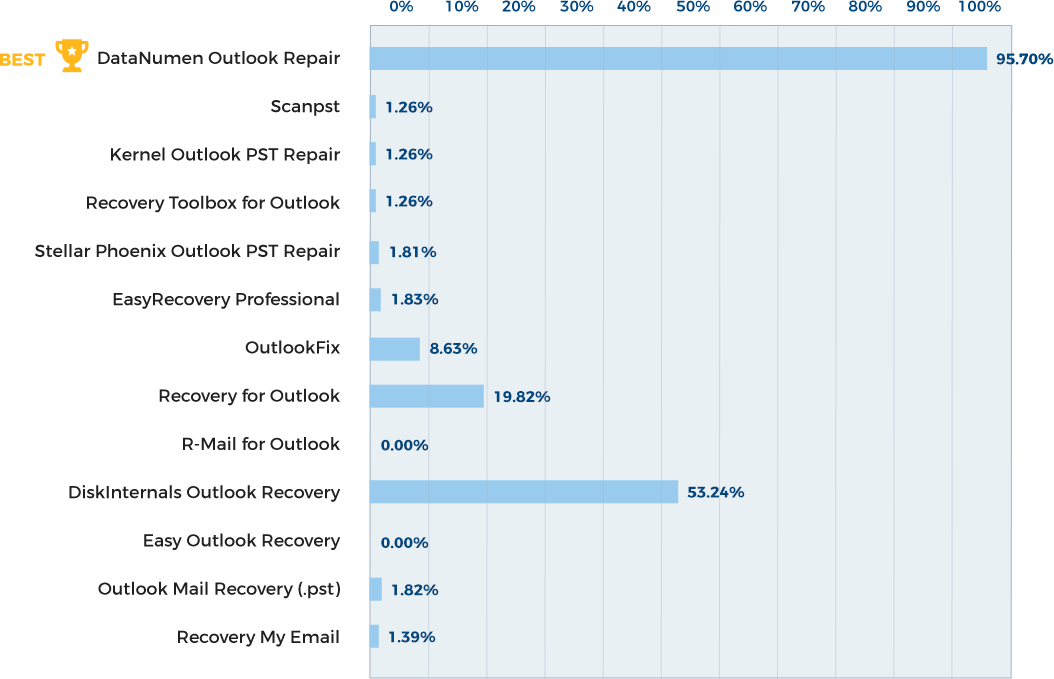
9.2 Success rate comparison
Recovery success rates differ significantly:
- Scanpst.exe: 1.26% average recovery rate
- DataNumen: 95.7% recovery rate
Below is a complete competitive comparison:
9.3 Recovery from Severe Corruption
Advanced capabilities for severe cases:
- Recovery from physically damaged storage
- Recovery from formatted drives or crashed systems
- Recover from disk images, backup files, virtual machine disk files, temporary files, etc.
9.4 Deleted item recovery
Enhanced recovery features include:
- Recovery of shift-deleted items
- Restoration of emptied folders
- Retrieval of long-deleted contents
9.5 Handling Oversized PST files
Advanced capabilities for large files:
- Support for files close to the 2GB limit(>= 1.8GB)
- Split large files
- Convert PST files between ANSI format and Unicode format.
- Efficient processing of large datasets
- Optimized memory usage for huge file recovery
9.6 Password handling capabilities
Enhanced decryption features:
- Recover encrypted files without passwords
- No password in the recovered files
9.7 When to Consider Professional Solutions:
- After multiple failed Scanpst.exe attempts
- For severe corruption scenarios
- When dealing with critical business data
- When time is critical
- When maximum recovery is essential
Professional solutions like DataNumen Outlook Repair represent a significant upgrade over Scanpst.exe, offering much better success rates and more comprehensive recovery options for challenging data recovery scenarios.
10. FAQs

Q: How long does a scan typically take?
A: Scan duration varies based on:
- PST file size (approximately 1-2 minutes per GB)
- Level of corruption
- System performance
- Drive speed
Q: Can I run Scanpst.exe multiple times?
A: Yes, you can and sometimes should:
- Multiple passes may improve results
- Recommended maximum of 4-5 attempts
- Stop if no new improvements are seen in the log
Q: Will I lose data during repair?
A: Yes, data loss risks exist, so you should always create backups before repair.
Note:
- Minor data loss is possible
- Success rate varies by corruption level
Q: I create a new empty PST file. But scanpst still report error in it. Why?
A: scanpst evaluates the PST file in a way slightly different from that of Outlook. So it will report error even on a newly created healthy PST file, but normally the error is minor, like this: “Only minor inconsistencies were found in this file.“. In such a case, you can safely ignore the error and do not let scanpst to repair it.
Q: scanpst reports there are only minor issues and the repair is optional, should I repair it?
A: You can safely ignore the issues. Do not let scanpst to repair it.
Q: Why the repaired file is larger than the original one?
A: After reconstructing the file, scanpst may add some empty blocks and nodes, which will increase the PST file size. However, that will NOT cause any problems at all.
Q: Can scanpst.exe repair OST files?
A: Yes, scanpst.exe is also able to repair OST files. However, if your OST file is corrupt and you are using an Exchange account, you can simply delete the corrupt OST file instead of repairing it. The next time you start Outlook, it will recreate a new OST file for you.
11. Conclusion

11.1 Summary of key points
Essential takeaways about Scanpst.exe:
- Primary Functions:
- Basic PST file repair capability
- First-line troubleshooting tool
- Built-in Outlook maintenance utility
- Core Benefits:
- Free and readily available
- Official Microsoft solution
- Simple user interface
- No additional installation required
- Key Limitations:
- Basic repair capabilities only
- Size restrictions
- No advanced recovery features
- Limited success with severe corruption
11.2 When to use Scanpst.exe vs. advanced solutions
Use Scanpst.exe for:
- Minor PST corruptions
- Regular maintenance
- Initial troubleshooting
- Small PST files
Consider advanced solutions when:
- Scanpst.exe fails repeatedly
- Dealing with severe corruption
- Handling large PST files
- Needing deleted item recovery
- Working with encrypted files
11.3 Next steps for users with persistent issues
Immediate actions:
- Assessment:
- Evaluate data criticality
- Document error messages
- Review repair attempts
- Decision Making:
- Consider professional solutions
- Evaluate cost implications
- Plan recovery strategy
- Prevention:
- Implement backup solutions
- Establish maintenance routines
- Consider alternative storage options
Long-term recommendations:
- Data Management:
- Regular archiving strategy
- PST file size monitoring
- Backup schedule implementation
- System Maintenance:
- Regular Outlook updates
- System optimization
- Storage management
- Professional Support:
- IT support contact information
- Recovery service options
- Training resources
11.4 Final thoughts:
- Scanpst.exe remains a valuable first-response tool
- Understanding its limitations is crucial
- Prevention is better than cure
- Professional solutions offer more comprehensive recovery options
- Regular maintenance is key to preventing PST issues
By understanding both the capabilities and limitations of Scanpst.exe, users can make informed decisions about their PST file maintenance and recovery strategies, ensuring optimal email data management and minimal disruption to their work.